23
Buzzer sound setting
The buzzer sound can be turned on or off. The default
buzzer sound setting is “ON”.
Enter the machine setting mode.
To turn off the buzzer sound, press the cursor key “ ”
and the “oF” mark will blink.
To turn on the buzzer sound, press the cursor key “ ”
and the “on” mark will blink.
Press the memory key to apply the setting.
Customizing Machine Settings
You can customize the machine settings to your
preference.
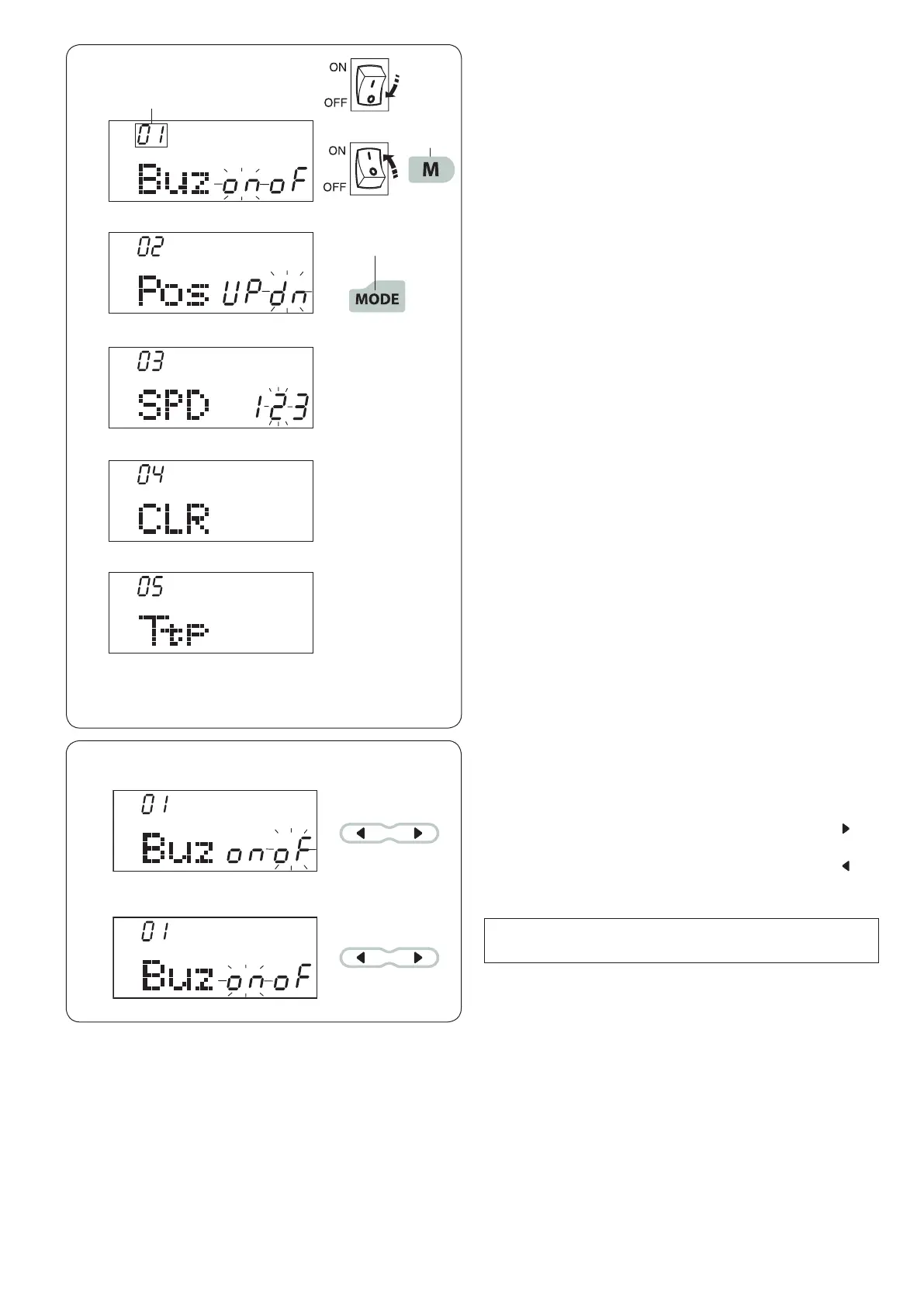
To enter the setting mode, turn the power off.
Press and hold the memory key q and turn the power
switch on until the setting mode screen appears.
Press the mode key w to select the desired setting.
Each time you press the mode key, the mode number
e changes, and you can set the machine functions as
follows:
r Buzzer sound setting
t Needle stop position setting
y Start up speed setting
u Resetting all to default
i Key position calibration
To exit the setting mode, press the memory key.
q
w
r
t
y
u
i
e
NOTE:
Caution buzzer sound cannot be turned off.







 To Next Page