10
Stop Logging
To stop logging press Set\Data logging\Stop (Set\Data logging\Disable on older
models). This stops further readings being taken. The logged data is saved until
logging is started again.
Re-Starting logging
Data is saved in non-volatile memory that retains data even if the batteries are
removed. BUT the memory that retains information about when the next log time is
and the clock itself require battery power. So if power is lost for any reason logging
will not restart until both the time and the date have been set. After this is done
logging will continue, leaving a blank in the memory for the data that was not
recorded.
Logger-PC Communications
See below for information on installing the reception software on your computer..
1. Start the PC program (‘RView’) on the computer.
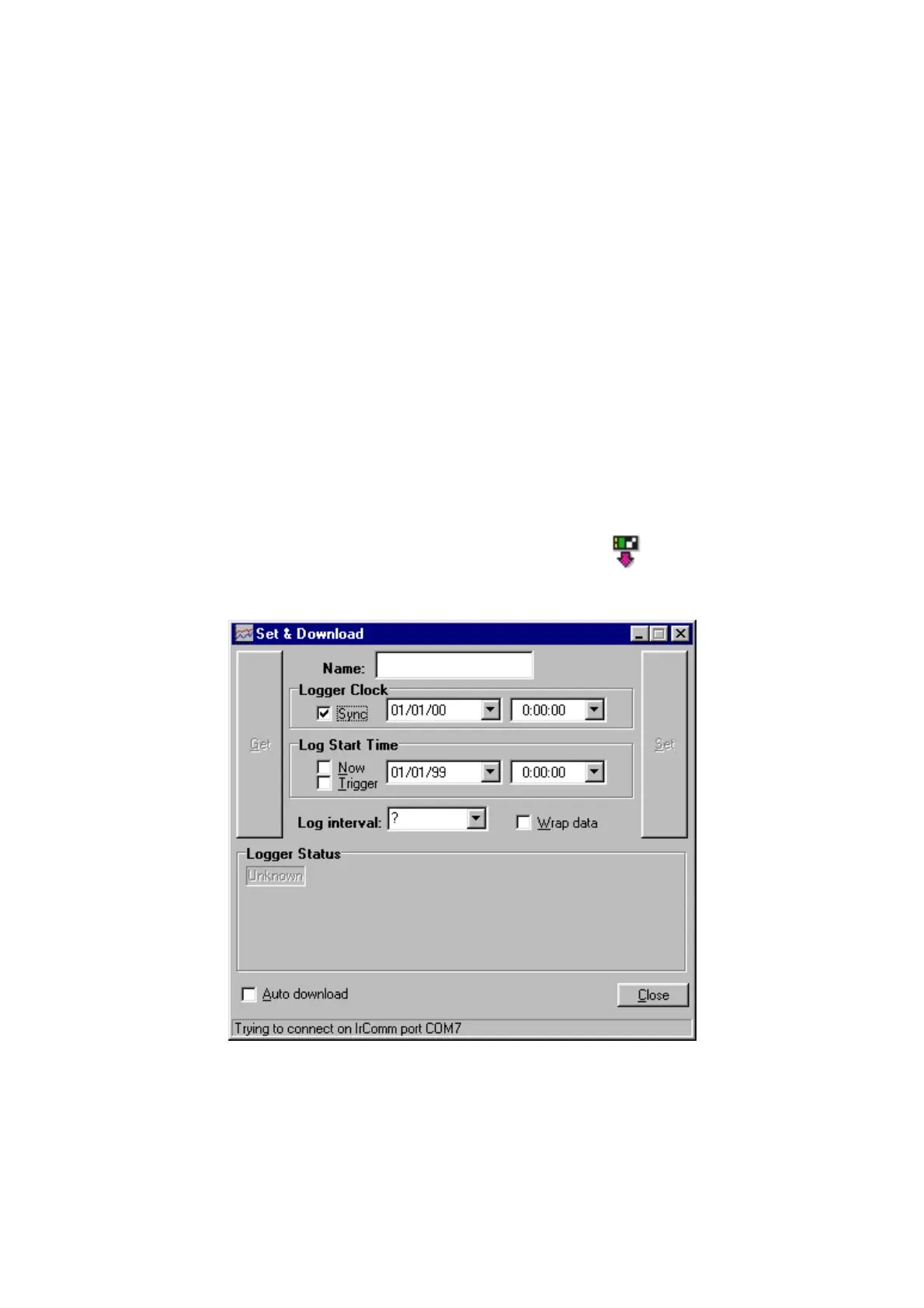
2. Open the Set & Download window by pressing the button or selecting
"Logger/Set & Download" from the menu. Something similar to the following is
displayed:
If "Auto Download" is checked then any new data is downloaded as soon as
contact is made with the logger.
3. Select Set\Data logging\Transmit on the 764.


 To Next Page