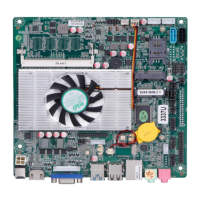
This document provides a comprehensive user manual for the ELSKY EM218, EM219, and EM229 series of motherboards, all supporting Intel ATOM Bay Trail processors (FCBGA1170). The manual covers ordering information, detailed specifications, pin definitions, BIOS setup, and troubleshooting.
Function Description
The EM218, EM219, and EM229 motherboards are designed for various industrial and embedded applications, offering a compact Thin-ITX form factor (17017018mm). They integrate Intel HD Graphics for display output and support a range of connectivity options including LAN, USB, serial ports, and audio. These motherboards are fanless by default, making them suitable for environments requiring silent operation, but can be configured for fan cooling if needed. They are compatible with Windows 10, Windows 8, Windows 7, and Linux operating systems.
Important Technical Specifications
- Processor:
- EM218: Intel Celeron dual-core J1800 CPU (Base Frequency: 2.41 GHz, Burst Frequency: 2.58 GHz)
- EM219: Intel Celeron quad-core J1900 CPU (Base Frequency: 2.0 GHz, Burst Frequency: 2.42 GHz)
- EM229: Intel Pentium quad-core J2900 CPU (Base Frequency: 2.41 GHz, Burst Frequency: 2.66 GHz)
- All CPUs have a TDP of 10W and integrate Intel HD Graphics (1080P, 2K, FHD).
- Chipset: Intel Bay Trail SOC Chipset.
- Memory: 1x SODIMM1 slot, supporting 1x NB-DDR3 1600MHz 1.35V memory, with a maximum capacity of 8GB RAM.
- Storage: 1x SATA1 interface (Standard SATA2.0 hard disk) and 1x MSATA slot (Mini SATA2.0 SSD). The MSATA slot can be configured to support PCIE signals upon request.
- Display:
- Integrated Intel HD Graphics in CPU, supporting single display, dual display copy/expansion, and single display in DOS.
- 1x VGA DB15 interface (Max. Resolution 1920x1200@60Hz).
- 1x VGA_H1 pin (Max. Resolution 1920x1200@60Hz).
- 1x EDP1 pin (Max. Resolution 1920x1080@60Hz, 30Pin, 2x15Pin, 2.0mm).
- 1x EDP2 pin (Max. Resolution 1920x1080@60Hz, 20Pin, 2x10Pin, 2.0mm).
- 1x LVDS2 pin (Max. Resolution 1920x1080@60Hz, 30Pin, 2x15Pin, 2.0mm).
- EDP1 and EDP2 pins do not support LVDS by default; EDP2 conflicts with LVDS, requiring a choice between them.
- USB: 1x USB3.0 interface (rear standard), 3x USB2.0 interfaces (rear standard), 1x F_USB2 pin (front, 2x USB2.0), 1x F_USB3 pin (front, 2x USB2.0).
- LAN: 1x RJ45 LAN interface (Realtek 8111H 10/100/1000Mbps), supporting Wake-on-LAN and PXE diskless boot.
- Serial Ports: Supports optional 2x COM or 4x COM configurations. COM1/2/3/4 only support RS232. The 9th pin of COM ports can output 0V, 5V, or 12V via jumper settings (default 0V for COM1/2).
- Audio: Integrated Realtek ALC662 HD digital audio decoder (6-channel high-fidelity audio controller), 1x LINE_OUT, 1x MIC_IN, 1x JAMP1 pin (8Ω 5W speaker dual channel output).
- Expansion: 1x MINI_PCIE interface (supporting optional WIFI/Bluetooth/3G/4G/GPS).
- Power Supply: DC port (5.5x2.5mm), supports 12V. Full load power consumption is about 25W. Recommended 12V 5A/7A/10A power adapter.
- Cooling: Heat sink (fanless, passive cooling) by default, with an optional thin silent cool fan.
- Operating Environment: Temperature: -20℃~60℃, Humidity: 5%~95% (non-condensing).
- BIOS: AMI BIOS, supporting power on, timing switch, remote switch, and intelligent device identification.
- Watch Dog: Supports hardware reset function (256 levels, 0~255 seconds).
Usage Features
- Ordering Flexibility: The motherboards offer variations in CPU (J1800, J1900, J2900) and COM port configurations (2C or 4C), allowing users to select the model best suited for their needs.
- Display Configuration: Multiple display outputs (VGA, EDP1, EDP2, LVDS) provide versatility for various display setups. Users must be careful when configuring EDP2/LVDS due to potential conflicts and voltage requirements.
- Jumper Settings: Critical functions like COM port voltage output and EDP/LVDS screen operating voltages are controlled via jumpers, requiring careful adjustment according to screen specifications to prevent damage.
- BIOS Setup: The BIOS provides extensive configuration options, including ACPI settings, Super IO configuration, CPU information, IDE settings, and USB configuration. Users can set boot priorities, enable/disable features like Wake-on-LAN, and manage power-saving modes.
- Password Protection: BIOS offers Administrator and User password settings for enhanced security.
- Diskless Boot: Supports PXE diskless boot functionality via the Realtek LAN PXE OPROM.
Maintenance Features
- CMOS Clearing: The manual details two methods for clearing CMOS settings:
- Hardware Method: Briefly connecting pins 2 and 3 of "CLR_CMOS1" for 5-6 seconds after disconnecting power.
- Battery Method: Removing and re-installing the button battery after 10 seconds.
- Caution: Do not clear CMOS while the motherboard is running or charging.
- Battery Specification: Uses a 3V CR2032 button battery. Users are advised to ensure correct battery orientation, sufficient voltage (2.8V-3V), and use the same model or manufacturer-recommended type to avoid explosion risk.
- Troubleshooting Guide: A dedicated section provides solutions for common issues such as:
- Computer not booting.
- VGA not displaying.
- Unable to save BIOS settings (often due to low CMOS battery voltage).
- "Bootable device not found" errors.
- Blue screen or crashes during system entry.
- Slow operating system entry.
- Automatic system restarts.
- USB device detection issues.
- LVDS screen display problems (no display, blurred image).
- Customized Power Cord: For SATA_PWR, a customized power cord from the manufacturer is required to prevent burning the hard disk, as pin 1 outputs 12V and pin 4 outputs 5V.
- Product Certifications: The product comes with CCC, ISO 9001:2015, MSDS, and China certificates for energy conservation, ensuring quality and compliance.
- Specification Changes: All product specifications are subject to change without prior notice.

 Need help?
 General

 To Next Page