EasyManua.ls Logo

Eltrinex LS500 - User Manual

Eltrinex LS500
118 pages
Print Icon
To Next Page IconTo Next Page
Loading...
Before you start
Please pay attention to the following initial instructions before using the car
camera Eltrinex LS500 GPS.
The default language of this camera is Czech. If you like to switch into
English, please follow instructions at: www.eltrinex.cz/ls500-firmware
Thank you for understanding.
MicroSD card
This product supports SD type memory cards. Please insert the card into the
slot until you hear a soft click sound. To remove the SD card, push the card a
little bit and when you hear the soft click sound, the card is ready for remove.
Content of the box
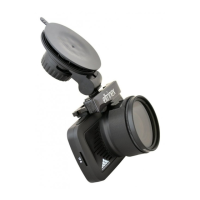
1x Eltrinex LS500 GPS camera, 1x magnetic holder with a sucker, 1x car
adaptor, 1x USB cable, 1x manual.
Warning
Temperatures over 50°C and below 5°C can damage the camera. This kind
of damage causes loss of warranty. Do not leave the camera in the car if
there is a risc of high or low temperatures. When installing the camera,
please take care to keep all installed parts easily accessible (camera should
be easy to uninstall in case of need for repair, upgrade firmware, etc.)
ENGLISH
Question and Answer IconNeed help?

Do you have a question about the Eltrinex LS500 and is the answer not in the manual?

Summary

Before You Start

MicroSD Card Handling

Instructions for inserting and removing the MicroSD card.

Content of the Box

List of items included in the package.

Important Warnings

Critical warnings about temperature damage and installation accessibility.

Important Usage Information

Safe Disconnection and Volume Control

Procedures for disconnecting the camera and adjusting volume.

Timezone and Auto-Power Settings

Importance of correct timezone for GPS time and auto-power function.

Camera Setup and First Use

Initial Charging and Power-On

Steps for initial charging and turning the camera on.

Mounting and Connecting the Holder

Instructions for attaching the mount and docking the camera.

Traffic Usage Guidelines

Recommendations for using the camera while driving.

Powering and Peripherals

Camera Powering Requirements

Using the car adapter and connecting to the GPS module.

Polarizing Filter and PC Connection

Using the filter and connecting the camera to a PC.

Camera Components and Controls

Main Parts Overview

Identification of physical parts and indicators on the camera.

Description of Control Elements

Detailed explanation of buttons and their functions.

Turning Camera On and Off

Step-by-step guide for powering the camera on and off.

Camera Modes and Operations

Changing Camera Mode

How to switch between video, photo, and playback modes.

Resetting and Charging the Camera

Procedures for camera reset and charging.

Initial Mode Operations

Functions available in the camera's initial operating mode.

Video Recording Mode

Controls and features specific to video recording.

Photo Camera Mode

Controls and features for taking photos.

Menu Navigation and Settings

Setting the Camera Menu

How to access and navigate the camera's settings menu.

Working with Recordings

Operations for managing recorded videos and photos.

Video Playback Functions

Controls for playing, pausing, and navigating video recordings.

Main MENU Structure

Overview of the main menu folders: Speed, Video, Settings.

Advanced Settings

Speed and Video Folder Settings

Configuration options for speed limits, warnings, and video quality.

Settings Folder Options

Settings for date/time, frequency, matrix, and screen saver.

Additional Configuration Options

System settings like sounds, text notes, format, reset, and photo functions.

Safety, Warranty, and Support

Safety Instructions

Essential safety guidelines for device usage and environmental factors.

Warranty Information

Details on warranty coverage, limitations, and exclusions.

Technical Specifications

Detailed technical data of the camera's hardware and features.

Troubleshooting Common Issues

Solutions for frequently encountered problems with the camera.

Eltrinex LS500 Specifications

General IconGeneral
BrandEltrinex
ModelLS500
CategoryDigital Camera
LanguageEnglish