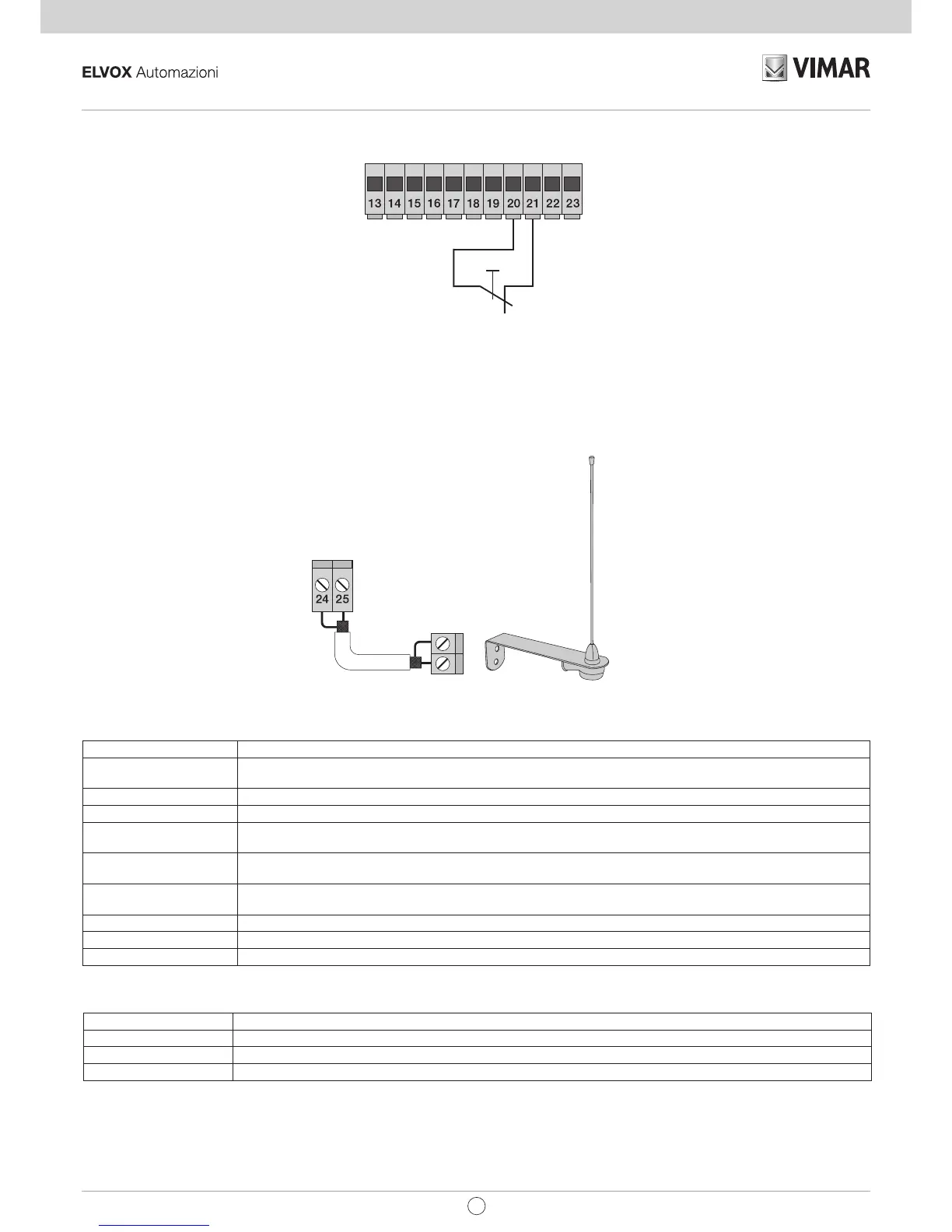
3.9- Stop button connection: normally closed contact, opening the contact causes the gate to stop and suspends the automatic closing time
(when the button is not engaged, the STOP LED should be lit), if not used then jumper between COM and STOP:
N.B. If the system has no photocells, sensitive edges or stop buttons, the PHOTO, STPA and STOP inputs must be jumpered (do not
activate the photo-test function and select the switch edge, dip switch 1.4 and 1.8 set OFF).
3.10- Connecting the aerial:
The 17cm rod is supplied pre-wired, to increase the range connect the aerial as shown in the figure:
4 - Description of the LEDS in the circuit:
5 - Buttons in the circuit:
Abbreviation Description
AP/CH Controls opening and closing the gate
P1 Press to enter travel programming
P2 Press to enter radio controls programming or deletion
Preliminary check:
After powering up the control unit the DL9 LED comes on for a second. Check the diagnostic LEDs of the inputs, STOP, PHOTO, STPA, FCAP and
FCCH must be on, if one of the normally closed contacts or one of the normally open contacts is not in the rest state, the DL9 LED flashes quickly to
indicate a fault.
Should one of the safety inputs (PHOTO, STOP, STPA) not be used, insert a jumper between COM and the input not used.
ABBREVIATION DESCRIPTION
OPEN Displays the status of the OPEN input (terminal number 16), if not engaged the red LED stays off (used to control
opening only, dedicated for the magnetic induction coil connection or timer)
AP/CH Displays the status of the AP/CH input (terminal number 18), if not engaged the red LED remains off
APED Displays the status of the APED input (terminal number 19), if not engaged the red LED remains off
STOP Displays the status of the STOP input (terminal number 21), if not engaged the green LED remains lit, if not used then
jumper between terminal COM and STOP
PHOTO Displays the status of the PHOTO input (terminal number 22), if not engaged the green LED remains lit, if not used
then jumper between terminal COM and PHOTO.
STPA Displays the status of the STPA input (terminal number 23), if not engaged the green LED remains lit, if not used then
jumper between terminal COM and STPA.
FCAP Displays the input of the opening limit switch, it turns off when the gate is fully open, if the dip-switch 2.1 is set to OFF
FCCH Displays the input of the closing limit switch, it turns off when the gate is fully closed, if the dip-switch 2.1 is set to OFF
DL9 Displays the programming status
EN


 To Next Page