EasyManua.ls Logo

Elvox RS04 - User Manual

Elvox RS04
128 pages
Go to English
Print Icon
To Next Page IconTo Next Page
Loading...
Manuale per il collegamento e l’uso - Installation and operation manual - Manuel pour le raccordement et l’emploi
Manual para el conexionado y el uso - Installations-und Benutzerhandbuch - Εγχειρίδιο σύνδεσης και χρήσης
RS04
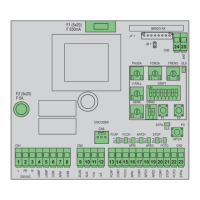
Scheda con display per cancelli battenti
Board with display for swing gates
Carte avec afficheur pour portails battants
Tarjeta con pantalla para cancelas batientes
Leiterplatte mit Display für Flügeltorantrieb
Πλακέτα με οθόνη για ανοιγόμενες καγκελόπορτες
F2 (5x20)
F 3.15A
20 A
IBRIDO RX
CN8
CN6
U2
U1
CN3
CN2CN1
APED
JP5
SEC
5678910 11 12
CN4
17 18 1913 14 15 16
CN5
VA2
VA1
ELVOX SERIE EC
PT1
22 23
FSC
FST
CN7
APCH STOP FOTO
STPA
20 21
2CAN
-SERR
AUX
+VA
-VA
-LAMP
+LAMP
COM1
APCH
APED
COM1
STOP
FOTO
STPA
ANT
1234
APM1
CHM1
APM2
CHM2
+SERR
JP2
JP1
AP/CH
P1
P2 P5
P3
P4
OKESC
PROGRAM. MENU'
AC
DL6
F1 (ATO)
ENCM2
Led
encM1
Led
encM2
22 23 24 25 26 27

Table of Contents

Questions and Answers

  • P
    Pamela MossJul 31, 2025
    Why Elvox Control Unit automatic gate system does not work?
    • K
      Kara WatkinsJul 31, 2025
      The automatic gate system might not be working due to several reasons. First, check the power line switch to ensure there is a mains supply. Second, blown fuses could be the cause; replace them with fuses of the same value. Finally, control and safety inputs might not be working; check the diagnosis LEDs (STOP, STPA, and FOT must be on).
  • L
    Levi HoustonAug 4, 2025
    What to do if I cannot save the remote controls on my Elvox Control Unit?
    • D
      drakebarbaraAug 4, 2025
      If you're having trouble saving remote controls, there could be a few reasons. First, check the diagnosis LEDs (STOP, STPA, and FOT must be on), as safety devices might be open. Second, the batteries of the remote control might be discharged, try replacing them. Third, the remote control might not be compatible with the first one saved (the first saved remote control configures the control panel to save only rolling-code remote controls or only dip-switch remote controls). Finally, you might have reached memory saturation; delete at least one remote control or add an external receiver (maximum capacity 200 remote controls).
  • R
    Ryan WatsonAug 8, 2025
    What to do if Elvox Control Unit gate starts, stops and reverses?
    • C
      Curtis DanielsAug 9, 2025
      If the gate starts, stops, and reverses, the motor torque might not be sufficient. Increase the motor force using parameters number 21 and 22.
  • C
    Christy HillAug 13, 2025
    What to do if Elvox Control Unit gate stops and reverses during slowdown?
    • A
      Abigail MeadowsAug 13, 2025
      If the gate stops and reverses during slowdown, the slowdown speed might be too low. Increase the value of parameter 17-18-19 and 20.
  • A
    Angela DavisAug 18, 2025
    Why movement of one of the 2 motors is reversed in Elvox Control Unit?
    • A
      angelica60Aug 18, 2025
      If the movement of one of the two motors is reversed, it could be due to wrong wiring. Check the motor wiring: 1= opens M1, 2= closes M1, 3= opens M2, 4= closes M2.
  • C
    carrie45Aug 21, 2025
    What to do if during calibration the motor M1 starts and stops after 1 second on Elvox Control Unit?
    • C
      Claudia RobinsonAug 22, 2025
      If, during calibration, the motor M1 starts and stops after 1 second, the encoder 1 wiring might be reversed with encoder 2. Check the encoder wiring.
  • R
    robleselizabethAug 26, 2025
    What to do if motor 1 is not able to start opening or does not close completely with the electrical lock on Elvox Control Unit?
    • M
      Mr. Anthony SimmonsAug 26, 2025
      If, when using the electrical lock, motor 1 cannot start opening or does not close completely, the electrical lock might not reset. Set parameter 32 ON (electric lock connection disconnection function).

Summary

Installer Safety Warnings

Gate System Risk Assessment

Power Supply Wiring

Connecting Safety Edges;Internal Photocell

Control Board LEDs and Buttons

Quick Programming Procedures

Facilitated Gate Leaf Travel Programming

Facilitated method for programming gate leaf travel with an encoder.

Saving Remote Controls

Adjusting Automatic Closing Time

Programming Menu Details

Detailed explanation of the control panel's programming menu structure.

Remote Control Management (RAD)

Custom Gate Travel Learning (LRN)

Parameter Modification (PAR)

Opening Counters (CNT)

Fault and Error Log (ERR)

List and explanation of the last 9 recorded faults or errors.

Password Protection (PASS)

Troubleshooting Common Issues

Programmable Parameters Summary

Elvox RS04 Specifications

General IconGeneral
BrandElvox
ModelRS04
CategoryControl Unit
LanguageEnglish