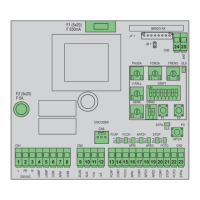
8 - Dip switch functions: After setting the dip switches it is necessary to jumper the jr1 reset contacts for a few seconds or switch power off
and back on again for the change to be updated by the control panel:
Dip switch number Status of dip switch Description
DIP 1-1 OFF Pick-up on starting ON
DIP 1-1 ON Pick-up on starting OFF
DIP 1-2 OFF Pre-flashing off
DIP 1-2 ON Pre-flashing on, before the gate moves the flashing light comes on for 3 seconds
DIP 1-3 OFF The 2CAN output is associated with the second channel of the remote control
DIP 1-3 ON The 2CAN output is used to feed the photocell transmitters
DIP 1-4 OFF The STPA input used for the switch sensitive edge connection
DIP 1-4 ON The STPA input used for the resistive sensitive edge connection
DIP 1-5 OFF
See table for control input operating logic
DIP 1-5 ON
DIP 1-6 OFF
DIP 1-6 ON
DIP 1-7 OFF
DIP 1-7 ON
DIP 1-8 OFF Photo-test function off
DIP 1-8 ON Photo-test function on (photocell checking with each command) see paragraph 4.8
DIP 2-1 OFF For opening the gate to the right
DIP 2-1 ON For opening the gate to the left
DIP 2-2 OFF
The AUX output (terminal number 10) flashes during the gate movement, slowly flashing when
opening, quickly during closing, on steady when the gate is open and off when the gate is closed
DIP 2-2 ON The AUX output (terminal number 10) is switched off only when the gate is fully closed
Control input operating logic:
Dip 5 Dip 6 Dip 7 Logic
OFF OFF OFF Condominium plus
OFF OFF ON Condominium plus+ close immediately
OFF ON OFF Automatic
OFF ON ON Automatic+ close immediately
ON ON OFF condominium
ON ON ON Condominium + close immediately
ON OFF OFF Semi-automatic
ON OFF ON Step-by-step
Logic description:
Condominium plus: when the gate is closed the APCH command controls opening, during the opening phase it is ignored. Once opening has completed
the gate is paused for the rest time. During the pause time an APCH command makes the automatic closing time restart from scratch. During closing the
APCH command controls reopening.
Automatic: when the gate is closed the APCH command controls opening, during the opening phase it stops the gate and with an additional command
the gate closes. In the case of complete opening, the gate is paused for the rest time. During the pause time an APCH command makes the gate restart
with closing. During closing the APCH command controls reopening.
Condominium: with the gate closed an APCH input command controls opening, during gate opening the APCH command is ignored by the control unit,
with the gate fully open it stays open for the automatic closing time. With an APCH command during the pause the gate starts to close, an additional
command during closing controls reopening.
Semi-automatic: with the gate closed an APCH input command controls opening. During opening the APCH command stops the gate. When the gate
is fully open and automatic closing is not active, to close the gate before the automatic closing time you need to apply a command via the APCH input,
another APCH command during closing controls reopening.
Step-by-step: with the gate closed an APCH input command controls opening. During opening the APCH command stops the gate. When the gate is fully
open, automatic closing is not active, to close the gate you need to apply a command via the APCH input, another APCH command during closing stops
the gate and another pulse causes reopening.
Close immediately: engaging the photocells causes the gate to close 5 seconds after they are disengaged, regardless of the set rest time.
The control panel can work with or without an encoder. When switching on, the control unit checks for the presence of the encoder on
connector CN6. For operation without an encoder it is necessary to insert the jumper in connector CN6 as shown in the image fig.15 and
power up the control panel. With this configuration, the SENS trimmer and the obstacle detection function are not active. For operation with an
encoder it is necessary to insert the encoder circuit cable in connector CN6 and power up the control panel. With this configuration, the SENS
trimmer and the obstacle detection function are active.
EN


 To Next Page
 Loading...