EasyManua.ls Logo

Em-Trak B922 CLASS B I - User Manual

Em-Trak B922 CLASS B I
3 pages
Print Icon
To Next Page IconTo Next Page
Loading...
I Certified AIS Class B – 2W CSTDMA
I Integrated WiFi and Bluetooth
I Global Certification - USCG / FCC / Canada / Europe
I SRT-AIS
Transceiver Engine for superlative
proven performance
I FLEXI-FIT
bracket system for easy, convenient and
secure installation
I Internal high-performance GPS receiver and antenna
(external antenna optional)
I Water, pressure spray and damp proof
(IPx7 & IPx6 Certified)
I Protected from vibration, shock and extreme temperatures
I Small and lightweight
I Ultra-low power consumption – best in class.
I Guaranteed connectivity and interoperability with any
app, chart plotter, smart phone, tablet or PC
I NMEA0183 & NMEA2000
I Automated health and performance monitoring
I Silent Mode (transmit-off) function
I Enhanced RF screening to protect against
electromagnetic interference
I Built-in power surge protection
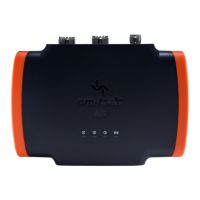
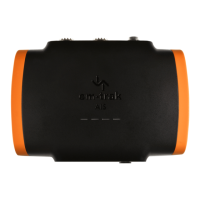
The B922 is a standard transmit power
(2W CSTDMA) Class B AIS transceiver that is small
and lightweight, yet delivers the very best AIS
receive and transmit performance so you see more
AIS information and targets at maximum range
– all achieved with the lowest power consumption.
The B922 combines WiFi and Bluetooth for seamless
wireless connectivity and AIS data streaming to
any mobile device or PC. With built-in intelligent
connectivity, integrated next generation GPS receiver
& antenna and a unique FLEXI-FIT
bracket system,
safe and secure installation is simple.
DESCRIPTION
EM-TRAK.COM
B922 CLASS B I AIS Transceiver
STANDARD POWER (2W CSTDMA)
EU
FEATURES
EM-TRAK.COM
Product Code: 430-0003
TRANSMIT & RECEIVE
NMEA0183 & 2000
IP67
WATERPROOF
2W/CS
WiFi
BLUETOOTH
GPS

Questions and Answers

  • M
    munozmichaelSep 4, 2025
    How to fix WiFi or Bluetooth connection issues on my Em-Trak B922 CLASS B I?
    • K
      Kimberly OlsonSep 4, 2025
      If you can't establish a connection using WiFi or Bluetooth with your Em-Trak Transceiver, check that the transceiver is powered by 12 - 24V. Also, check the configuration parameters using proAIS2. Ensure there are no obstructions between the transceiver and your mobile device and that there are no sources of interference nearby.
  • D
    Darryl ShepardSep 18, 2025
    What to do if no LED indicators are illuminated on my Em-Trak Transceiver?
    • L
      Lisa BrewerSep 18, 2025
      If no LED indicators are illuminated on your Em-Trak Transceiver, check that the power supply is connected correctly and that it is a 12V or 24V supply.
  • H
    harrisheatherSep 16, 2025
    Why is the amber LED indicator flashing continuously on my Em-Trak Transceiver?
    • R
      Ricky WilliamsonSep 16, 2025
      The amber LED indicator flashes on the Em-Trak transceiver while it searches for a position fix. If this takes longer than a minute, check the GPS antenna performance using the configuration tools.
  • S
    Sheryl WeberSep 14, 2025
    What to do if Em-Trak Transceiver data is not being received by the chart plotter?
    • D
      diazkimberlySep 14, 2025
      If your Em-Trak Transceiver is not sending data to the chart plotter, verify that the signal wires are correctly connected, the baud rate matches on both the transceiver and the chart plotter, and other vessels are within radio range and displayed on the Other Vessels tab of proAIS2 or CONNECT-AIS.
  • D
    David MccormickSep 12, 2025
    How to fix Em-Trak Transceiver connection issues with WiFi or Bluetooth?
    • T
      Teresa TuckerSep 13, 2025
      If you can't establish a connection using WiFi or Bluetooth on your Em-Trak Transceiver, check that the transceiver is powered by 12 - 24V, review the configuration parameters using proAIS2, ensure there are no obstructions or sources of interference between the transceiver and your mobile device, confirm that the 5-minute Bluetooth pairing window hasn't expired (if it has, remove and reapply power, including USB), and verify you're not using Bluetooth with an Apple device.
  • A
    anthony28Sep 12, 2025
    Why is my Em-Trak Transceiver vessel name not being received by other vessels?
    • J
      jacksonmichaelSep 12, 2025
      If your Em-Trak Transceiver isn't sending vessel name data to other vessels, remember that static data (including vessel name and call sign) transmits every 6 minutes. It might take a few transmissions before all data appears. Position reports with critical information like position, MMSI, and speed are sent more frequently.
  • G
    Gabriella CardenasSep 9, 2025
    How to troubleshoot no illuminated indicators on my Em-Trak B922 CLASS B I?
    • J
      Jessica HarrisSep 9, 2025
      If no indicators are illuminated on your Em-Trak Transceiver, check that the power supply is connected correctly and that the power supply is a 12V or 24V supply.
  • J
    Jacob ValdezSep 7, 2025
    Why is my vessel name not being received by other vessels using my Em-Trak B922 CLASS B I?
    • J
      Jessica SmithSep 8, 2025
      If your vessel name isn't being received by other vessels from your Em-Trak Transceiver, note that static data (containing vessel name, call sign, etc.) is transmitted every 6 minutes, so it may take a few transmissions before all the vessel data is displayed. Position reports contain critical data like position, MMSI number, vessel speed, etc., and this is transmitted more regularly.
  • C
    Christine HarringtonSep 5, 2025
    Why is the amber indicator flashing continuously on my Em-Trak B922 CLASS B I?
    • R
      rweberSep 6, 2025
      The amber indicator flashes on your Em-Trak Transceiver while the transceiver searches for a position fix. If it takes longer than a minute, you can check the performance of the GNSS antenna by using the GNSS Status tab of proAIS2.
  • J
    John FloresAug 21, 2025
    What to do if the red error LED indicator is flashing on my Em-Trak Transceiver?
    • A
      Amanda CarsonAug 21, 2025
      If the red error LED is flashing, there may be a problem with the VHF antenna system, which can be confirmed using proAIS2. Check for a faulty VHF antenna, cable, or connectors, and ensure they are properly connected. Confirm the suitability of the VHF antenna (for AIS only, use antennas covering 162MHz; for splitter variants, use antennas covering to 159MHz). Also, check the VHF antenna location, ensuring it isn't mounted near other transmitting antennas, sources of interference, metal structures, or other obstructions.

Em-Trak B922 CLASS B I Specifications

General IconGeneral
TypeAIS Transceiver
AIS ClassClass B
Frequency Range156.025 MHz to 162.025 MHz
Output Power2W
Weight0.5 kg
Voltage9.6 V to 31.2 V DC
WaterproofIPx7
ModulationGMSK
Channel Spacing25 kHz
DSC CapabilityNo
Operating Temperature-25°C to +55°C
Frequency161.975 MHz / 162.025 MHz
InterfaceNMEA 0183

Related product manuals