EasyManua.ls Logo

Em-Trak AIS Class B - User Manual

Em-Trak AIS Class B
58 pages
Print Icon
To Next Page IconTo Next Page
Loading...
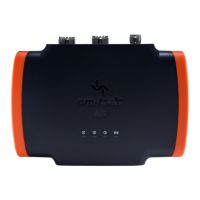
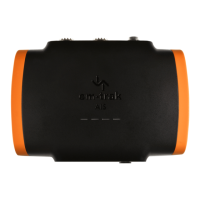
AIS Class B transceiver
Installation and operation manual

Questions and Answers

  • T
    Teresa Curtis MDAug 1, 2025
    What to do if no data is being received by the chart plotter from my Em-Trak AIS Class B Transceiver?
    • J
      Jesse SantanaAug 2, 2025
      If no data is being received by the chart plotter from your Em-Trak Transceiver, ensure the signal wires are correctly connected. Also, verify that the baud rate matches on both the transceiver and the chart plotter. Finally, confirm that other vessels are within radio range and are displayed on the Other Vessels tab of proAIS2.
  • S
    Stephanie ChandlerAug 6, 2025
    Why is the red 'error' indicator illuminated on my Em-Trak AIS Class B Transceiver?
    • M
      Mrs. Diana QuinnAug 6, 2025
      If the red 'error' indicator is illuminated on your Em-Trak Transceiver, first check that the unit is programmed with a valid MMSI number using the Configuration tab in proAIS2. Next, ensure that the GNSS antenna has a stable position fix, which can be confirmed in the GNSS Status tab of proAIS2. Finally, verify that the power supply is within 12 - 24V using the Diagnostics tab of proAIS2.
  • J
    Jasmin GutierrezAug 10, 2025
    What to do if the red error indicator is flashing on my Em-Trak Transceiver?
    • L
      Leah BrownAug 10, 2025
      If the red error indicator is flashing on your Em-Trak Transceiver, it may indicate a problem with the VHF antenna system. You can confirm this using proAIS2. If the 'High VSWR' alarm is active, check for a faulty VHF antenna, cable, or connectors, a poor connection at the VHF antenna/cable/connectors, the suitability of the VHF antenna (antennas tuned to 162MHz are recommended for AIS only, while antennas tuned to 159MHz are recommended for splitter variants), and the VHF antenna location (ensure it isn't mounted near other transmitting antennas, sources of interference, metal structures, or other obstructions).
  • Q
    qmillerAug 14, 2025
    How to fix WiFi or Bluetooth connection issues on my Em-Trak Transceiver?
    • E
      Edward MartinAug 14, 2025
      If you can't establish a connection using WiFi or Bluetooth with your Em-Trak Transceiver, check that the transceiver is powered by 12 - 24V. Also, check the configuration parameters using proAIS2. Ensure there are no obstructions between the transceiver and your mobile device and that there are no sources of interference nearby.
  • A
    anthony59Aug 18, 2025
    Why is the amber indicator flashing continuously on my Em-Trak AIS Class B?
    • A
      Andrew MaciasAug 18, 2025
      The amber indicator flashes on your Em-Trak Transceiver while the transceiver searches for a position fix. If it takes longer than a minute, you can check the performance of the GNSS antenna by using the GNSS Status tab of proAIS2.
  • M
    Mark SpencerAug 22, 2025
    Why is my vessel name not being received by other vessels using my Em-Trak Transceiver?
    • C
      Chris BrownAug 23, 2025
      If your vessel name isn't being received by other vessels from your Em-Trak Transceiver, note that static data (containing vessel name, call sign, etc.) is transmitted every 6 minutes, so it may take a few transmissions before all the vessel data is displayed. Position reports contain critical data like position, MMSI number, vessel speed, etc., and this is transmitted more regularly.
  • W
    wreedAug 27, 2025
    How to troubleshoot no illuminated indicators on my Em-Trak AIS Class B Transceiver?
    • A
      Amber ArnoldAug 27, 2025
      If no indicators are illuminated on your Em-Trak Transceiver, check that the power supply is connected correctly and that the power supply is a 12V or 24V supply.

Summary

1 Notices

1.1 Safety Warnings

Important safety instructions for installation and usage of the AIS transceiver.

2 About Your AIS Class B Transceiver

2.1 About AIS

Explains the Automatic Identification System (AIS) and its types like Class A and Class B.

3 Installation

3.1 Preparing for Installation

Steps and resources needed before starting the physical installation process.

3.2 Installation Procedures

Step 1: Mounting the AIS Transceiver

Guidelines for selecting the location and mounting the AIS transceiver unit.

Step 9 VHF Radio & Step 10 Power Supply

Instructions for connecting VHF radio and the power supply to the transceiver.

4 Configuring Your AIS Transceiver

4.1 First Time Power-On & 4.2 Configuration Methods

Describes initial indicator behavior and outlines configuration methods: dealer, proAIS2, CONNECT-AIS.

4.3 proAIS2 Intro & 4.4 Installation

Introduces the proAIS2 software and provides step-by-step installation instructions.

4.7 CONNECT-AIS Configuration

Provides a step-by-step guide to configuring the transceiver using the CONNECT-AIS mobile app.

5 Operation

8 Troubleshooting

Troubleshooting Indicators and Errors

Provides solutions for common problems like no indicators, red error flashing, and red error illuminated.

Troubleshooting Connectivity and Data

Addresses issues with amber indicator, chart plotter data, vessel name reception, and WiFi/Bluetooth connections.

9 Specifications

Em-Trak AIS Class B Specifications

General IconGeneral
AIS ClassClass B
Output Power2W
Transmitter Power2W
GPS ReceiverIntegrated
Channel Bandwidth25 kHz
Data Rate9600 bps
Receiver Sensitivity-107 dBm
GPS Sensitivity-162 dBm
Storage Temperature-25°C to +70°C
Frequency Range156.025 MHz - 162.025 MHz
InterfaceNMEA 0183
Waterproof RatingIPX6
ModulationGMSK
GPS Accuracy< 2.5m CEP
Operating Temperature+55°C
CertificationsCE, FCC

Related product manuals