Method 1 - Connect the Laser Smart Android TV Box to your
television via the HDMI Cable.
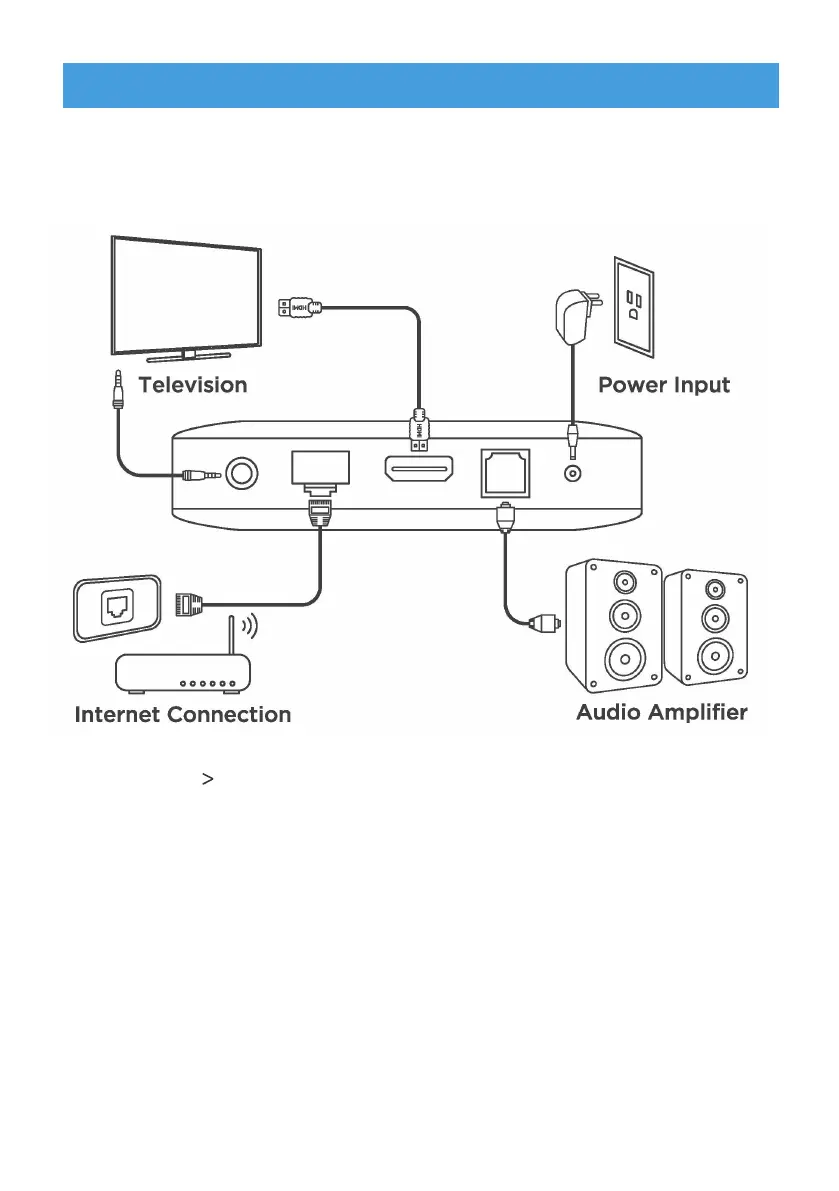
Refer to the diagram below for connecting your Laser Smart
Android TV Box to power, network and other devices (Note: Before
getting started, please turn off all devices to be connected).
Method 2 - Using an Ethernet Cable, connect the LAN Port of
the TV Box to the LAN Port of your router or home
broadband network.
Power - Connect the TV Box to the power using the power
adapter provided. You can then power on your
device and begin.
CONNECTION GUIDE
Note: The Laser Smart Android TV Box also supports Wi-Fi. To connect, go to
Settings - Network.
Note: Before turning on your device, please swith the signal output of the TV to
the correct source.
(,³.1),%³..#(!-®³-&.³(³(&³#²#³#(³),,³.)³
)((.³.)³."³(.1),%°
6WHS:HOFRPHWR$QGURLG79


 To Next Page