SETTING UP YOUR DEVICE
You may turn on your device after properly connecting all
hardware.
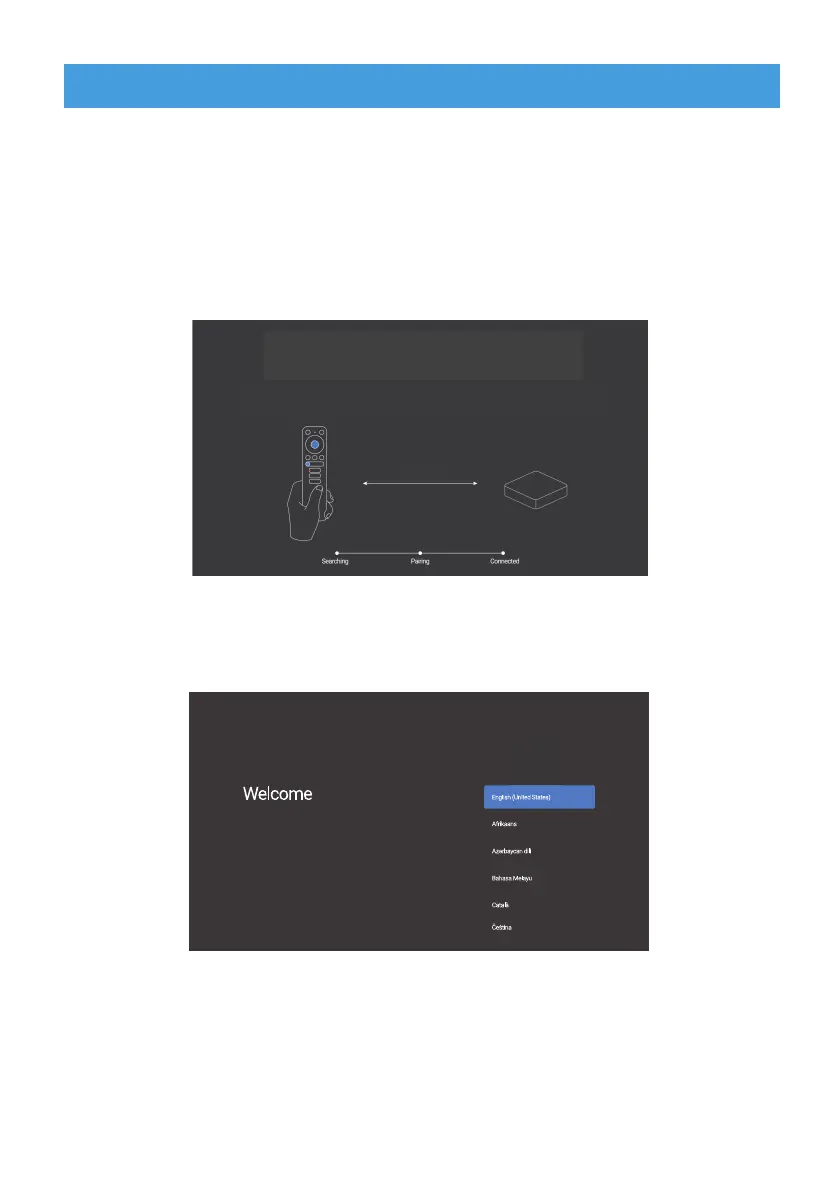
To be able to use Google Assistant on your remote, you must
first pair your Bluetooth Remote to your Smart Android TV Box.
Follow the pairing instructions on screen.
Step 1: Language
Select your preferred language on the Welcome Page.
Step 2: Set up with Android device
Choose whether to set up your TV with an Android device or
skip this step. If you choose Yes, please refer to the Bluetooth
Pairing section of this Manual.
To pair, place the remote on Qairing Node by holding down on both the Wolume Eown and the Fnter Cutton
within 30 centimetrFs of the TV Box unitil it is discoverable
7REHDEOHWRXVH*RRJOH$VVLVWDQWRQ\RXUUHPRWH
SDLUWKHUHPRWHWR\RXU$QGURLG79%R[
30 centimetrFs
To pair, place the remote on Qairing Node by holding down on both the Wolume Eown and the Fnter Cutton
within 30 centimetrFs of the TV Box unitil it is discoverable
7REHDEOHWRXVH*RRJOH$VVLVWDQWRQ\RXUUHPRWH
SDLUWKHUHPRWHWR\RXU$QGURLG79%R[
30 centimetrFs


 To Next Page