Tinyhawk II
10
emax-usa.com
Reprogramming Tinyhawk II Flight Controller
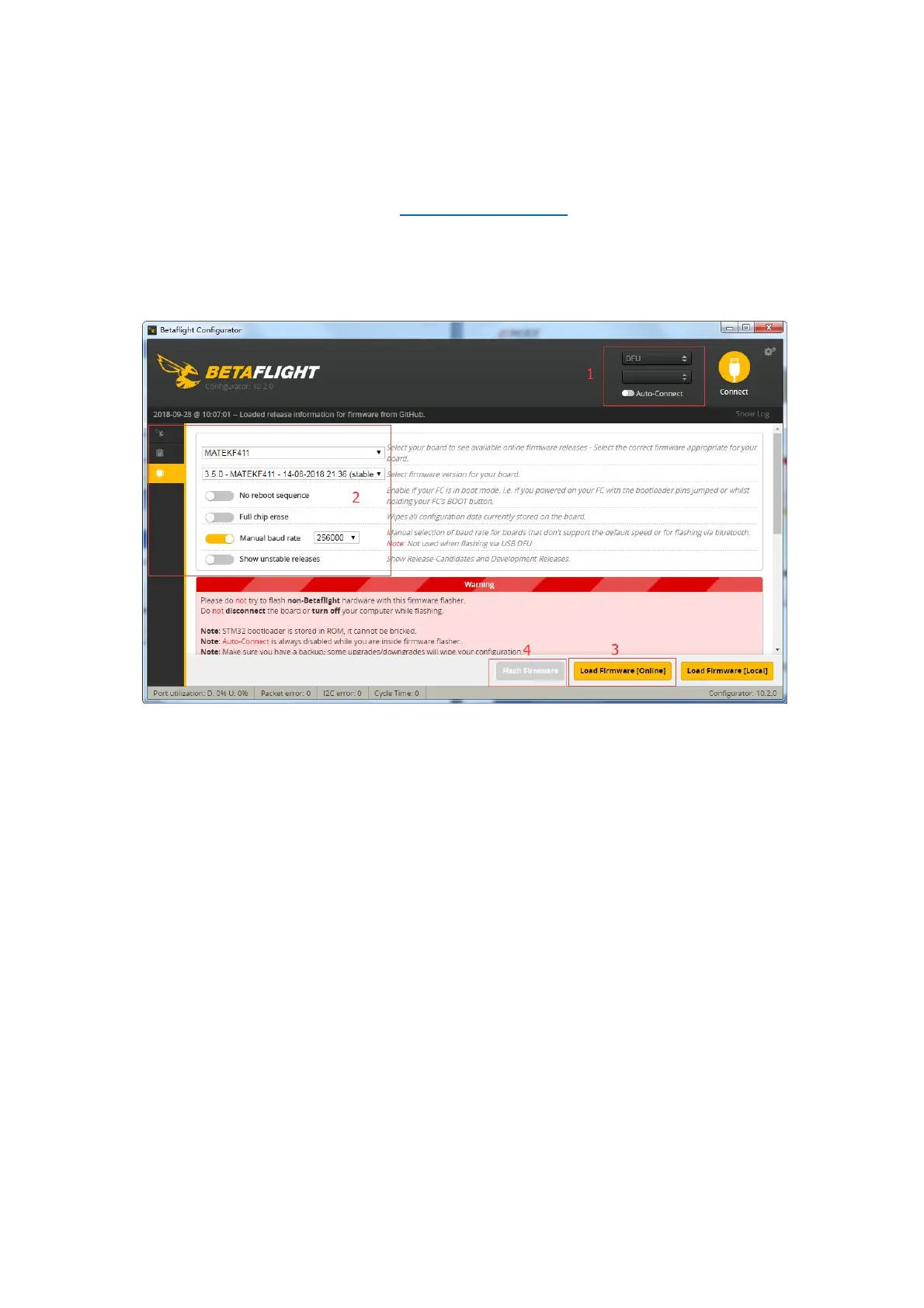
1. Put the Flight Controller in DFU mode by pressing the BOOT button while
plugging in the micro USB cable to a computer.
2. Select MATEKF411RX as the target and then select the firmware (4.0.0) or
download the hex file from https://emax-usa.com/ . Select Manual Baud Rate
with 256000 in the drop down menu
3. Select Load Firmware(Online) to download the firmware or Load
Firmware (Local) if already downloaded the hex file.
4. Select Flash Firmware to program the flight controller
Restoring the Tinyhawk default settings
1. Download the latest CLI Dump File from https://emax-usa.com/
2. Connect Tinyhawk II to Betaflight configurator and select the CLI tab
3. Open the CLI Dump File in a text editor and copy all the text.
4. Paste the settings into the command bar and press enter
5. Tinyhawk II will reconnect to Betaflight when completed














 To Next Page