28
4.6 CONTROL UNIT OPERATION & PROGRAMMING
Review this section prior to operating the machine.
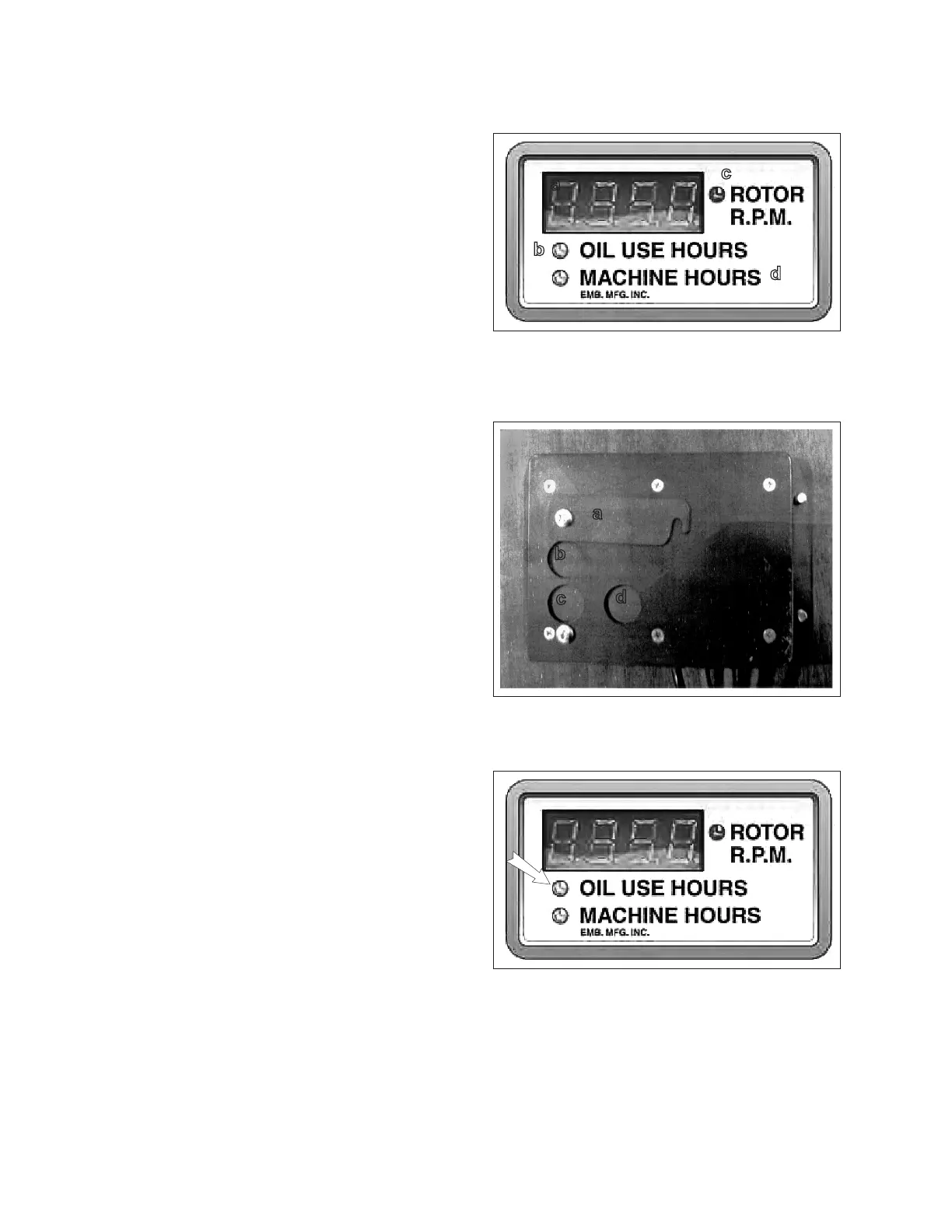
1. Normal Operation and Readouts:
a. Digital Readout:
Changes based on selected mode.
b. Oil Use Hours:
Default display can be reset to zero.
c. Rotor RPM:
Displays when rotor is turning
d. Machine Hours:
Non-resettable. Displays total machine
run time.
2. Back View - Mode and Programming But-
tons:
a. Flip Plate:
Rotates away from programming.
b. Top Programming Button:
Increases value.
c. Bottom Programming Button:
Decreases value
d. Mode Button:
Pages through modes and display. Press
and hold for 10 seconds to reset Oil Use
Hour counter when in oil use mode.
3. Programming Upper RPM Limit (Ceiling):
1. Press mode button twice. Digital readout
will display current upper limit setting. This
represents the RPM at which the auto-feed
wil re-start the feed rolls after a suspen-
sion.
2. Oil Use indicator will ash. Increase or
decrease setting using program buttons
(Kohler 38 HP gas: 1375 RPM. Kohler 25
HP diesel: 1375 RPM).
a
b
c
d
Fig. 7 READOUT
Fig. 8 BACK VIEW
a
b
c
d
Fig. 9 READOUT


 To Next Page