14
“Set-Point Cl” (PWM) mode - Digital
This mode is valid for any “Digital” output available. Pulse-width modulation (PWM) of a signal or power source
involves the modulation of its duty cycle, to either convey information over a communications channel or control the
amount of power sent to a load. This mode works over a settable (0 to 100 seconds) time to switch on or off selected
output. During this time if reading value will move towards a set value (on or off) the PWM will operate the output on
timered basis. Reaching the set value the PWM will permanently leave on or off the output. Parameters to set for this
mode are:
Unit Value + %: (time activity towards set value. 0% means 0 seconds. 100% means 100 seconds.)
Cl range: two Cl values within PWM operates.
For example: set rst Cl value at 1.40 = 00% and second Cl value at 0.80 = 60%.
For reading values ≥ to 1.40 the output will be permanently OFF.
For reading values ≤ 0.80 the output will be ON for 60 seconds and OFF for 40 seconds.
If reading value is 1.1 mg/l then the output will be active at 30% (ON for 30 seconds, OFF for 70 seconds).
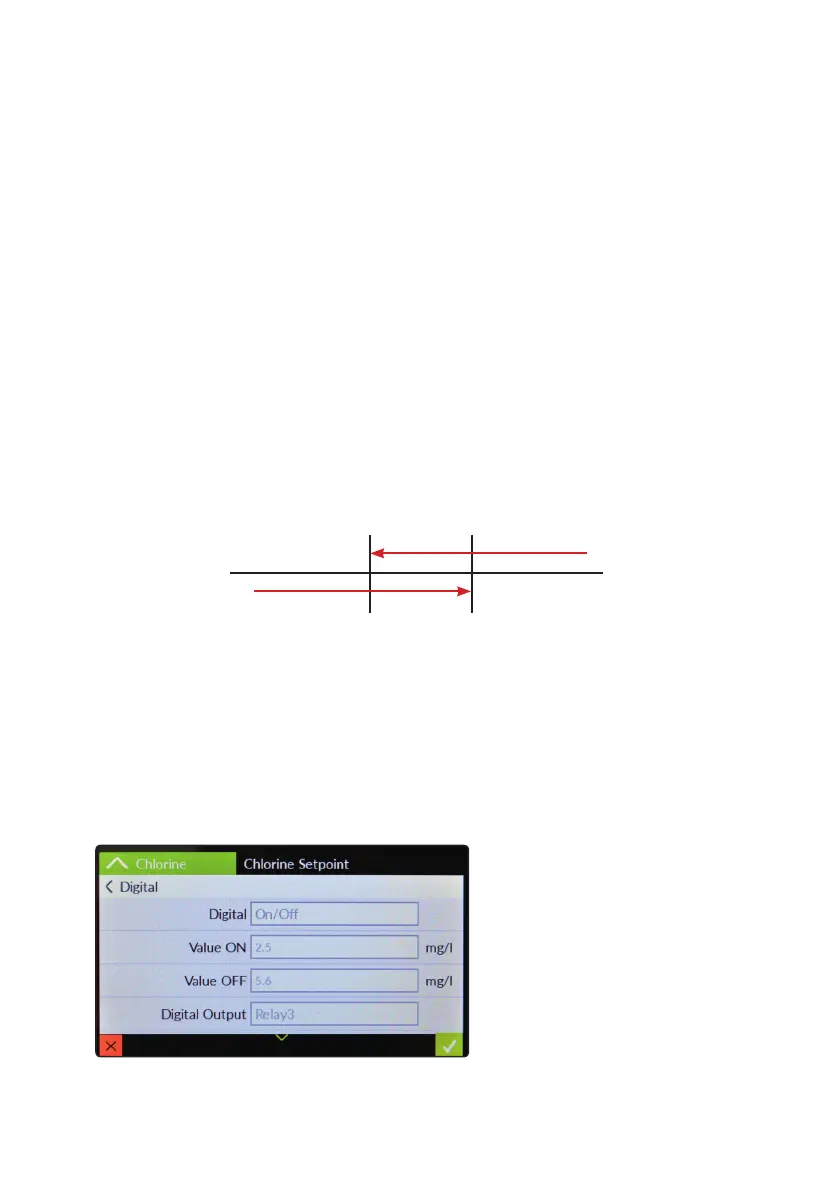
“Set-Point Cl” (on/off) mode - Digital
This mode is valid for any “Digital” output available. On/Off mode set the CONTROLLER to operate using two set
values that enable or disable the Cl pump. To use this mode tap on On/Off working mode. Tap on it.
ON/OFF mode
Set Cl value at 0.80 mg/l ON and 1.00 mg/l OFF. The difference between the two Cl values is called HYSTERESIS.
CONTROLLER will enable the Chlorine pump when reading value will decrease at 0.80mg/l
At 0.80mg/l the Chlorine pump will be enabled until reading value will increase at 1.00mg/l.
Pulse speed: to let pump operate at pulses per minutes add one or more minute (1pulse every xx minutes).
Tap on main function to enable / disable
Tap on value to change them according to preferences
Tap on Out to choose between any output available
0.80 1.00
ON
OFF
0.80
1.00



 To Next Page