24
“Centurio PRO” main menu: communication.
Main menu, Communication options are: ERMES, Mobile, Ethernet, Proxy, WiFi, Message and Modbus
“ERMES”.
This menu allows to enable or disable “ERMES” remote management system. Option is ENABLED OR DISABLED.Before
to enable it please congure at least one communication protocol between MOBILE, WiFi or Ethernet. Once the internet
communication has been estabilished, into main screen (see page 9) a conrmation icon will appears (e.g.:
). Tap on
it to complete “ERMES” conguration.
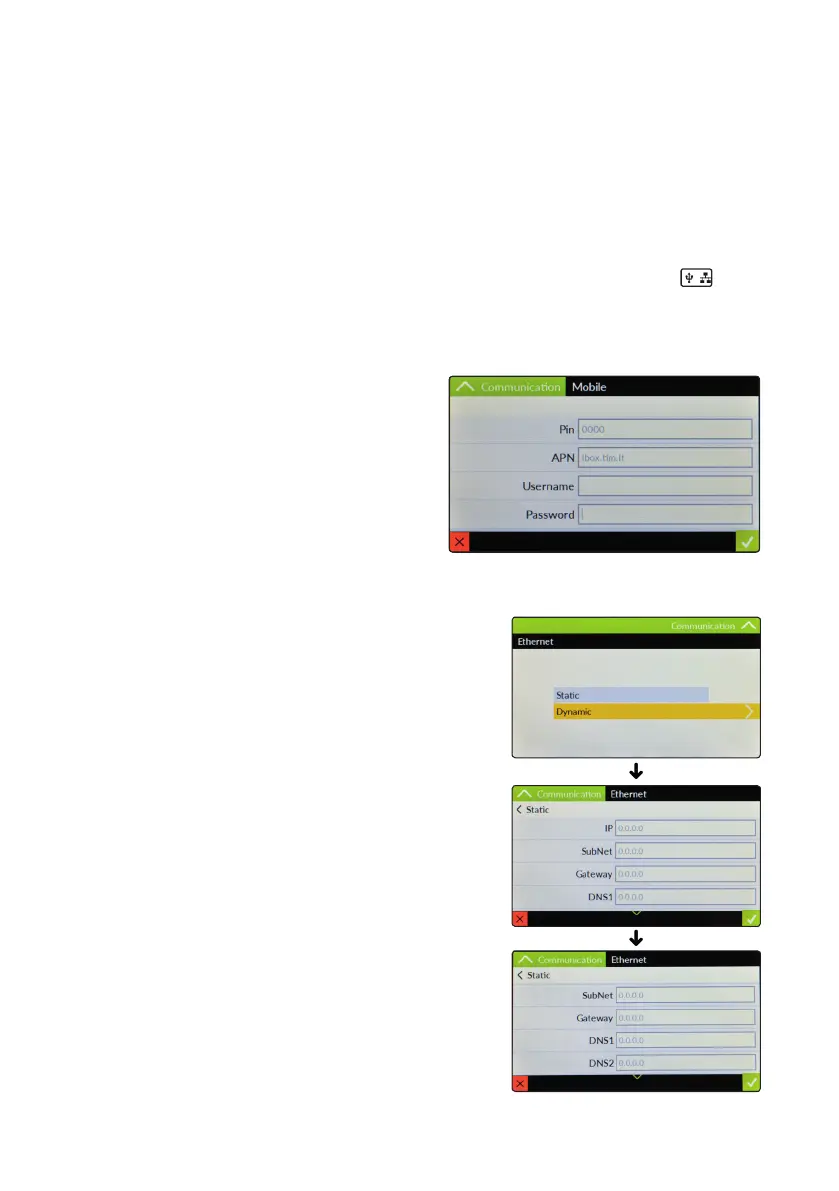
“Mobile”.
This menu allows to congure the mobile communication when
3G/4G GSM module has been installed. Options are:
PIN: Enter SIM PIN number (if required)
APN: According to your mobile operator, if required, enter the
access point name. Usually this eld is automatically assigned.
Username: Enter SIM Username (if required)
Password: Enter SIM Password (if required)
WARNING: THIS FUNCTION COULD NOT BE FREE OF CHARGE.
DEPENDING ON YOUR DATA PLANIT COULD GENERATE
PAYING SMS and/or DATA TRAFFIC !
“Ethernet”.
This menu allows to congure a cabled connection when an
ethernet module has been installed. Usually a Dynamic conguration
is suitable for most connections. Otherwise a Static conguration
can be enabled according to LAN ADMINISTRATOR. If this is the case
parameters to set are:
IP: static IP address assigned to the controller
SubNet: bitmask to encode the prex length in quad-dotted notation
Gateway: (Internet) network node for outgoing connections
DNS1 and / or DNS2: server address for domain name and mapping
Note: for MODBUS access over TCP/IP instruct PLC to reach port 502.



 To Next Page