14
9. “Probe Calibration”, pH
Full pH calibration procedure involves two calibration points and it requires two buffer solutions. Default buffer
solutions are pH 4.00 and pH 7.00. pH reading value can be also compensated from “pH compensation” menu.
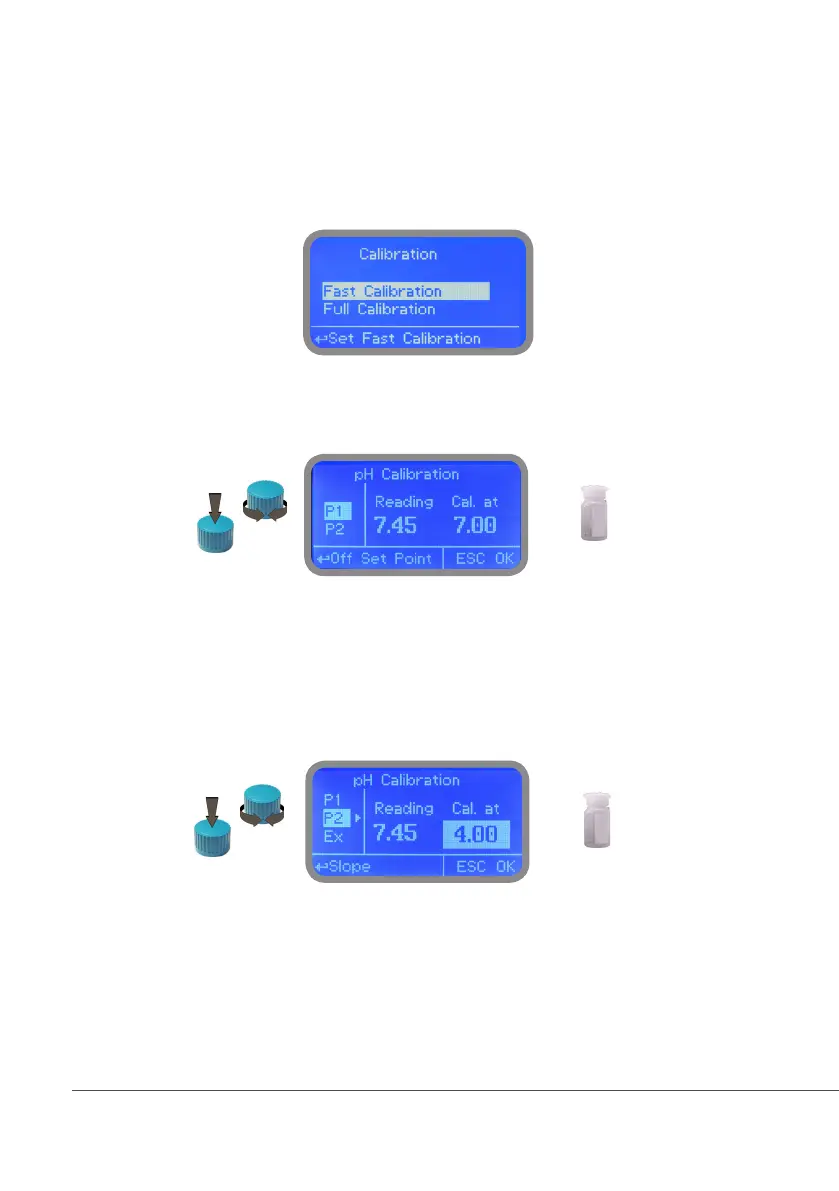
From “Menu Calibration” choose “pH probe”. Fast Calibration procedure involves one point calibration (choose
value closest to real field application).
In the following example instrument will calibrate pH using default buffer solutions values. Note: this procedure
assumes that instrument is correctly congured and a working pH probe connected. Otherwise unattended
results may occurr. When changing pH compensation option, calibration must be repeated.
Calib 1st Point.
Once into “pH Calibration” menu move wheel on “P1” then press wheel to enter into first point calibration
submenu. Prepare 7.00pH buffer solution and dip probe’s sensor on it. Wait until reading value is stable and accor-
ding to buffer solution value move wheel until it is the same on display (“Cal. at” field). Default value is 7.00pH.
To end procedure move cursor on “OK” and press wheel to proceed to next step. Note: buffer solution value may
change if environment temperature it’s different than 20°C. Read solution’s label for more information. Accor-
ding to this occurrence “pH Default” must be changed.
pH7
Calib 2nd Point.
Move wheel on “P2” then press wheel to enter into second point calibration submenu. Prepare 4.00pH buffer so-
lution and dip probe’s sensor on it. Wait until reading value is stable and according to buffer solution value move
wheel until it is the same on display (“Cal. at” field). Default value is 4.00pH.
To end procedure move cursor on “OK” and press wheel to proceed to “Save” request screen. Move wheel on
“YES” to save or “NO” to discard changes. Note: buffer solution value may change if environment temperature
it’s different than 20°C. Read solution’s label for more information. According to this occurrence “pH Default”
must be changed.
pH4


 To Next Page
 Loading...




