EasyManua.ls Logo

Emerson CKD9906 - User Manual

Emerson CKD9906
27 pages
Print Icon
To Next Page IconTo Next Page
Loading...
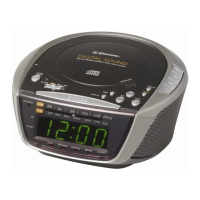
OWNER'S MANUAL
CKD9906
Stereo Radio, CD-R/RW Player
with Dual Alarm Clock
Visit our web site at www.emersonradio.com
CKD9906_071905.p65 19/7/2005, 14:2427

Questions and Answers

  • L
    Lisa FischerJul 30, 2025
    What to do if my Emerson Stereo System CD player will not play?
    • D
      Dustin RobinsonJul 30, 2025
      If the CD player on your Emerson Stereo System isn't playing, make sure the Function switch is set to CD. Also, check that the CD is correctly inserted with the label side facing up.
  • D
    davidmartinAug 5, 2025
    Why is there no sound on my Emerson Stereo System AM or FM?
    • K
      kcaldwellAug 5, 2025
      If you're not getting any sound on AM or FM from your Emerson Stereo System, first ensure the Function switch is set to either AM or FM ST as desired. Also, check the volume level and increase it if it's at the minimum.
  • S
    Suzanne JenkinsAug 10, 2025
    How to fix noise or distorted sound on Emerson Stereo System AM or FM?
    • K
      Kathryn ChambersAug 10, 2025
      If you're experiencing noise or distorted sound on AM or FM broadcasts with your Emerson Stereo System: * Retune the FM ST or AM broadcast station. * Extend the FM wire antenna if you are using FM. * Reposition the unit until the best reception is obtained if you are using AM.
  • K
    Kelly GonzalezAug 16, 2025
    What to do if Emerson Stereo System CD skips while playing?
    • A
      Andrea HendricksAug 16, 2025
      If the CD skips while playing on your Emerson Stereo System, the disc might be dirty or scratched. Try wiping the disc with a cloth or using a different disc.
  • S
    Sherry WilliamsAug 23, 2025
    Why doesn't the FM ST indicator light up on my Emerson Stereo System?
    • P
      Patricia MooreAug 23, 2025
      If the FM ST indicator on your Emerson Stereo System isn't lighting up, it could be because you've tuned to an FM mono station. Try selecting another FM stereo station and setting it to FM ST.

Summary

Safety Precautions

IMPORTANT SAFETY INSTRUCTIONS

Provides critical safety guidelines for using the appliance.

Introduction

Important Notes and Compliance

CLASS 1 LASER PRODUCT

Identifies the product as a Class 1 Laser Product.

FCC Information

Details compliance with FCC rules for digital devices.

Preparation and Setup

Unpacking And Set Up

Instructions for unpacking and setting up the unit.

Protect Your Furniture

Advises on protecting furniture from the unit's feet.

Power Source

Battery Back Up System

Controls and Indicators

Top Panel Controls

Lists controls located on the top surface of the unit.

Front Panel Controls

Lists controls located on the front surface of the unit.

Detailed Control & Indicator List

Comprehensive list and explanation of all controls and indicators.

Basic Operations

Setting The Time Of Day

Step-by-step guide to setting the current time.

Setting The Wake Up Times

Instructions for setting the alarm times.

Listening To The Radio

How to tune and listen to AM/FM radio stations.

Radio Antenna Information

AM Antenna

Specifics for AM antenna positioning.

FM Antenna

Specifics for FM antenna positioning.

CD Player Operations

Normal Playback

Steps to insert and play a CD.

CD Playback Operations

Details on disc reading, playback, pause, skip, and stop.

Specific Track Playback

How to select and play a specific track.

High Speed Music Search

How to fast forward or rewind within a track.

Random Playback

How to play tracks in a random order.

Repeat Playback Modes

Instructions for repeating single tracks or all tracks.

Programmed Playback

How to program a sequence of tracks to play.

Program Repeat Playback

How to combine programmed playback with repeat function.

Alarm Features

Setting Up Alarms

Detailed steps for setting and managing alarms.

Alarm Operation Notes

Important notes for radio, CD wake-up modes.

Snooze Functionality

How to use the snooze function for alarms.

Sleep To Music Timer

Sleep Timer Settings

How to set the unit to turn off after a set time.

Care and Maintenance

Compact Disc Care

Guidelines for cleaning and handling compact discs.

Cabinet Care

How to clean the unit's exterior cabinet.

Troubleshooting Guide

Radio Troubleshooting

Troubleshooting specific to the radio function.

CD Player Troubleshooting

Troubleshooting specific to the CD player function.

Limited Warranty

Emerson CKD9906 Specifications

General IconGeneral
BrandEmerson
ModelCKD9906
CategoryStereo System
LanguageEnglish

Related product manuals