CI-ControlWave EFM Installation & Operation / 2-15
SW2-3 set OFF forces the use of Soft Switches as set per factory default (see Section 2.4.4).
For use of user defined Soft Switches, SW2-3 must be set to the ON position. Note: If both
SW2-3 and SW2-8 are set OFF (closed), all communication ports will be set to 9600 bps
operation (8-bits, no parity, 1 stop bit, BSAP Protocol).
SW2-4 set OFF and used in conjunction with the SCM Mode switch will cause the
ControlWave EFM to perform a Core Updump (see Section 3.6).
SW2-6 set ON will enable the user to perform a remote download of System Firmware (see
Section 2.4.2.3).
SW2-5 set OFF forces the ControlWave EFM to reinitialize SRAM when the unit recovers
from a low power or power outage condition. When set ON, the contents of SRAM will be
retained and utilized when the system restarts. Note: If the Battery is removed from
the CPU Module (CPU removed) CPU should not be installed (and power applied)
before one minute has passed unless SW2-5 on the CPU has been set OFF.
SW2-8 set OFF prevents the ‘Boot Project’ from running and places the unit into diagnostic
mode. SW2-8 must be set OFF to run the WINDIAG program resident on the local PC (see
Section 3.5). When SW2-8 has been set ON, diagnostics is disabled. SW2-8 must be set to
the ON position for normal system operation, i.e. for the Boot project to run. Note: If both
SW2-3 and SW2-8 are set OFF (closed), all communication ports will be set to 9600 bps
operation (8-bits, no parity, 1 stop bit, BSAP Protocol).
Table 2-6 in Section 2.3.3.3 provides CPU Switch SW3 (COM3) and ECOM Switch SW1
COM5/9 RS-485 communication port settings.
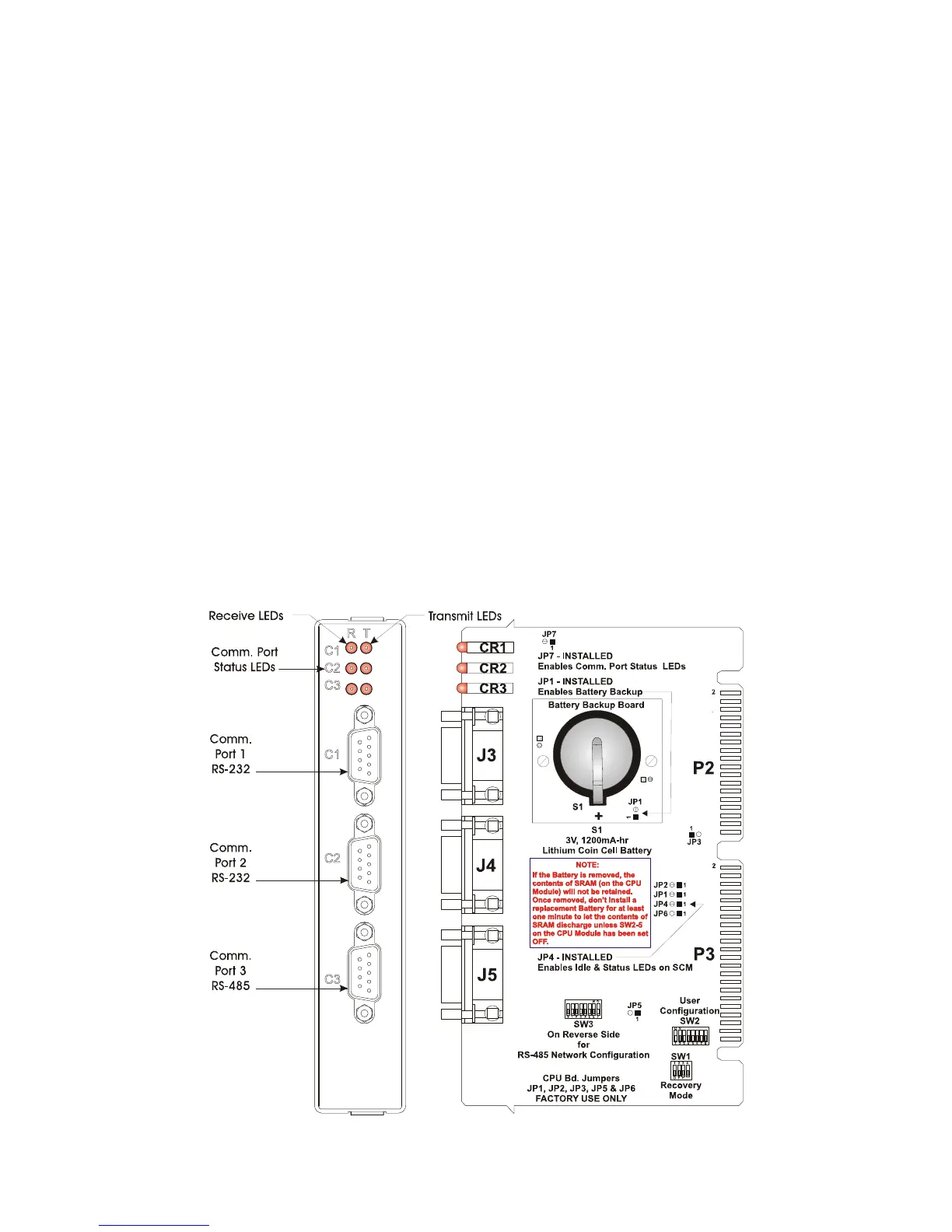
Figure 2-9 - CPU Module Component Identification Diagram














 To Next Page