Need help?
Do you have a question about the Emerson EC1-233 and is the answer not in the manual?
Ensures proper installation to prevent device failure, damage, or injury.
Adhere to technical data electrical ratings to prevent exceeding limits.
Maximum current for common live terminal (pin1) is 15 Amps.
Caution is required when removing cover due to mains voltage and electrical shock risk.
Disconnect all system voltages before commencing installation.
Maintain operating temperatures within specified nominal limits.
Ensure all wiring complies with applicable local electrical regulations.
Connect wires to terminals per diagram and replace rear cable protector.
Analog inputs are for dedicated sensors only; do not connect other devices.
Keep controller/sensor wiring separate from mains wiring by at least 30mm.
Indicates an air or defrost sensor is open circuit.
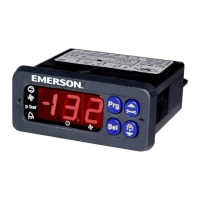
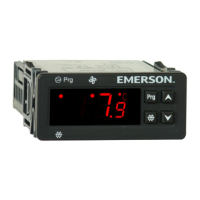
The EC1-233 is a dedicated refrigeration controller designed to manage air temperature, defrost cycles, and fan operations in display cases and cold rooms. It features a user-friendly interface with a 4-button keypad and an LED display, providing clear indications of operational status and parameters.
The core function of the EC1-233 is to maintain a desired air temperature within a refrigerated environment. It achieves this by controlling the refrigerant flow, typically through a solenoid valve and/or compressor, and managing defrost heaters and evaporator fans. The controller utilizes two ECN-Sxx temperature sensors: S1 for air temperature measurement and S5 for defrost termination.
The S1 air temperature sensor can be positioned to measure either the air-in or air-out temperature of the evaporator, providing crucial data for thermostat control. In environments where average ambient temperatures exceed 25°C, it is recommended to mount the air sensor in the lower air discharge duct for more accurate readings. Proper placement of the S1 sensor involves mounting it on spacers within the air duct to ensure airflow around it and prevent contact with surfaces that could skew temperature readings.
The S5 defrost temperature sensor is strategically placed within the evaporator, typically closer to the expansion valve or in the air-outlet duct immediately after the evaporator (if S1 is in the air-in duct). This sensor is critical for initiating and terminating defrost cycles, preventing excessive ice buildup while optimizing energy consumption.
The controller offers various fan modes, allowing for flexible operation. Fans can be set to start/stop with cooling, remain off during defrost, or run continuously. A fan delay after defrost can also be configured to ensure optimal performance.
Alarm functions are integrated to alert users to potential issues. High and low-temperature alarm limits can be set, with adjustable delays to prevent nuisance alarms from transient temperature fluctuations. A sensor error alarm indicates an open circuit in either the air or defrost sensor, prompting immediate attention.
The EC1-233 is designed for ease of use and flexibility in parameter configuration.
Mounting: The device is designed for panel mounting with a standard 71 x 29 mm cutout. Installation involves removing the cable protector and mounting clips, pushing the controller into the cutout with the gasket positioned on the outer surface, and then securing it with the mounting clips. This ensures a firm hold and prevents dust and moisture ingress.
Electrical Installation: Wiring connections are made to clearly labeled terminals at the rear of the device. The controller has an internally mounted transformer, allowing direct connection to a 230V 50/60Hz power supply. It is crucial to keep controller and sensor wiring well separated from mains wiring, with a minimum recommended distance of 30mm, to prevent interference.
Parameter Modification: Parameters can be accessed and modified via the 4-button keypad or more efficiently using a copy key. The parameters are organized into user and administration sections, providing two levels of access.
Copy Key Procedure: The EC1-233 supports a copy key for quick and efficient parameter transfer between controllers.
Defrost Activation: A defrost cycle can be manually activated from the keypad by pressing the down button for more than 3 seconds. The defrost LED will illuminate, provided the defrost termination temperature (S5) is below the set value.
Continuous Cooling Demand Activation: The controller can be forced into continuous cooling mode by pressing the up button for more than 3 seconds. The cooling LED will illuminate. Pressing the up button again for more than 3 seconds stops the continuous cooling process.
Display of Data: During normal operation, the display shows the temperature measured by the S1 air sensor. Pressing the down button displays the current value of the defrost termination sensor. A blinking LED indicates that a relay is inhibited due to a time delay or an active alarm condition.
The EC1-233 is designed for robust operation, but proper installation and adherence to safety guidelines are essential for long-term reliability.
The controller's design emphasizes reliability and ease of troubleshooting, with clear LED indications for various operational states, including cooling, defrost, and fan activity. Alarm codes provide specific information about detected issues, such as high/low temperature alarms or sensor errors, facilitating quick diagnosis and resolution.
 General
| Power Supply | 24 VDC |
|---|---|
| Input Voltage | 24 VDC |
| Enclosure Rating | IP20 |
| Product Type | PLC Controller |
| Series | EC1 |
| Ethernet Ports | 1 |
| Serial Ports | 1 x RS-485 |
| Programming Languages | Ladder Logic, Structured Text, Function Block Diagram |
| Communication Protocol | Modbus RTU |

 To Next Page