B. MPAA Rating
MPAA Rating is the rating system created by MPAA (Motion Picture
Association of America).
4
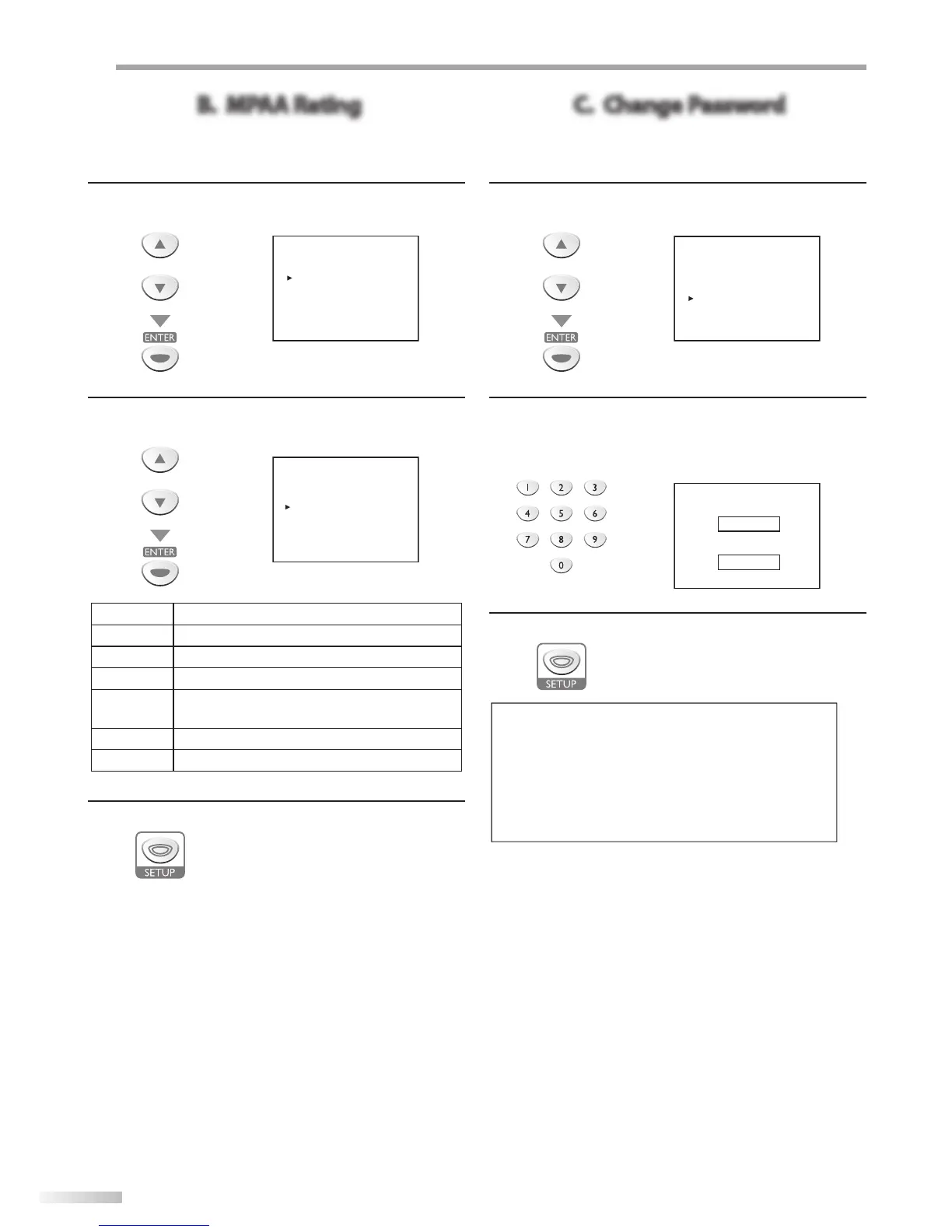
Use [Cursor K /L] to select “MPAA RATING”, then press
[ENTER].
or
--- V-- CHIP SETUP ---
TV RATING
MPAA RATING
DOWNLOADABLE RATING
CHANGE PASSWORD
5
Use [Cursor K /L], then press [ENTER] repeatedly to
change the setting.
or
G [VIEW]
PG [VIEW]
PG-13 [VIEW]
R [BLOCK]
NC-17 [BLOCK]
X [BLOCK]
Rating Category
G
General audience
PG
Parental guidance suggested
PG-13
Unsuitable for children under 13
R
Restricted; under 17 requires accompanying
parent or adult guardian
NC-17
No one under 17 admitted
X
Mature audience only
6
Press [SETUP] to exit.
C. Change Password
Although the default code “0000” is supplied with the unit, you can set
your own password.
4
Use [Cursor K /L] to select “CHANGE PASSWORD”, then
press [ENTER].
or
--- V-- CHIP SETUP ---
TV RATING
MPAA RATING
DOWNLOADABLE RATING
CHANGE PASSWORD
5
Press [the Number buttons] on the remote control to
enter the new 4-digit password.
• Enter password again in “CONFIRM PASSWORD.”
space.
NEW PASSWORD
_ _ _ _
CONFIRM PASSWORD
_ _ _ _
6
Press [SETUP] to exit.
Note:
• Make sure new password and confirm password must be
exactly the same. If they are different, the space is cleared
for reentering.
• Your password will be erased and return to the default
(0000) when a power failure occurs or when you turn off
the power using a wall switch. If you forget the password,
unplug the power cord for 10 seconds to restore the
password to 0000.





 To Next Page