1-6-4 H94X1IB
LOADING THE BATTERIES
. Open the battery compartment cover.
. Insert two AA batteries (supplied), with each one oriented correctly.
. Close the cover.
otes
Do not mix alkaline and manganese batteries.
Do not mix old and new batteries.
5
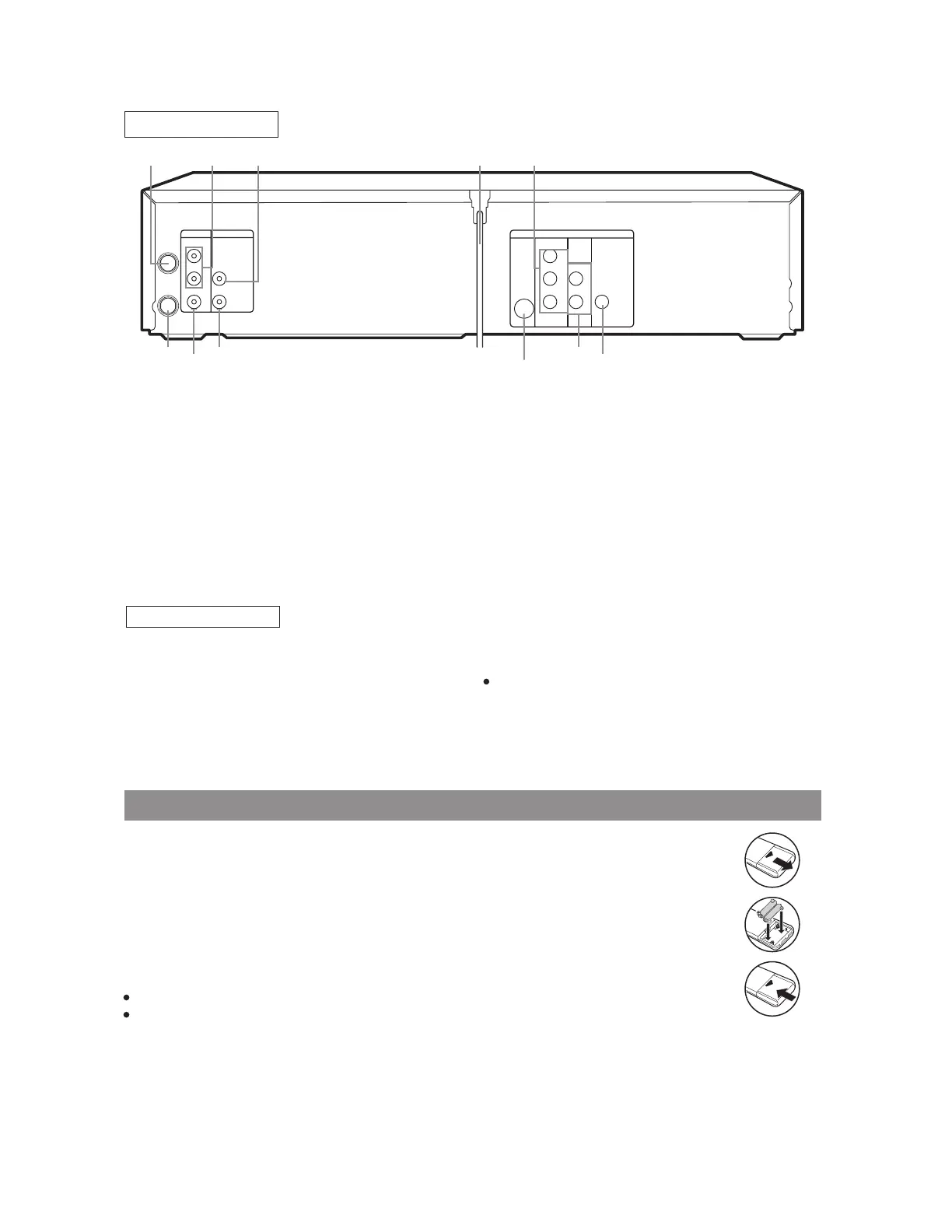
6. ANT-IN (Antenna In) Jack
Connect your antenna, Cable Box, or Satellite decoder
box.
7. DVD/VCR AUDIO OUT Jacks
Connect the supplied audio cables here and to the
Audio In jacks of a television or other audio equip-
ment.
8. AUDIO IN Jack
Connect an audio cable coming from the audio out
jack of a camcorder, another VCR, or an audio
source here.
9. AC Power Cord
Connect to a standard AC outlet to supply power to
the DVD/VCR COMBINATION UNIT.
0. COMPONENT VIDEO OUT Jacks
Connect optional component video cables here and
to the component Video In jacks of a television.
1. COAXIAL Jack
Connect an optional coaxial digital audio cable here
and to the Coaxial Digital Audio In jack of a decoder
or audio receiver.
62. DVD ANALOG AUDIO OUT Jacks
Connect the supplied audio cables here and to th
Audio In jacks of a television or other audio equi
ment (DVD only).
63. S-VIDEO OUT Jack
Connect an optional S-Video cable here and to the
Video In jack of a television. (DVD only).
64. VIDEO IN Jack
Connect a cable coming from the video out jack of
camcorder, another VCR, or an audio-visual sour
(laser disc player, video disc player, etc.) here.
65. DVD/VCR VIDEO OUT Jack
Connect the yellow video cable (supplied) here an
to the TV’s Video In jack.
66. ANT-OUT (Antenna Out) Jack
Use the supplied RF coaxial cable to connect th
jack to the ANTENNA IN Jack on your TV.
Notes
The S-VIDEO OUT jack, COAXIAL jack, and COM
PONENT VIDEO OUT jack are only useful
DVDmode.
Caution: Do not touch the inner pins of the jacks
on the rear panel. Electrostatic discharge may
cause permanent damage to the player.
DVD Playback only
ANT-IN
ANT-OUT
VIDEO OUT
AUDIO OUT
S-VIDEO
OUT
AUDIO
OUT
DIGITAL
AUDIO OUT
COAXIAL
Y
Cb
Cr
L
R
COMPONENT
VIDEO OUT
AUDIO IN
VIDEO IN
DVD/VCR VCR DVD
R
L
66
65
64
63
62
61
5756 58 59 60
REAR VIEW


 To Next Page