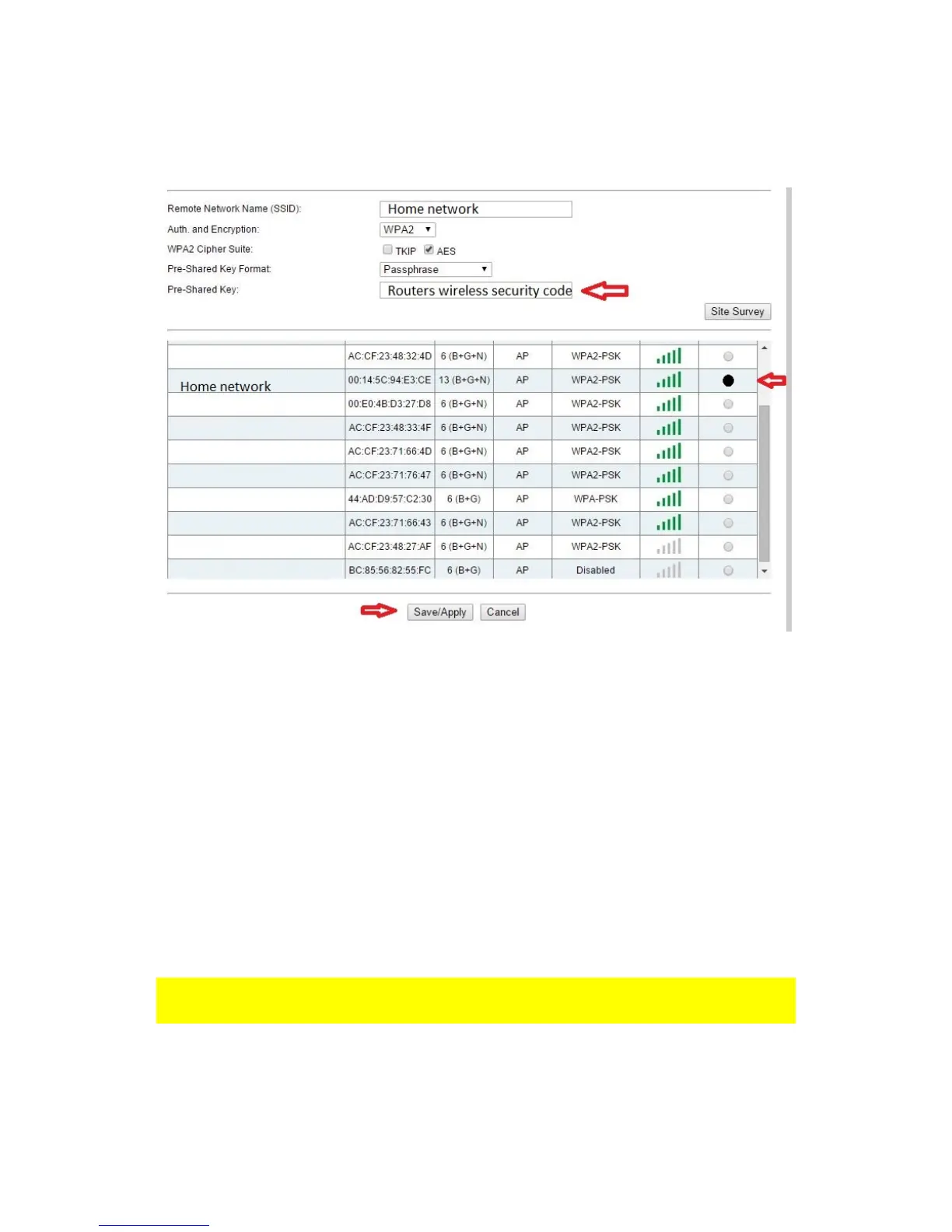
7. Make sure Repeater mode is enabled.
8. Click on the Site Survey button.
9. You will see a screen with all the available Wi-Fi networks.
10. Select the corresponding network you want to connect to in the “Select” field.
11. Your router’s Wi-Fi network name will be shown in the Network Name ( SSID )
field.
12. Enter the security key of your wireless network in the Pre-Shared Key field.
13. If you want to ensure easy login to your repeater after connecting to your home
network, you can select the option Auto configure LAN IP address. Your repeater
will now obtain ip address from your router. If you don’t change this option the
repeaters ip address will remain 192.168.10.1.
14. Click on Save/Apply button.
15. The EM4595 will reboot and connect to your router.
16. You can now connect your wireless network adapter(s) to your repeaters Wi-Fi
network name and entering the wireless security key of the wireless network you
previously connected.
Note: After the settings have been applied, the EM4595 will reboot. Your device will no
longer be connected to the wireless network SSID of the EM4595.



 To Next Page