4
MAINS
V12:380VV1V
Waitforstart
:220
V23:380VV2:220V
V31:380VV3:220V
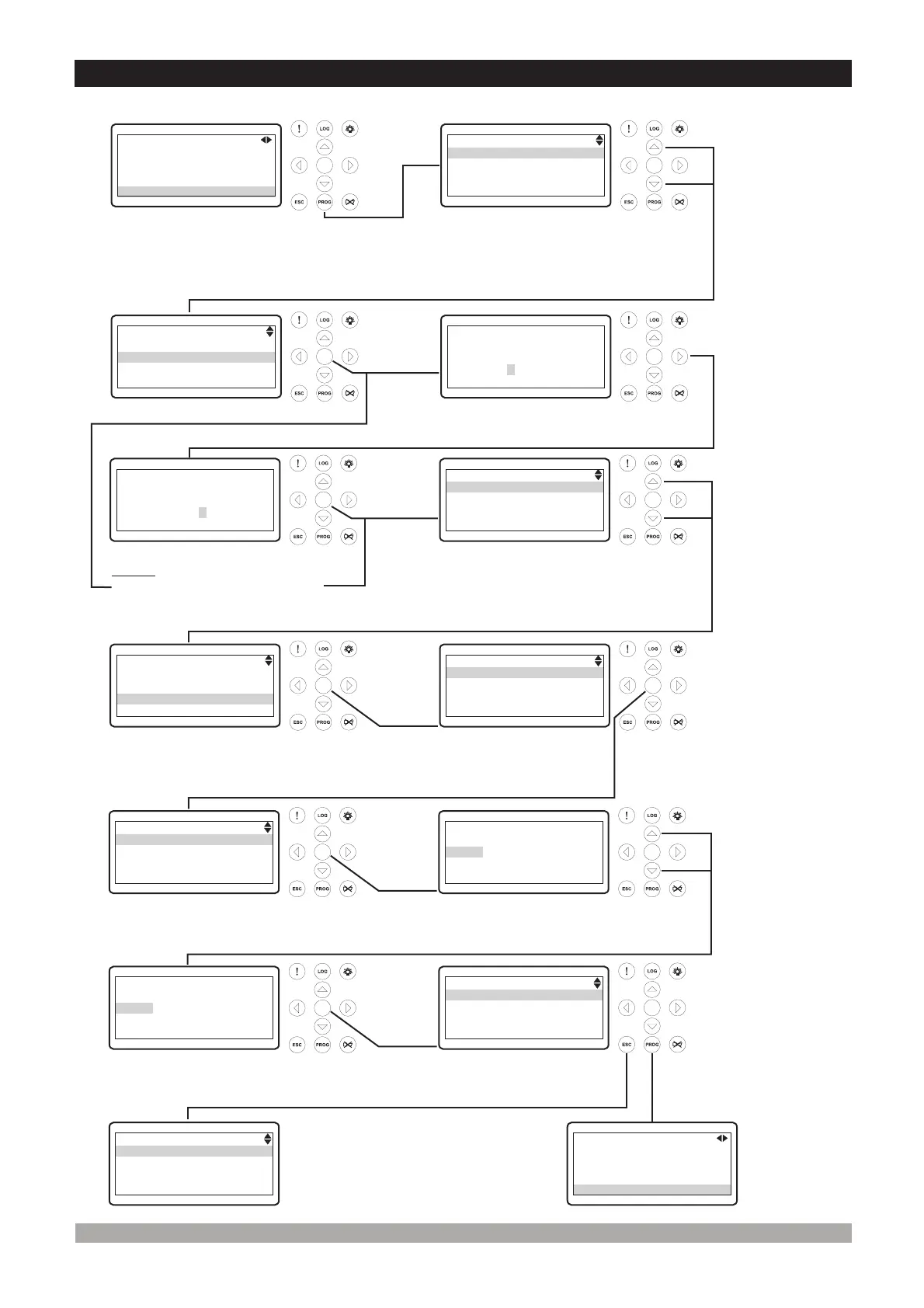
3.Changing AndSavingParametersValues
ü
OperationScreen
WhentheProgbuttonis
pressed,theparameters
sectionisaskedfor
accessingtoparameters.
ü
ü ü
ü
ü
ü ü
ü ü
ü
ü
PresstheUpor
Downbuttonsto
selectthesection
youwishto
view/change.
Pressthe
Enter
button.
Enterpassword
withcursor(Right,
Left,
) .
Upand
Down buttons
PresstheEnterbuttontoconfirm
password. Ifthepasswordis
incorrect,theunitwilldropoutof
programmode.
PresstheUpor
Downbuttonsto
selectthemain
parametergroup
youwishto
view/change.
Note1: IfEnterbuttonispressed
andthetechnicianpasswordis
zero,Passwordscreenisignored.
PressEnterbuttontoaccessto
allparameterspageincurrently
mainparametergroup.
Parametercanbe
changedwithUp
andDownbuttons.
PressEnterbuttonto
confirmthechangedvalue.
PROGRAM
Operatorsetting
Techniciansetting
Factoryadjustment
PROGRAM
Operatorsetting
Techniciansetting
Factoryadjustment
TECHNICIANSETTING
Password
0162
TECHNICIANSETTING
Password
0000
TECHNICIANSETTING
System
Mains
Generator
Engine
TECHNICIANSETTING
System
Mains
Generator
Engine
GENERATOR
Voltlevel
Frequencylevel
Currentlevel&act.
Powerlevel
GENERATORVOLTLEVEL
Undervoltshutdown
320Vac
GENERATORVOLTLEVEL
voltreset
Overvoltshutdown
Undervoltshutdown
Undervoltprealarm
Under
PresstheEnter
buttontoview
parametervalue.
PressEnterbuttonto
accesstoallparametersin
currentlyparameterpage.
GENERATORVOLTLEVEL
Undervoltshutdown
325Vac
GENERATORVOLTLEVEL
voltreset
Overvoltshutdown
Undervoltshutdown
Undervoltprealarm
Under
Operation
Screen
GENERATOR
Voltlevel
Frequencylevel
Currentlevel&act.
Powerlevel
WhentheEscapebuttonis
pressedanytime,previous
pagecanbeaccessed.
MAINS
V12:380VV1V
Waitforstart
:220
V23:380VV2:220V
V31:380VV3:220V
Toexitfrom
programmingmodeany
time,pressProgbutton.


 To Next Page
 Loading...