10
TO MANUALLY SET THE CLOCK / TIME ZONE SELECTION
1. Press and hold [ CLOCK ] key for 2 seconds until 12 or 24 Hr flashes
2. Use [
] key / [ ] key to adjust, and press [ CLOCK ] key to proceed to the next setting.
3. Press [ CLOCK ] key again to step the setting items in this sequence: Hour format
Hour Minute
Second Year Month Date Hour offset Language DST AUTO/OFF.
Note:
- The unit will automatically exit setting mode if no key was pressed in 60 seconds.
- The hour offset is for DCF and MSF version. Its range is between -23 and +23 hours
- DST (Daylight Saving Time) feature is set to Auto (factory set).
- The clock has been programmed to automatically switch when the daylight saving time is in effect. User ca
set the DST to OFF to disable the feature.
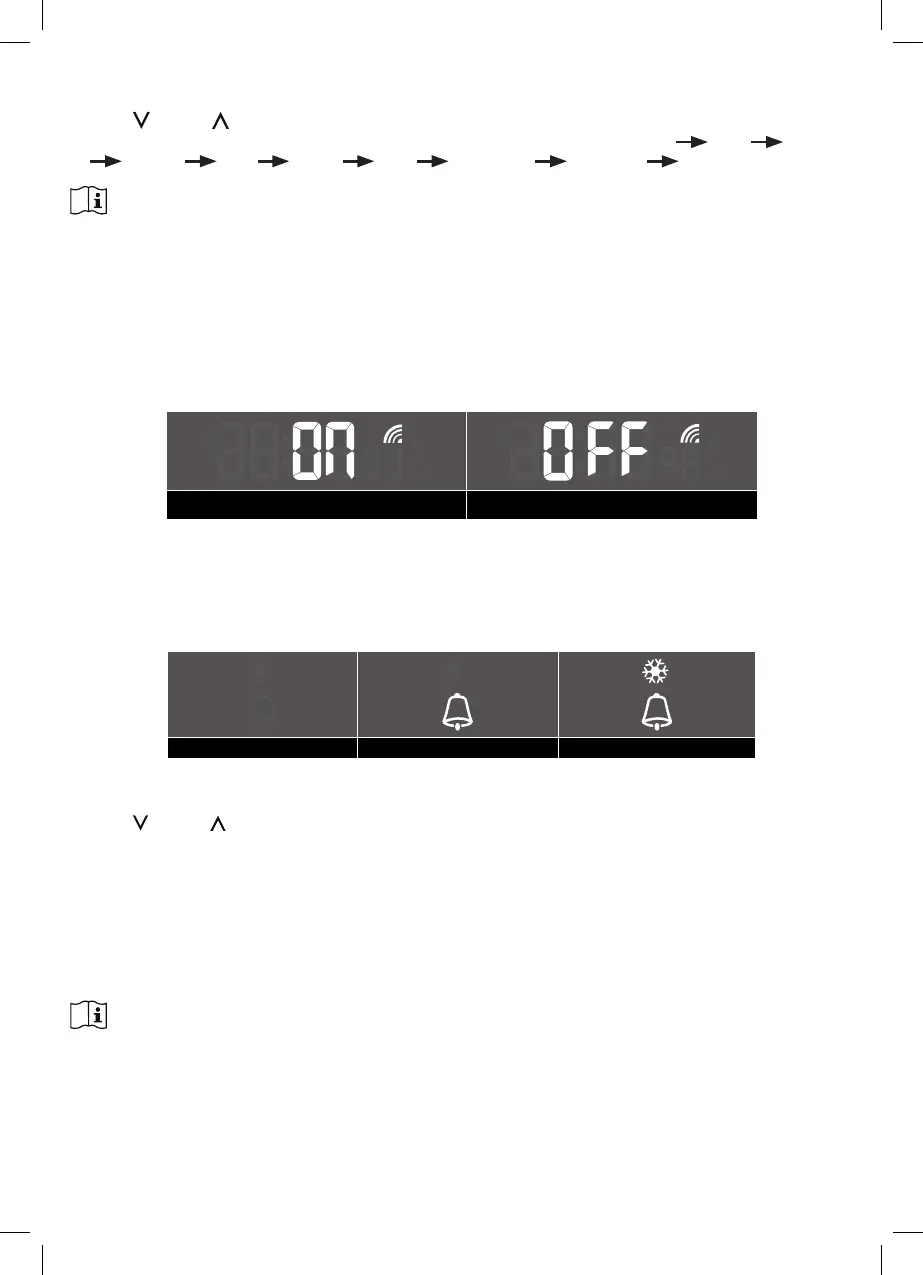
DISABLE / ENABLE RCC SIGNAL RECEPTION
1. Press and hold the [ RCC ] key 8 seconds to disable the reception.
2. Press and hold the [ RCC ] key 8 seconds to enable automatic RCC reception.
RCC on RCC o
TO TURN ON / OFF ALARM CLOCK (WITH ICE-ALERT FUNCTION)
1. Press the [ ALARM ] key anytime to show the alarm time.
2. Press the[ ALARM ] key to activate the alarm.
3. Press again to activate alarm with ice-alert function.
4. To disable the alarm, press until the alarm icon disappears.
Alarm o Alarm on Alarm with ice-alert
TO SET THE ALARM TIME
1. Press and hold the [ ALARM ] key for 2 seconds to enter alarm setting mode HOUR will begin to flash
2. Use [
] key / [ ] key to adjust HOUR, and press the [ ALARM ] key to proceed to set MINUTE.
3. Repeat 2 above to set MINUTE, and then press the [ ALARM ] key to exit.
STOP ALARM ALERT & SNOOZE
1. Press [ SNOOZE / LIGHT ] key to stop the current alarm and enter snooze. Alarm icon will be flashin
continuously. The alarm will sound again in 5 minutes. Snooze can be operated continuously in 24 hours.
2. When the alarm is sounding, it will stop automatically without pressing any key in 2 minutes. Also you can
press and hold the [ SNOOZE / LIGHT ] key for 2 seconds or press [ ALARM ] key to stop the current
alarm. And the alarm will automatically sound again at the alarm time next day.
Note:
- Pressing the[ ALARM ] key twice when alarm time is being displayed will activate the temperature-adjusted
pre-alarm.
- The alarm will sound 30 minutes earlier if it detects outside temperature is below -3°C.


 To Next Page