6
If the thermostat is currently in the
mode and you want to change the temperature, press
the Temp button.
Note: Default temperature setting:
= 19°C, = 15°C.
Manual setting of temperature
Press to choose comfort temperature. Press to choose economy temperature. The current
temperature mode will be stopped until next change in the program. The hand
icon is displayed.
Press OK to cancel the manual temperature change.
Increase in the time of manual change of temperature
Press and hold for 4 seconds (increase comfort temperature time), or (increase economy
temperature time). This displays time setting value and hand
icon. Repeatedly press /
to change the time value.
You can set 1 to 24 hours, in 1 hour increments.
Press OK to return to the current operation mode. The hand icon is not displayed.
During the dened time, the temperature is not aected by the program.
If the increased time mode is active, pressing the relevant button of temperature mode change (e.g.
, if comfort mode is dened) will show the remaining time. The remaining dened time can also
be changed by pressing the same button repeatedly. If you press another temperature mode button
(e.g. when the comfort mode is dened), the timer of the dened time is cleared.
Displaying/setting temperature program
Press repeatedly Prog.
Each depression will show the temperature program for each day of week and number of the day.
E.g.: The displayed day number is 1 (Monday) and PROG 1 is shown above the number.
To select the temperature program for a certain day, press the Prog button repeatedly (setting day)
and Prog # button repeatedly (setting program).
Press OK to conrm selection of the program.
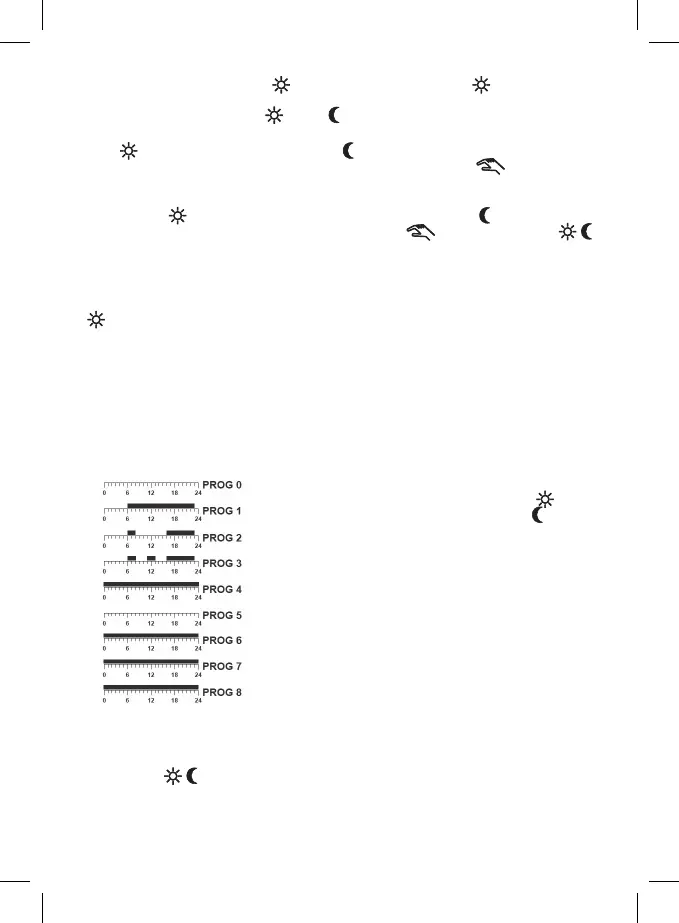
Factory setting of each temperature program:
Black section = comfort temperature
Empty eld = economy temperature
Programs 0 to 5 are factory pre-set, they cannot
be changed.
Program 0 has an anti-freeze temperature of 7°C
dened for all day.
Users can change settings of programs 6 to 8.
If you want to create your own program, proceed as follows.
Press Prog repeatedly to select the required day (day number is shown).
Now press the Prog # button repeatedly and choose program 6, 7 or 8.
The display will show program number, e.g. PROG 6.
Now press the
/ button repeatedly to set the whole day temperature pattern.
Each depression moves one hour forward, temperature section will be ashing with the hour being
selected.
To move forward, you can also use the H button.
Press OK to return to the current operation mode.


 To Next Page