5
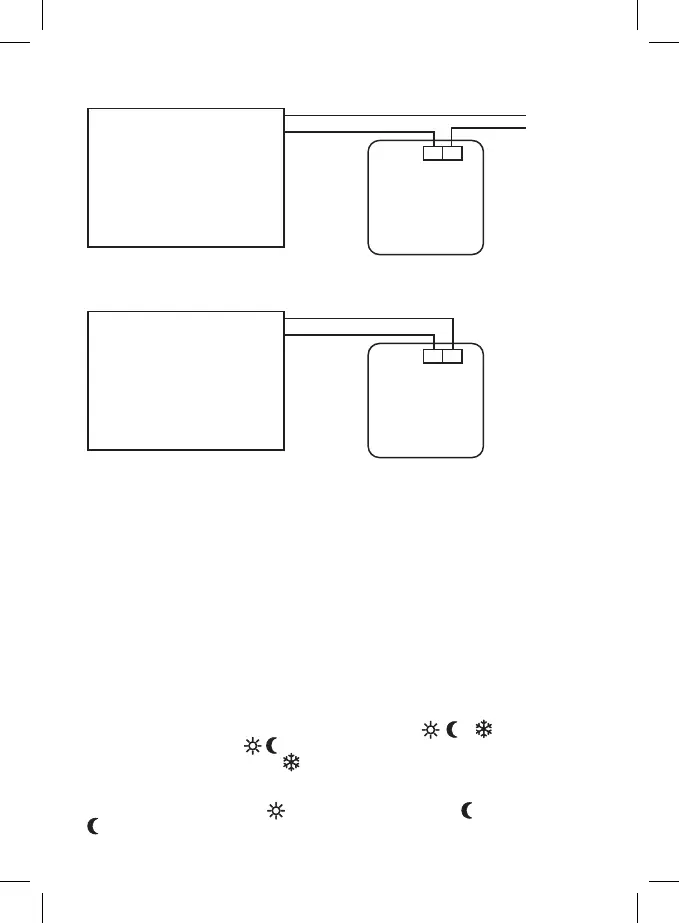
Diagram of power connection of thermostat T091FL to “NO” boilers:
Max 230 V 5(3) A
230 V~
N
N
L
L
NO COM
Heating device requiring
230 V power supply,
e.g. central heating pump.
Thermostat
* In case of NC boiler, te thermostat should be set to COOLING mode.
Diagram of voltage free connection of thermostat T091FL to “NO” boilers:
Max 230 V 5(3) A
NO
NO
COM
COM
Heating device requiring
voltage free contact,
e.g. gas boiler.
Thermostat
* In case of NC boiler, te thermostat should be set to COOLING mode.
Putting into operation
Remove front cover and insert 2× 1,5 V AA batteries.
Only use alkaline batteries, not rechargeable ones.
Insertion of batteries starts the thermostat and activates the display.
If the thermostat is not working properly, please check polarity of batteries, charging state of the
batteries, or press the Reset button.
Basic setting
Note: Remember that the rst pressing of a button activates display backlight, the next pressing
sets values/functions.
Setting day/time
Set the current day by pressing the D button repeatedly (1–7 = Monday to Sunday).
Set the current hour by pressing H repeatedly, set the current minute by pressing M repeatedly .
Note: When you press and hold a button for 2 seconds, the setting process is accelerated.
Displaying/setting comfort temperature and economy temperature
Press and hold Temp to go to the temperature display/change mode.
The display will show currently set value of temperature mode (
, or icon). This value is
ashing. Repeatedly press the
/ button to change the temperature value.
Note: Anti-freeze mode temperature (
) cannot be changed.
Press OK to return to the current operation mode.
Example:
If the thermostat is currently in the
mode and you want to change the temperature, press the
button rst and then the Temp button.


 To Next Page