5
direct sunlight. Do not place the thermostat in the vicinity of heat sources
(such as TV sets, radiators, fridges), or close to a door (due to frequent
shocks or vibrations). If you do not comply with these recommendations,
the thermostat will not maintain room temperature correctly.
Thermostat Installation
1. Remove the rear cover of the thermostat.
2. Mark positions for holes.
3. Drill two holes, carefully insert the plastic wall plugs into them and
use two screws to fasten the rear thermostat cover.
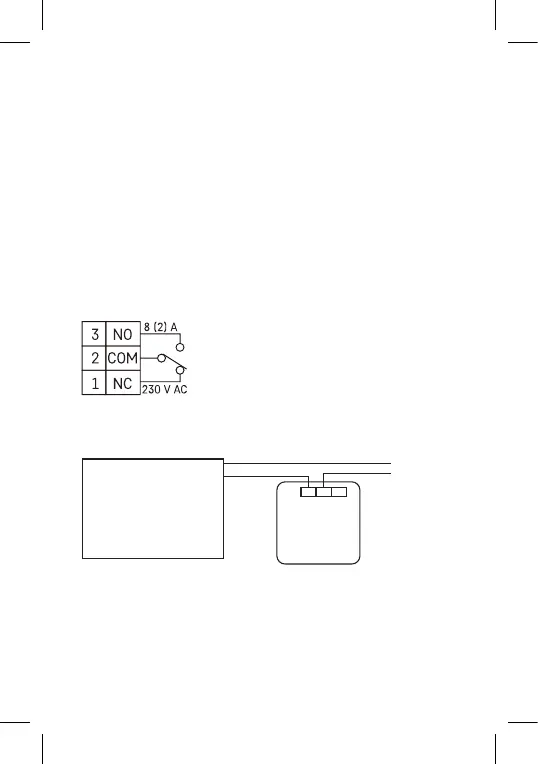
4. Connect the wires to the labelled terminals according to the wiring
diagram.
5. Complete the installation by tting the thermostat onto the mounted
rear cover.
Note: The terminals are located underneath the cover. Gently press onto
the right side of the cover and turn it to the left.
Wiring Diagram
NO – normally open contact
COM – contact for the switch
NC – normally closed contact
Voltage connection diagram for connecting thermostat P5607 to a
boiler with „NO“ outlet:
Max. 230 V 8(2) A
230 V~N
N
L
L
NO NCCOM
Heating device requiring
230 V power supply, e.g.
central heating pump.
Thermostat
* When connecting a cooling device to the thermostat, connect the „L“
phase conductor to the „NC“ terminal.



 To Next Page