6
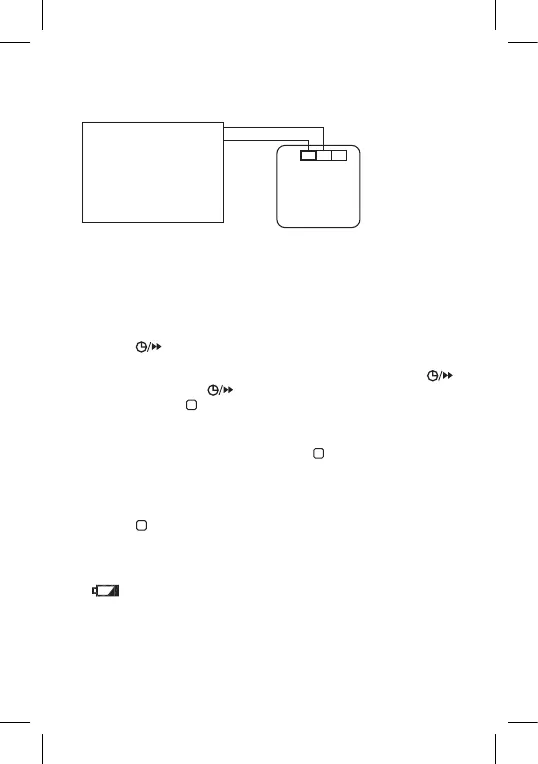
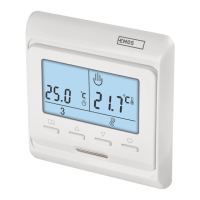
Zero-voltage connection diagram for connecting the P5607 thermostat
to a boiler with an NO outlet:
Max. 230 V 8(2) A
NO
COM
NO NCCOM
Heating device requiring
zero-voltage contact, e.g.
gas boiler. Thermostat
Commissioning (g. 3 and 4)
Remove the front cover of the thermostat and insert 2× 1.5 V AAA batteries.
Do not use 1.2V rechargeable batteries.
Inserting the batteries starts the thermostat and activates the screen.
If the thermostat is not working properly, please check the polarity of the
batteries and their state of charge.
Setting Day and Time
Press the button. The day number will start ashing (1 – Monday
to 7 – Sunday).
Use the + and – buttons to set the number of the current day and press .
Set the hour, then press again and set the minutes.
Conrm by pressing .
Choosing Operating Mode (Heating, Cooling, Anti-Freeze Tem-
perature)
1. To access mode settings, press and hold for 5 seconds.
2. Use the + and – buttons to select one of the following modes:
a. HEAT (heating system)
b. OFF (anti-freeze temperature: 7°C)
c. COOL (cooling system)
3. Press to conrm your selection.
Screen Illumination
Pressing any button activates screen illumination for 15 seconds.
Changing Batteries
If appears on the screen, it means the batteries are low and need
replacing.
Factory Preset Programmes
The programmable indoor thermostat was designed to be easy to use and
require minimal user input. Its preset times and temperatures will suit the
majority of users (see the table below).



 To Next Page