8
Use the + and – buttons to adjust the temperature value by -3 to +3°C
(0.5°C resolution).
Conrm by pressing
.
Example: The thermostat shows room temperature of 22°C; setting calibra-
tion to +1°C will cause the thermostat to display 23°C instead.
Temperature Dierential Setting
The temperature dierential (hysteresis) is the dierence in temperature
required for switching the system on and o. If for example you set the
temperature in heating mode to 20°C and dierential to 0.2°C, the ther-
mostat activates heating as soon as room temperature drops to 19.8°C and
switches heating o when temperature reaches 20.2°C.
Press and hold the button for 5 seconds. The SYSTEM table will be
displayed. Press twice.
diFF will appear on the screen and the temperature value will start ashing.
Use the + and – buttons to adjust temperature dierential to 0.2 to +2°C
(0.1°C resolution).
Conrm by pressing .
Short-Term Manual Change of Temperature
When in standard operating mode, where temperature is controlled by the
selected programme, it is possible to make a short-term change to the
current temperature setting.
Use the + and – buttons to set the new temperature and conrm with .
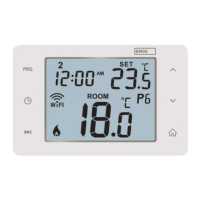
The PRG icon will be replaced with a hand icon
and the time remaining
until the next scheduled temperature change will be ashing.
Upon the next scheduled temperature change, the hand icon
will
disappear and the temperature will change according to the programme.
The manual change can also be overridden and ended prematurely using
the button.
Long-Term Manual Change of Temperature (HOLD Mode)
When in standard operating mode, where temperature is controlled by
the selected programme, it is possible to make a long-term change to the
current temperature setting.
Use the + and – buttons to set the new temperature and conrm with .
The icon will be displayed and temperature will be ashing. You can again
use the + and – buttons to change the temperature and conrm with .
The set temperature will be maintained until HOLD mode is cancelled.
Any programmed temperature change will not be carried out.
In this mode, you can use the + and – buttons to set a new temperature
and conrm with .
To end HOLD mode, press the button; the icon will disappear.



 To Next Page