OPERATING INSTRUCTION
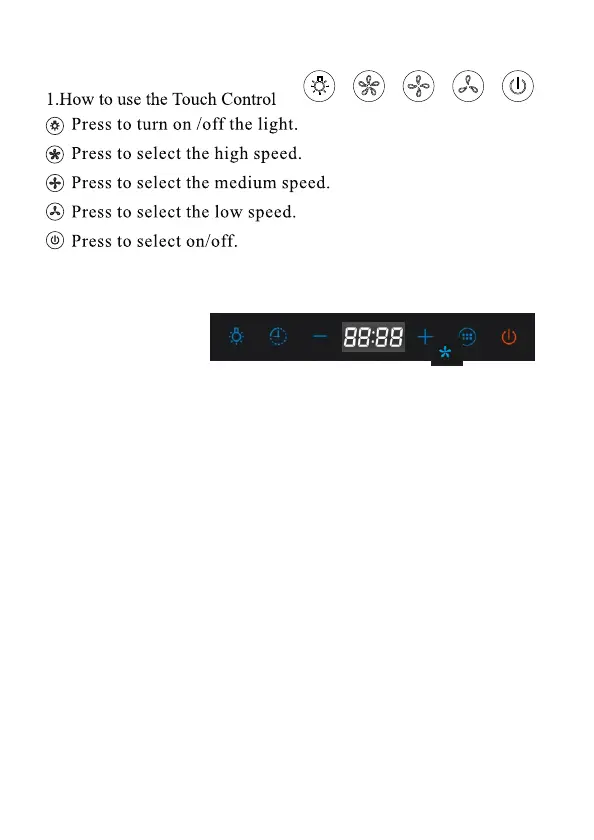
1).Electronic Switch
A. Light
B. Time
C. Speed down
D. Speed up
E. Max speed
F. On /off
A B C D E F
2). Touch Control
A: Light
Press the button once to turn on the light, press again to turn off.
B. Timer
In standby mode, press 3 seconds, to enter into time setting mode,
Press “+” set hour (0-23 circle set) and press “–” set minute(0-59),
No operation within 5 seconds for automatically confirmation. When
working, press once to enter into delay turn off mode for 3 minutes.
Press again to increase delay turn off time from 3-59 minutes.
No operation for 5 seconds, the hood will be turn off in 3 minutes.
Press again to turn off immediately.
C.- In standby mode, press to change to speed 1.
D.+ In standby mode, press to change to speed 2 & 3.
E. Speeds
In standby mode, press once to start high speed.
F. Power on/off
In standby mode, press once to turn on all buttons. Press again to
turn off the power. When working, press once to start delay turn off
3 minutes. In delay turn off mode, press again to stop delay turn off.



 To Next Page