3 User Passwords:
It is possible for the system to be programmed to allow a PIN number rather than the
control keyswitch to change from Access Level 1 to Level 2.
The system is not programmed, as standard with this feature as the control keyswitch is
normally used, however up to 99 User PINS can be assigned/changed at User Level 3 by
the Installer/Maintenance Contractor if required.
4 Controls and Displays: -
4.1 Controls Layout:
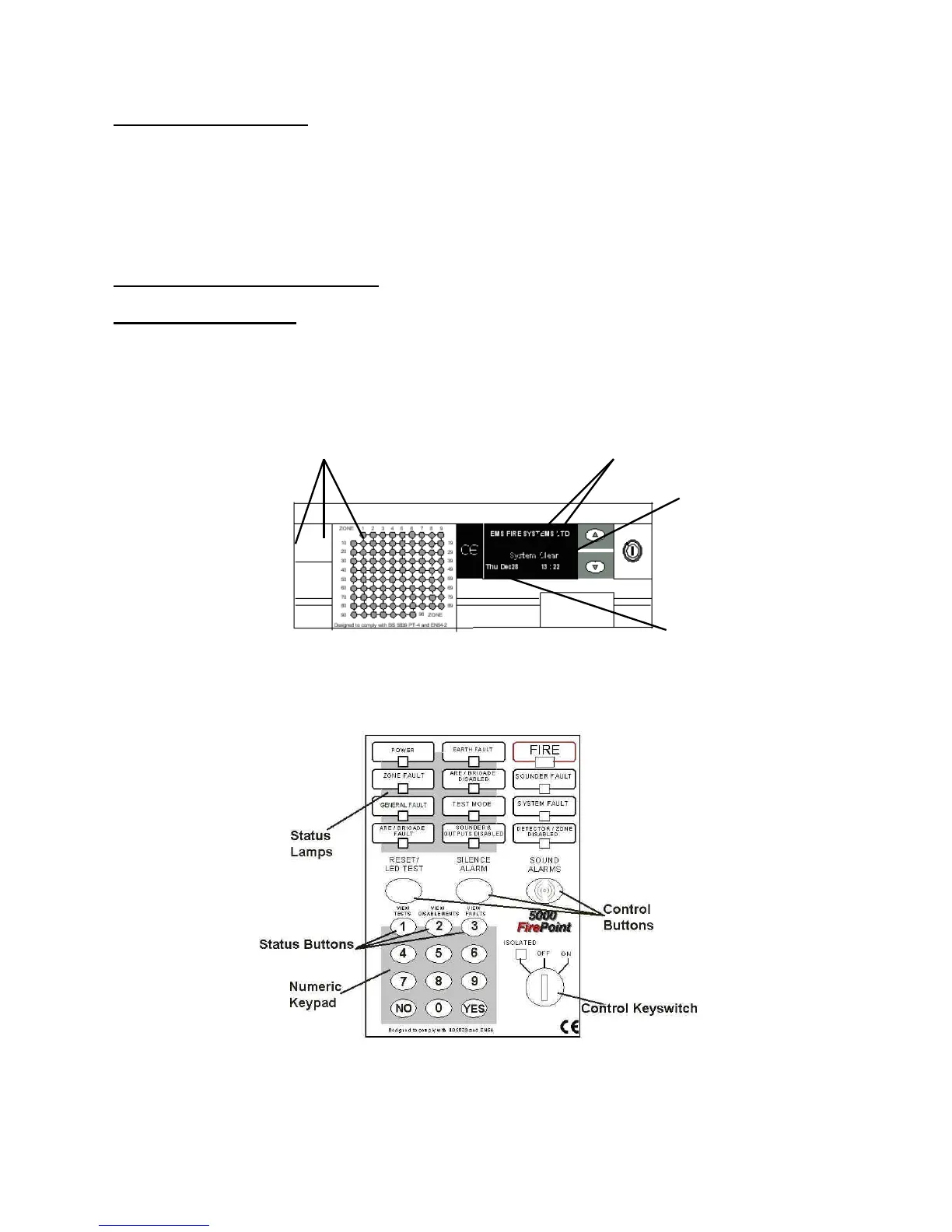
The System 5000 control panel provides status information via the Display, Zone Lamps
and Status Lamps. The display and control of the panel’s functions is achieved through
two control panel sections. Figure 1, shows the display area which includes Fire Zone
Lamps, the Display itself and the “∆” and “∇” Scroll Buttons.
Figure 1 - Zone Lamps and Display (model shown 5096)
The System 5000 Panel is controlled by the use of the Control Keyswitch, a Numeric
Keypad and 3 Control Buttons. Fig 2 shows the Panel Controls and Indicator Lamps.
Figure 2
NOTE: The Status Lamps/Buttons & Control Keyswitch/Buttons operation is identical, for
all styles of control panel.


 To Next Page