7. How to set up and check WDS ( Rx Mode)
7.1
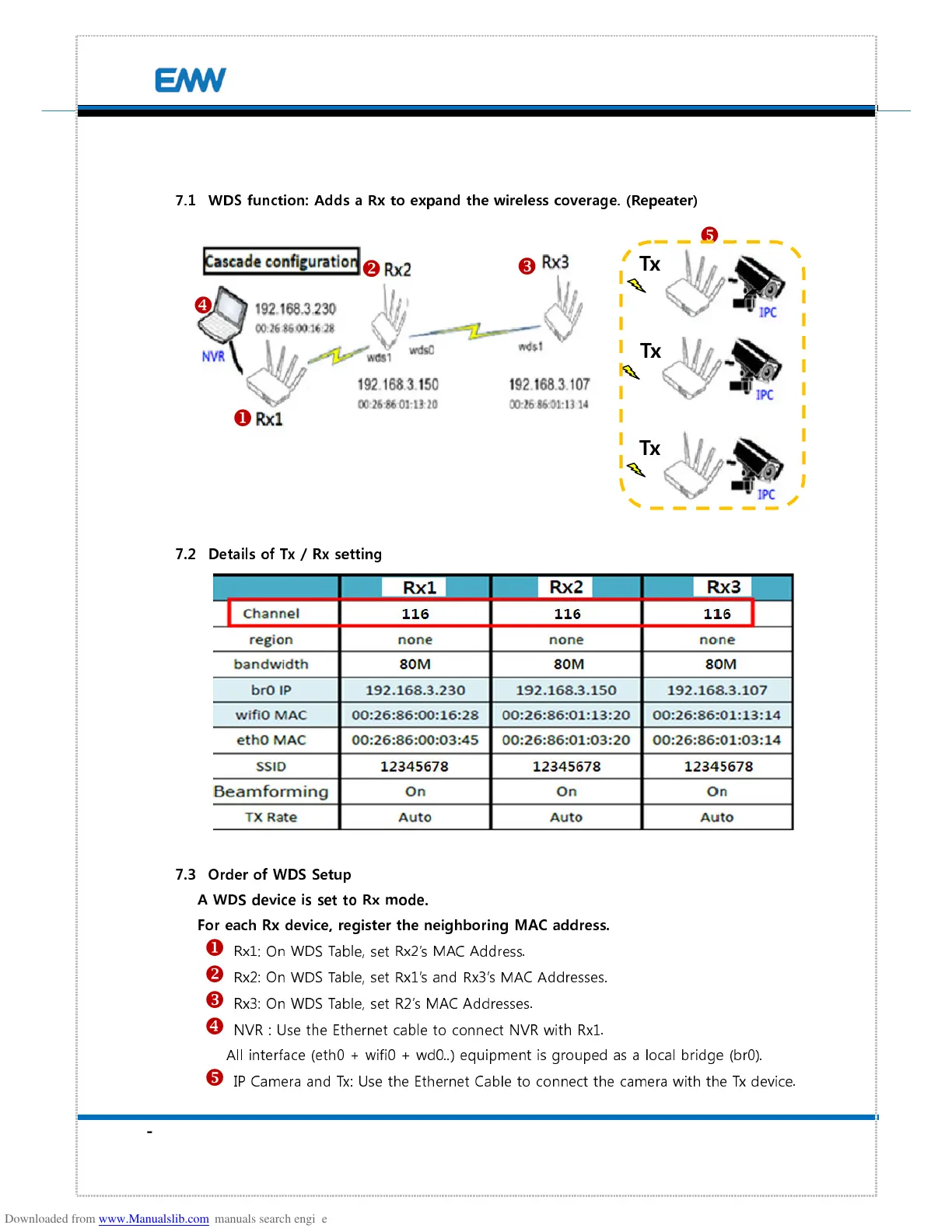
WDS function: Adds a Rx to expand the wireless coverage. (Repeater)
7.2
Details of Tx / Rx setting
7.3
Order of WDS Setup
A WDS device is set to Rx mode.
For each Rx device, register the neighboring MAC address.
Rx1: On WDS Table, set Rx2’s MAC Address.
Rx2: On WDS Table, set Rx1’s and Rx3’s MAC Addresses.
Rx3: On WDS Table, set R2’s MAC Addresses.
NVR : Use the Ethernet cable to connect NVR with Rx1.
All interface (eth0 + wifi0 + wd0..) equipment is grouped as a local bridge (br0).
IP Camera and Tx: Use the Ethernet Cable to connect the camera with the Tx device.


 To Next Page