EasyManua.ls Logo

EMW EVB-A100 - 7.4 How to set up WDS on Web UI screen

EMW EVB-A100
41 pages
Print Icon
To Next Page IconTo Next Page
To Previous Page IconTo Previous Page
Loading...
- 34 -
EMW Co., Ltd.
EVB
-
A100
User
Manual
And find and connect a correct Rx device with the Tx device.
Go to Web UI
[Config-> Wireless->Search Rx]
and find and connect Rx with Tx.
If Password input box opens, enter the passphrase of Rx.
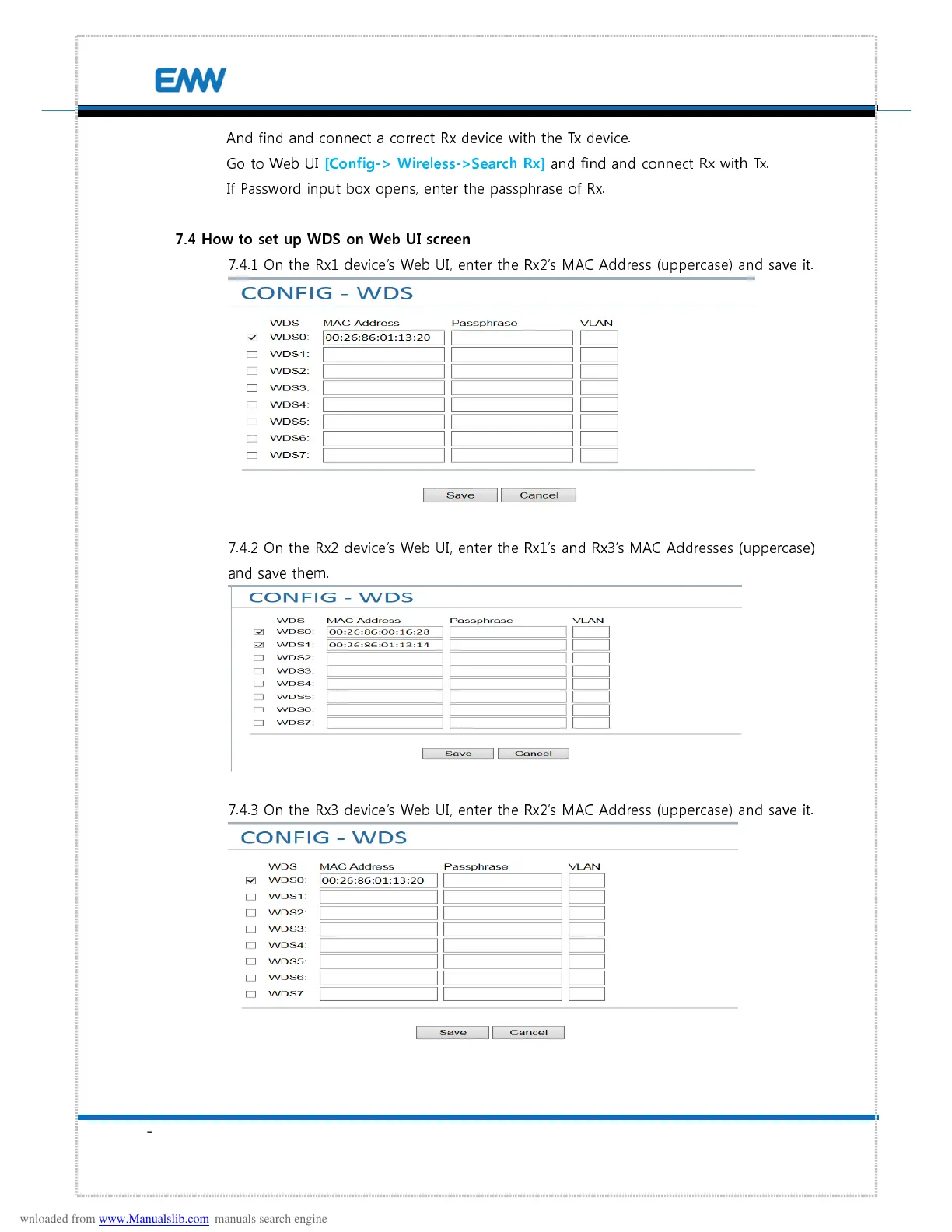
7.4 How to set up WDS on Web UI screen
7.4.1 On the Rx1 devices Web UI, enter the Rx2s MAC Address (uppercase) and save it.
7.4.2 On the Rx2 devices Web UI, enter the Rx1s and Rx3s MAC Addresses (uppercase)
and save them.
7.4.3 On the Rx3 devices Web UI, enter the Rx2s MAC Address (uppercase) and save it.