1. Technical specifications
Copyright © 2015 by Endecotts Ltd.
1. Technical specifications
Control Box
• Connected to the machine by a 2 m serial line
• Could be mounted on the wall or placed on a table next to the machine
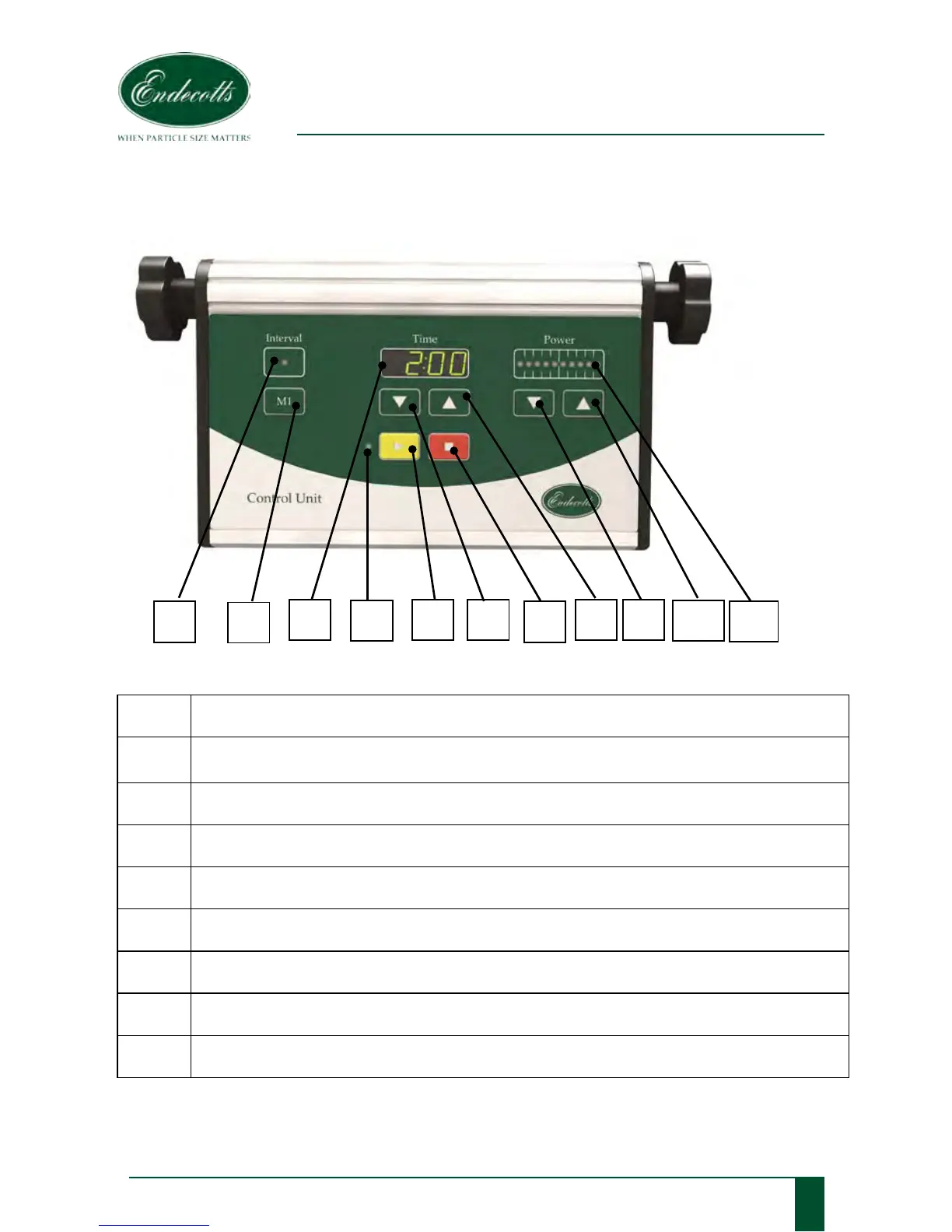
1 LED light to indicate interval operation ON.
2
Interval mode button M1 switches interval operation ON/OFF,
upper LED lights up; 10 seconds on, 2 seconds off
3 Display shows the preselected sieving time, 00:10 – 99:50 min.
4 LED light to indicate START button “>” ON
5 Start the machine by pressing the START button “>”.
6 & 8 “˅“ and “˄” button reduces/increases the sieving time, 00:10 – 99:50 min.
7
Stop the machine by pressing the STOP button “
□“.
9 & 10 “˅“ and “˄” button reduces/increases the amplitude, in 10 steps
11 10 LED’s for the Power bar indicating amplitude setting in 10 steps



 To Next Page