10 www.ener-c.com www.ener-c.com 11
E. Operation
The following sections contain the recommended procedures for optimum therapeutic cooling and heating.
The control unit can be set to temperatures between 8 °C (46 °F) and 42 °C (108 °F).
To switch the device on or o: press ON/OFF button.
NOTE: The Power symbol on the display blinks until the set temperature is reached.
To set the temperature: press the COOLER or WARMER
button on the control panel until the required temperature is shown.
To select °C or °F: press the TEMPERATURE SCALE button.
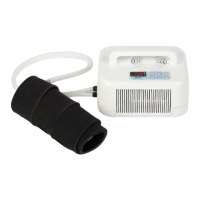
For optimum eciency, the control unit should be located at about the same height as the CTM Exchanger®.
Please also note that the system is designed for operation at normal ambient temperatures below 25°C (77°F).
The cooling performance is reduced at ambient temperatures above this value.
For cooling, the control unit’s fan runs at 55% output in the standard setting. Proceed as follows if you would
like to increase the output manually to 75%:
Press and hold the button for 3 seconds with the device switched on
The fan stops automatically when the set target temperature is reached. To switch o manually,
please press and hold the ENTER button again for 3 seconds.
Control unit operation in low-noise SILENT mode (40% output) as follows:
Press and hold the button for 6 seconds with the device switched on
NOTE: The device does NOT stop automatically in silent mode. It is only possible to switch o manually by
pressing and holding the ENTER button for 3 seconds again. After changing the temperature > 5 Kelvin, the
control unit's fan starts to run with the standard settings until the new set temperature is reached.
Recommended procedure for therapeutic cooling
NOTE: always follow the therapy temperature and exposure time given by the treating physician.
To isolate the device from the supply mains disconnect the power cord. Please ensure the power cord is easy
accessible and could be unplugged at any time. It is advisable to disconnect the device after each use.
Set the device to 8°C (46°F) and let it cool down until the display shows 12°C (54°F) or less. Apply the
CTM Exchanger® to the required part of the body without the tube kinking, because this impairs the ow of water.
When the CTM Exchanger® is applied to the body, the temperature displayed on the control panel goes up
by a few degrees. This is normal and means that the CTM Exchanger® is removing heat from the body.
NOTE: If the temperature rises further to above 20°C (68°F), it is likely that the ow of water has been restricted.
In this case, the cooling phase must be restarted. In order to re-establish the ow, remove the CTM Exchanger®
from the body and set the temperature to 42°C (108°F) for about 7 to 10 minutes. The ow of water should then
be re-established and you can restart the cold therapy.
WARNING: Too long application of cold can lead to frostbites and to local skin damages up to tissue necrosis.
Recommended procedure for therapeutic heating
NOTE: always follow the therapy temperature and exposure time given by the treating physician.
Set the device to 42°C (108°F) and let it heat up until the display shows 40°C (104°F) or more. Apply the
CTM Exchanger® to the required part of the body without the tube kinking, because this impairs the ow of
water.
When the CTM Exchanger® is applied to the body, the temperature displayed on the control panel falls by a
few degrees. This is normal and means that the CTM Exchanger® is supplying heat to the body.
Regularly monitor the temperature of the device and stop the treatment if the temperature drops below
8°C (46°F) or exceeds 43°C (109°F) or if discomfort occurs. If these temperatures are applied to the skin over
a long period of time, this may lead to serious injuries.
Contact the treating physician to discuss the discomfort symptoms.
Display current temperature
Only the set temperature is shown on the display during operation. The current temperature can be shown
as follows:
Press the TEMPERATURE SCALE button and hold for 2 seconds
The target temperature setting does not change in the process. The indication of the current temperature
appears for 3 seconds on the display and then disappears again.
NOTE: If the water temperature drops below 4°C or higher 47°C, the device automatically switches o.
The device can only be restarted after disconnection from the mains.
Timer function
The timer programs the device to switch o within 6 minutes to 4 hours according to the setting. This can
be set in steps of 0.1 hours. For example, a timer setting of 1 means that the device will be switched o in 1 hour.
A timer setting of 4 means that the device will be switched o in 4 hours.
When the TIMER button is pressed, the standard setting is 00.
Press the TIMER button repeatedly to set the desired time.
So that the device switches OFF at a dened time: make sure that the control unit is switched ON.
Repeatedly press the TIMER button until the desired number of 0.1 hour steps is achieved. Press the ENTER
button. The indicator light above the TIMER remains switched on. The control unit will end the heating
or cooling at the desired time.
After 4 hours without any action on the CTM Controller® 1600, the system will be automatically switched o.
Warning
Ener-C | CTM Controller® 1600 | Operating manual | E. Operation | Rev. 1.1 | 2017-12-12 Ener-C | CTM Controller® 1600 | Operating manual | E. Operation | Rev. 1.1 | 2017-12-12


 To Next Page
 Loading...