1010
OPERATING INSTRUCTIONS
Operating Instructions
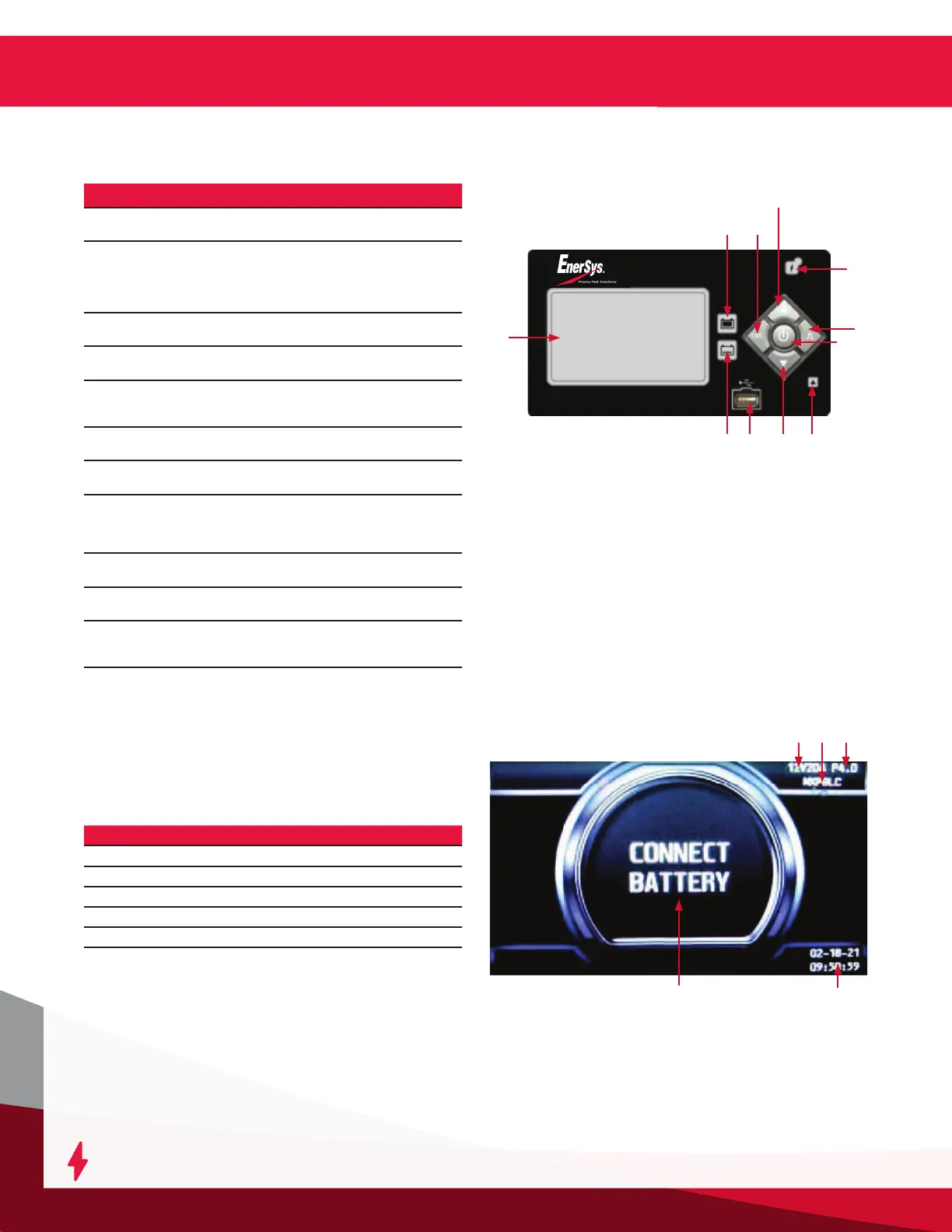
Ref Function Description
1
Graphical display
Display charger operation
info/menus
2
GREEN charge
complete indicator
OFF = charger off or battery
not available
FLASHING = cooling phase
ON = battery ready and
available
3
Navigate LEFT/ESC
button
Enter main menu/Scroll left/
Exit menus
4
Navigate UP button
Navigate menus/Change
values
5
YELLOW charging
indicator
OFF = charger off or battery
not available
ON = charging in progress
6
USB port
Download memos/Upload
software
7
Navigate DOWN
button
Navigate menus/Change
values
8
RED fault indicator
OFF = no fault
FLASHING = ongoing fault
detected
ON = fault
9
BLUE AC supply
indicator
OFF = AC missing
ON = AC present
10
Navigate RIGHT/
EQUALIZE button
Scroll right/Start equalize or
desulfation
11
ENTER/STOP and
START button
Select menu items/Enter
values/Stop and restart
battery charge
1
Control Panel Features
2
5 6
3
4
11
7
10
9
8
Charge Operation
Charger idle display: With the charger in wait mode (no
battery connected) and without pressing the ENTER/
STOP and START button, the display will show the
following information:
Reference Description
1 Charger DC Voltage
2 Selected Charge Prole
3 Firmware Version
4 Connect Battery
5 System Time and Date
Charger Idle Display
1 32
4
5




 To Next Page