1414
MENU & DISPLAY INFORMATION
Menu and Display Information (cont.)
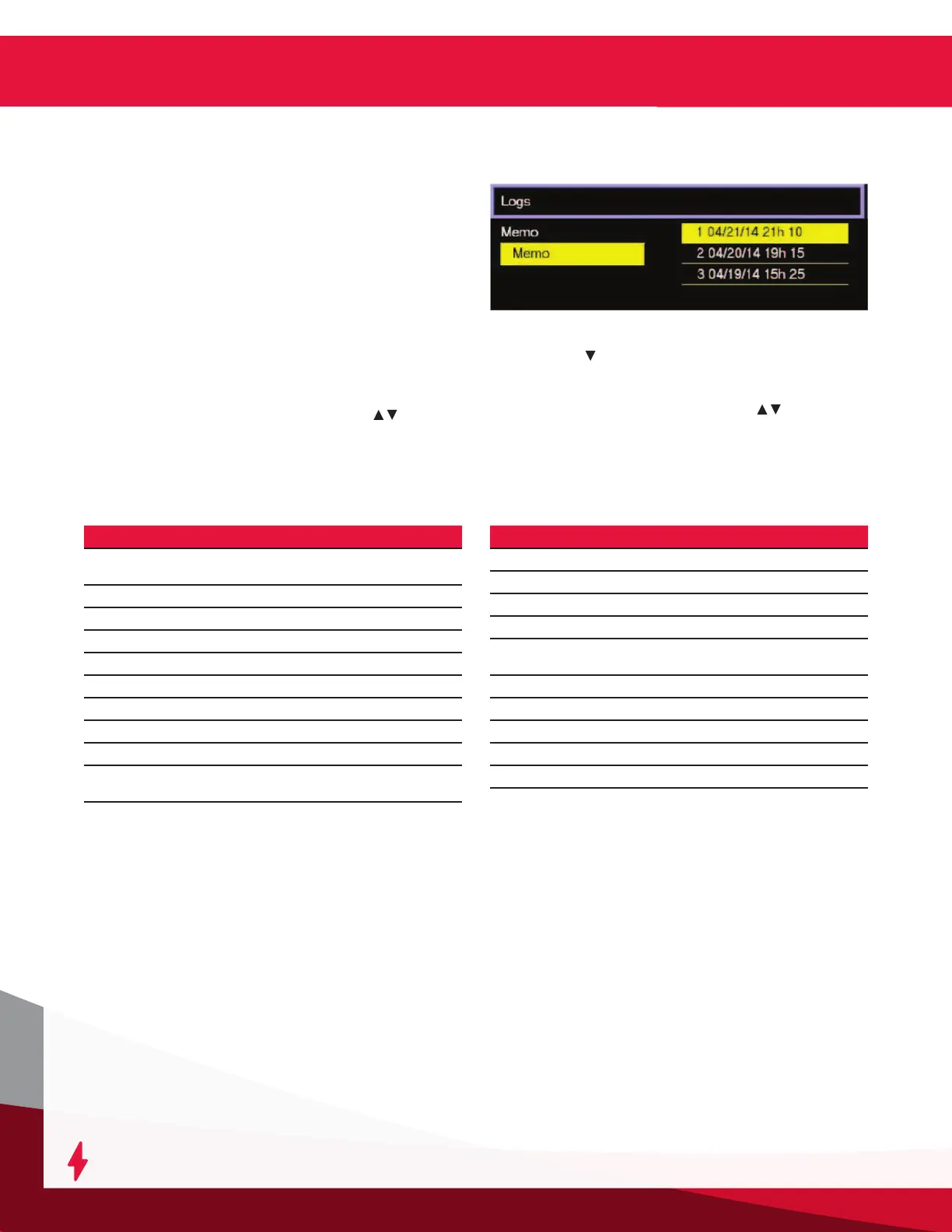
Logs
Memorization Display Screen
The charger can display the details of the last 300
charge cycles.
The display here shows that 3 charges have been
stored in memory. Memo 1 is the latest charge
memorized. After memorizing the three-hundredth
charge, the oldest record is deleted and replaced by the
next oldest.
Displaying a Charge Cycle
Proceed as follows:
1. Select a record (Memo x) using the / buttons.
2. Display the rst History screen by pressing the
Enter button.
3. Display the second History screen by
pressing .
4. Return to the Main Menu by pressing the ESC
button.
The charge history is displayed; use / to scroll
through the parameters.
Memo Description
S/N
Wi-iQ
®
battery monitoring device serial
number
Capacity Rated battery capacity (Ah)
U batt Rated battery voltage (V)
Temp Battery temperature at State of Charge (°F)
Techno Battery technology
Prole Selected prole
% init State of charge at start of charge (%)
U start Battery voltage at start of charge (Vpc)
U end Battery voltage at end of charge (Vpc)
Warning
Wi-iQ
®
battery monitoring device
warnings
Memo Description
I end Current at end of charge
Temp end Battery temperature at end of charge (°F)
Chg Time Time of the charge cycle (minutes)
Ah Amp-hours returned during charge cycle
kWh
Kilowatt-hours returned during charge
cycle
Status Partial or complete
Default Fault codes
SoC Start of charge date and time
DBa Battery disconnect date and time
CFC Termination code (for service technician)
Memorization Data



 To Next Page