59
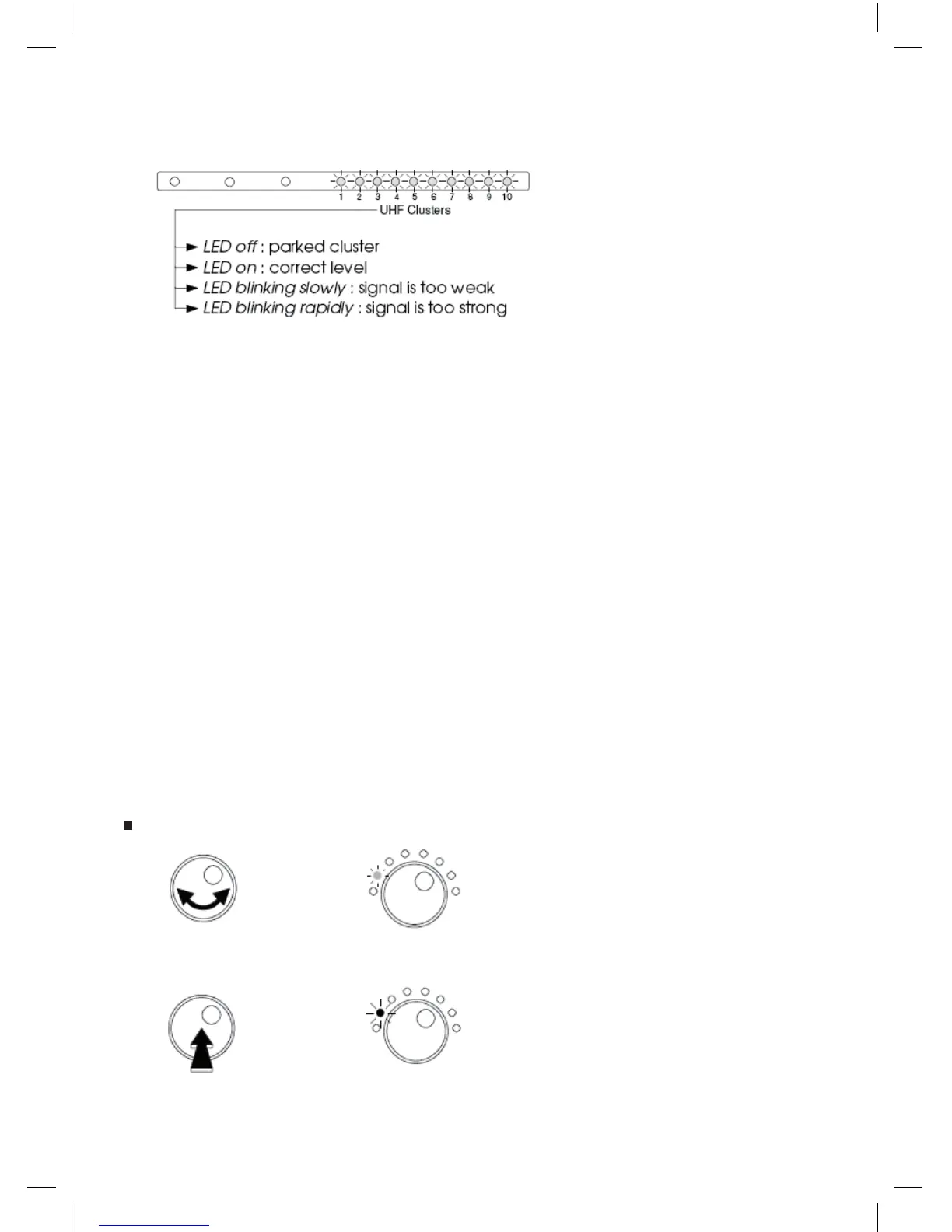
- Each cluster’s LED shows the status of equalization.
Notes:
- The automatic level adjustament set the output level of the clusters at 100 dBμV (for an input level
between 50 to 80 dBμV).
If the input level is less than 50 dBμV, the LED will blink slowly after the automatic level adjustment.
If the input level is higher than 80 dBμV, the LED will blink rapidly after the automatic level adjustment.
Adjust the input level (attenuation or amplication) if necessary.
- The general attenuator is xed to 0 after the automatic level adjustment. It can be adjusted from -9 to
+10 to get a level between 91 to 110 dBμV (see “General UHF level setting”).
- The level of each cluster can be adjusted independently (see “manually level setting”).
IMPORTANT: the 10 LEDs indication will not be changed after setting the levels manually.
After automatic level setting procedure, the general level of the UHF signals (clusters and the UHF part
of the VHF-UHF input) can be adjusted from +10 dB to -9 dB in steps of 1 dB.
GENERAL UHF LEVEL SETTING:
- Select all the clusters and VHF-UHF.
- Turn the button to choose the Select Filter mode.
The LED is GREEN.
- Push the rotary button to enter the selected mode.
The LED is now RED colored.
Select
Filter
Select
Filter



 To Next Page