Quick Installation Guide
EnGenius Europe | Veldzigt 28, 3454 PW De Meern,
Netherlands | 0900-WIFIABC | www.wiabc.com
Disclaimer: Information may be subject to changes without prior notication.
Follow us
https://www.linkedin.com/company/engeniuseurope
https://plus.google.com/+EngeniusEuropeBVDeMeern
https://www.youtube.com/user/engeniuseuropebv
https://twitter.com/engeniuseu
ENH710EXT
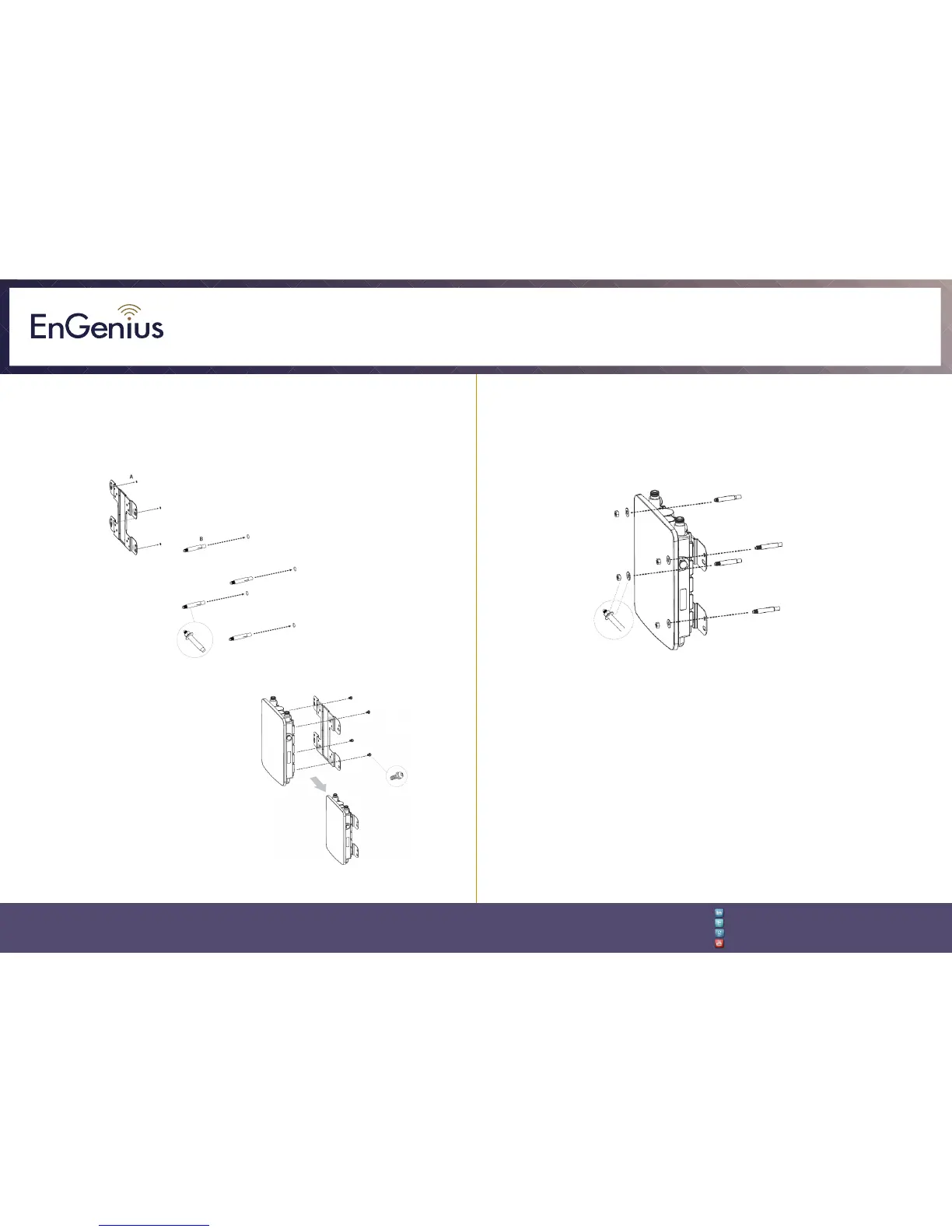
ENH710EXT wall mounting
A. Determine where the product is to be placed and mark the location on the
surface for the four mounting holes.
B. Use the appropiate drill bit to drill four 8 mm diagram and 37mm depth
holes in the markings and hammer the bolts into the openings.
C. Place the lock and flat washer on
the round head screws and drive the
screws to attach mounting base to the
back of the product.
D. Attach the device onto the wall by tightening the bolt’s flat washers and nuts
to secure the mounting base to the mounting surface.













 To Next Page