[pg.76]
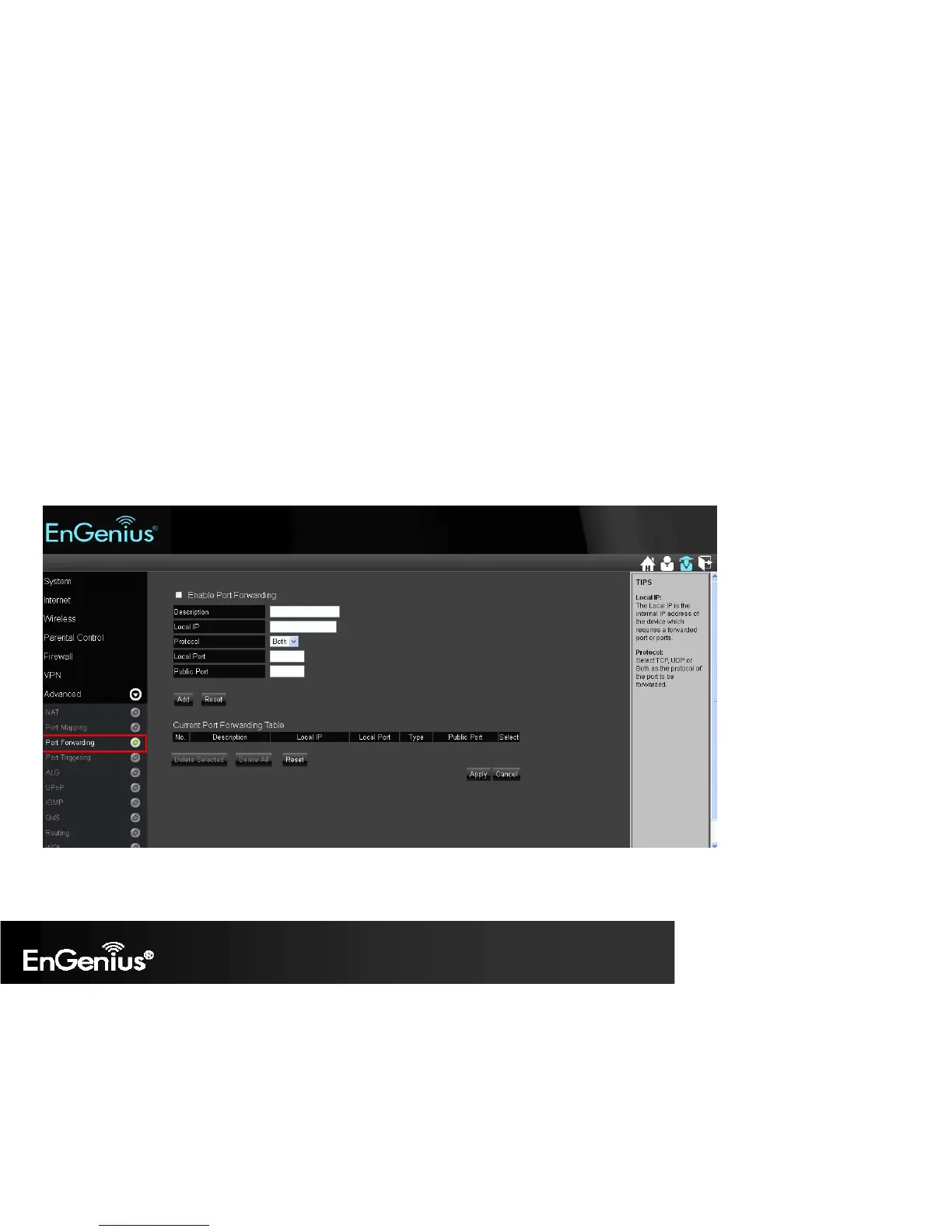
Advanced > Port Forwarding
Use the Port Forwarding (Virtual Server) function when you want different servers/clients in your LAN to handle different internet application type
(e.g. Email, FTP, Web server etc.) from the Internet. Computers use port numbers to recognize a particular internet application type. The Virtual
Server allows you to re-direct a particular port number (from the Internet/WAN Port) to a particular LAN private IP address and its service port
number. Enable Port Forwarding: Mark the checkbox to Enable Port Forwarding.
1. Description: Enter the description on why the ports will be forwarded.
2. Local IP: Enter the LAN Client/Host IP address and Port number that the Public Port number packet will be sent to.
3. Protocol: Select whether TCP, UDP, or Both ports will be forwarded.
4. Local Port: This is the LAN Client/Host IP address and Port number that the Public Port number packet will be sent to.
5. Public Port: Port number will be changed to Local Port when the packet enters your LAN Network.


 To Next Page