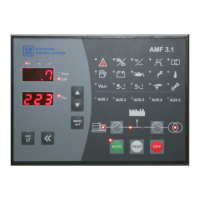
Selection Button:
While in normal operation this button has the same function as the button above.
While in parameter menu, after pressing the Enter Button and selecting a parameter to edit, the desired
digit can be selected by using this button, each press will shift the selected digit to the right.
OPERATION MODES
Automatic Operation Modes: When the Auto Button is pressed the Generator will enter the Automatic
Operation Mode. In this mode, the 3 phase Mains is constantly monitored against the limits set by the parameter
values shown below.
When the Mains is normal, the Load is supplied by the Mains. If the monitored values of the Mains are
outside the limits set by the related parameters and the time period specified by the “P039 – Mains Failure Delay
Timer” has passed, it means there is a Mains failure. In this case the Mains contactor is opened and the Generator
is started. Once the Generator has started, the unit will wait for the time period set by the “P018 – General Failure
Delay Timer” and will check for any failures. Then, after waiting for the time period set by “P006 – Generator
Contact Delay Timer”, the Generator contactor will be closed and the Load is transferred to the Generator.
Once the monitored values of the Mains are back and stays within the limits set by the related parameters
for the time period set by the “P005 – Mains Contact Delay Timer”, the Mains contactor will be closed and the
Load is transferred to the Mains. In the case where the Generator has supplied the Load since the engine started,
the engine will be cooled down for the time period set by “P007 – Engine Cool-down Timer”. If the Generator has
not supplied the Load since the engine started, the Generator will be stopped without cooling down. In the
Automatic operation mode, if the AMF unit is receiving a signal that the Generator is running although it is not
supposed to, the AMF will try to stop the Generator.
Test Operation Mode: When the TEST Button is pressed the Generator enters the Test operation mode and the
Generator will start without checking the Mains. In this mode the Generator Contactor Status Button and the
Mains Contactor Status Button will become active. If the Generator is running and the Generator Status LED
is constantly lit, the Generator contactor can be checked using the Generator Contactor Status Button as long
as the Mains contactor is open. The Generator Contactor Status Button will energize the GCB if it is de-
energized and will transfer the Load to the Generator. If the GCB is already energized, pressing the Generator
Contactor Status Button will idle the Load. The same situation is applicable for the Mains Contactor Status Button
also. If the Mains status LED is constantly lit and the Generator contactor is open, the Load can be transferred to


 To Next Page
 Loading...