MN-28646 • Rev 4 • 03/18 • EC Series Fluid Combination Blanket/Fluid Warmer
10
Operation Instructions
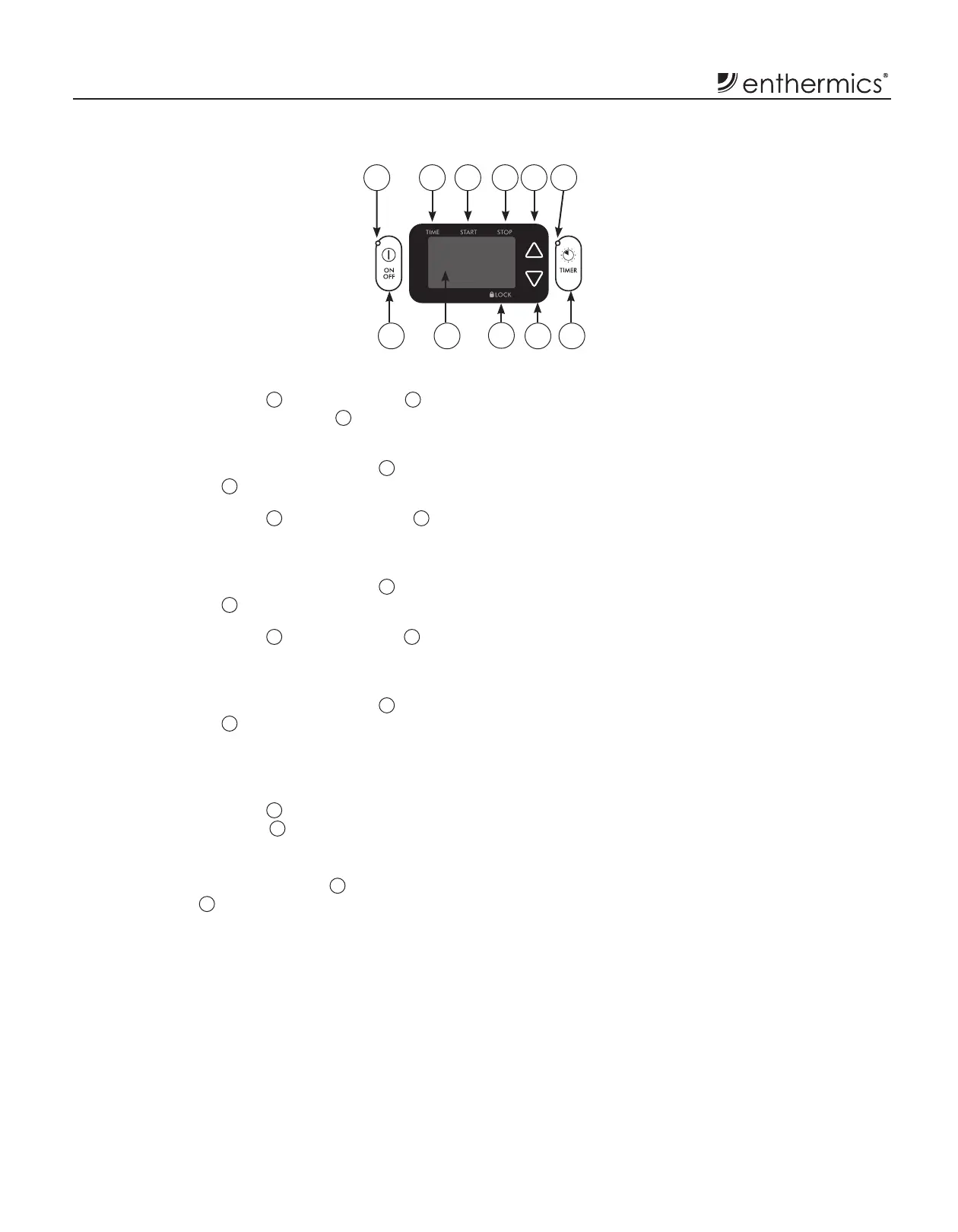
Press the "TIMER" button
11
. The "TIME" icon
2
illuminates. The controller displays
8
the time of day
in a 24-hour format (hh:mm).
If necessary, press the up arrow button
5
or the down
arrow button
10
to change the current time of day.
Press the "TIMER" button
11
. The "START" icon
3
illuminates. This is the time of day the controller
automatically begins operation.
If necessary, press the up arrow button
5
or the down
arrow button
10
to change the start time.
Press the "TIMER" button
11
. The "STOP" icon
4
illuminates. This is the time of day the controller
automatically shuts down.
If necessary, press the up arrow button
5
or the down
arrow button
10
to change the stop time.
Make sure that the start and stop times are di erent.
The timer will not operate if both times are the same.
4. Press the "TIMER" button
11
to enable the timer feature.
The timer status indicator
6
illuminates.
How to Disable the Timer
.
Press and hold the "TIMER" button
11
until the timer
status indicator
6
goes o .
Blanket Controller Settings
Controller and LED
180
F
1
7 8
9
10 11
2 3 4 5 6


 To Next Page