MN-28646 • Rev 4 • 03/18 • EC Series Fluid Combination Blanket/Fluid Warmer
9
Operation Instructions
How to Set the Temperature Scale
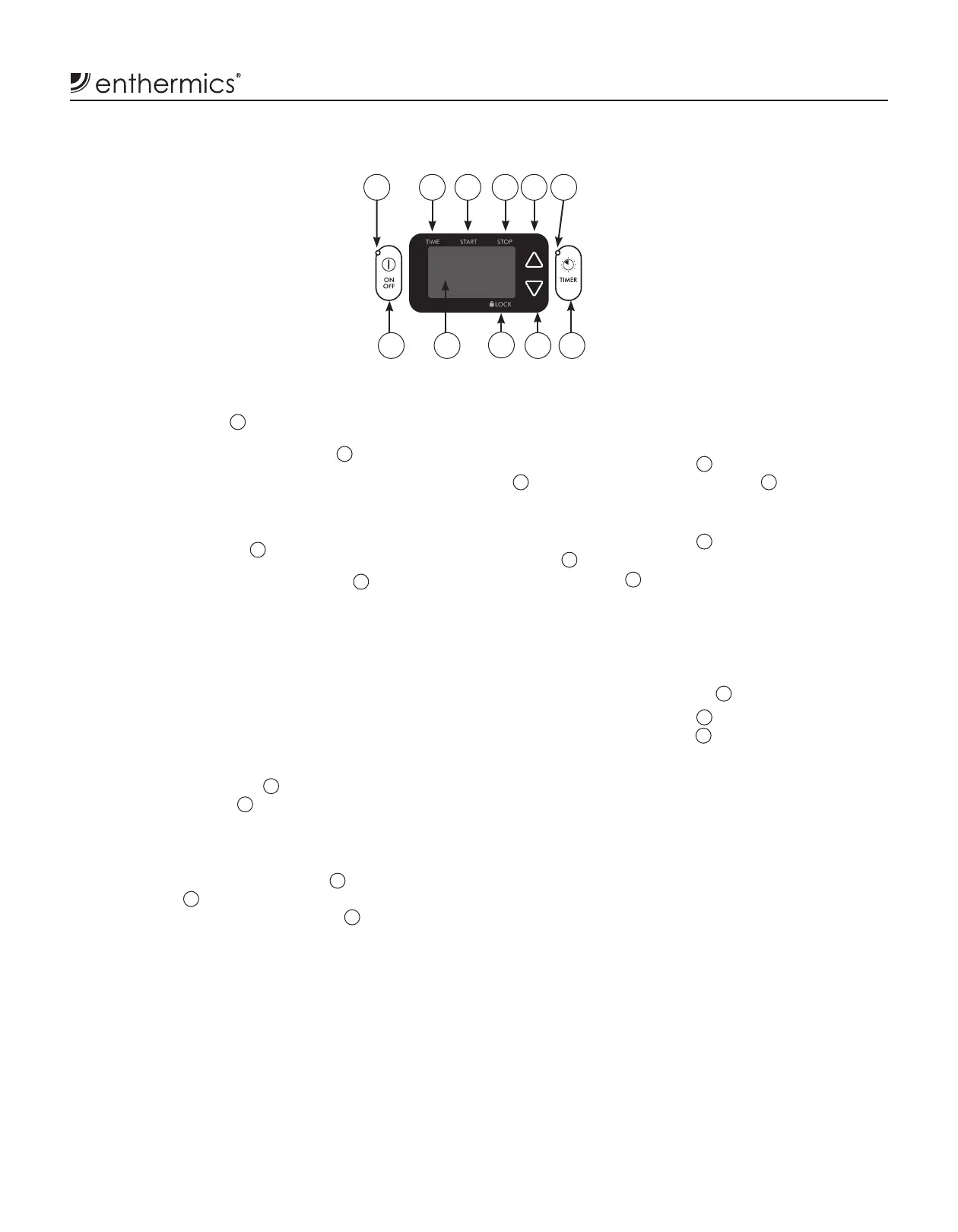
1. While the controller is in the o mode, press and hold
the up arrow button
5
for ve (5) seconds.
2. Press and hold the up arrow button
5
again to change
to Fahrenheit (°F) or Celsius (°C).
How to Set the Operational Sound Selection
1. While the controller is in the o mode, press and hold
the down arrow button
10
for ve (5) seconds.
2. Press and hold the down arrow button
10
again to
change the sound to on or o .
How to Start the Warmer
1. Connect the warmer to an appropriate hospital grade
receptable — speci ed on the electrical information
page.
2. Locate the circuit breaker on the back of the warmer.
3. Push the circuit breaker to the ON (I) position.
4. Press the ON/OFF button
7
. The previous temperature
set-point is displayed
8
.
How to Display the Compartment
Temperature
1. Press and hold the "TIMER" button
11
and the up
arrow button
5
simultaneously. The temperature at
the compartment sensor is displayed
8
.
How to Lock the Controller
The controller can be locked to prevent changes from
being made to the temperature set-point, the mode
selection, or the ON/OFF button.
1. Press the "ON/OFF" button
7
and the up arrow button
5
simultaneously. The "LOCK" icon
9
illuminates.
How to Unlock the Controller
1. Press the "ON/OFF" button
7
and the down arrow
button
10
simultaneously. The controller unlocks and
the "LOCK" icon
9
goes o .
Power Fail Detection
The controller stores all settings and resumes operation
using these settings in the event of a power failure. When
the power is restored, the controller sounds an alarm
once. The on/o status indicator
1
ashes.
1. Press the "ON/OFF" button
7
.
The on/o status indicator
1
stops ashing.
NOTE: The controller displays the length of time of the
power outage in hours and minutes (hh:mm) for
2-5 seconds. Then the controller displays the set
operating temperature.
2. Make sure the product inside the appliance is at the
correct operational temperature before using.
Blanket Controller Settings
Controller and LED
180
F
1
7 8
9
10 11
2 3 4 5 6


 To Next Page