EN-7100e
11
EN-7100e
31MY02
Operating Instructions
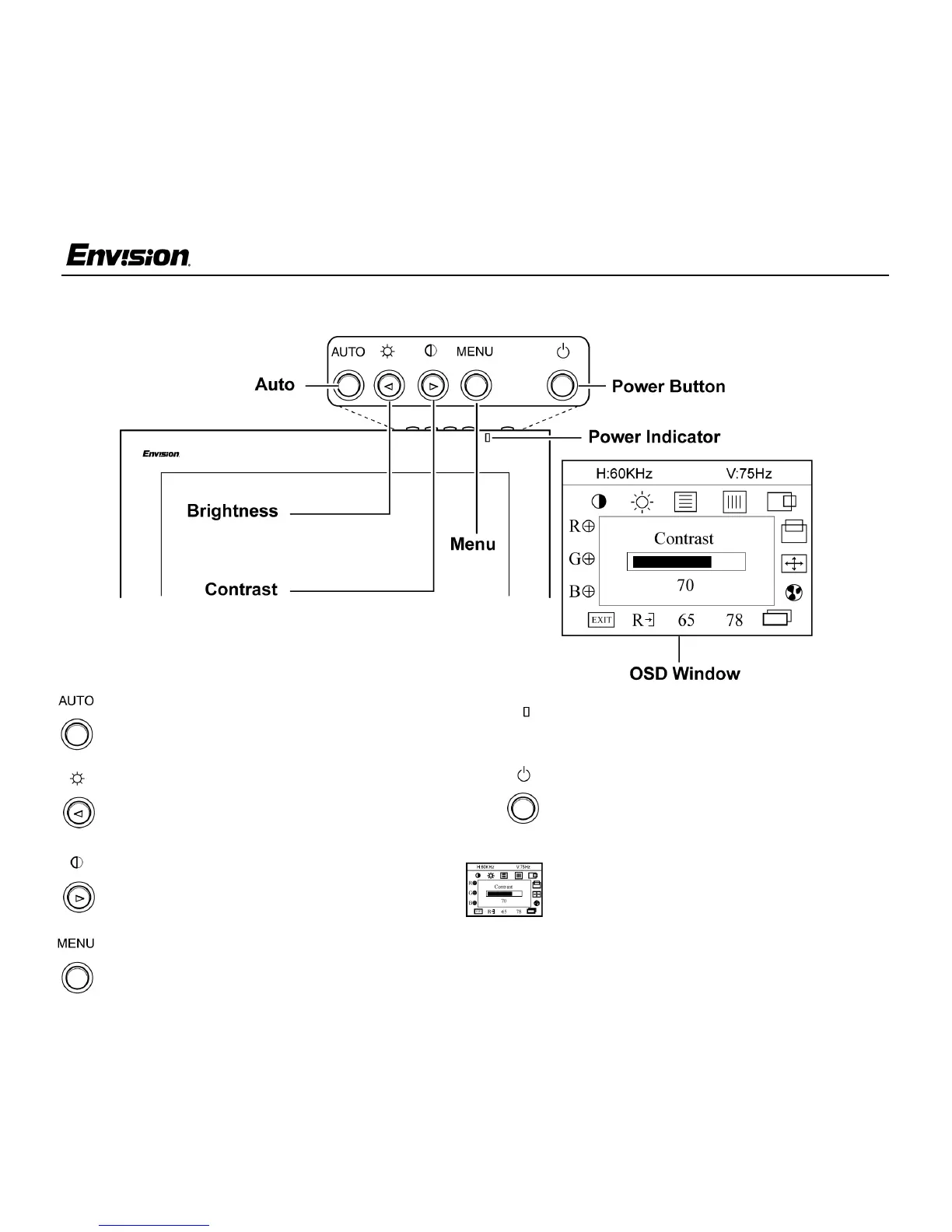
Front Panel Buttons
Auto: Press this button to automatically set
the H-Position, V-Position, Clock and Focus
settings.
Brightness: Press this button to adjust the
picture’s brightness. If the OSD window is
open, this button allows you to move within
the window and select desired functions.
Contrast: Press this button to adjust the
picture’s contrast. If the OSD window is
open, this button allows you to move within
the window and select desired functions.
MENU: Press this button to open the OSD
window or exit from the OSD window.
Power Indicator: A green light indicates
that the monitor is on. An orange light
indicates that the monitor is in Off mode.
Power: Press this button to turn the
monitor on or off. The power indicator will
light up.
On-screen Display (OSD): Press the
MENU button to open the OSD window
and adjust settings on your monitor.
(See next page.)


 To Next Page
 Loading...