REMOTE CONTROL OPERATION
Note: selecting your desired mode, you can
adjust the current mode being displayed
by using (VOL+or VOL-) buttons. When
P-EQ made is activate, press SEL button
to select the modes. And Bass/Treble
Mode are invalid (Show as below)
TV OPERATION(optional)
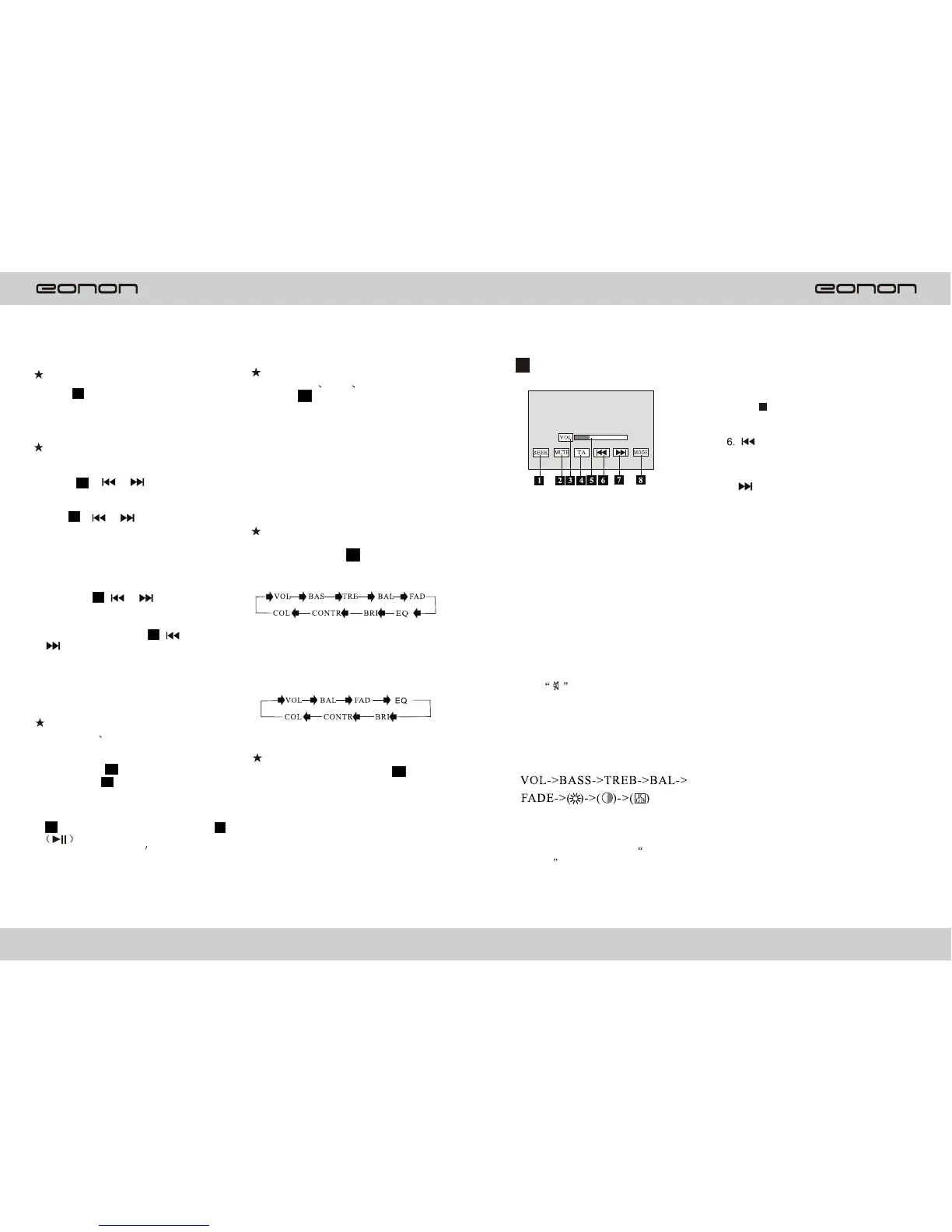
1.SEEK key
Press it, the unit will search
automatically form VHF. When
all the 100 channels are searched
and stored or when the search is
completed, auto-search will stop.
After the auto-search is finished,
the unit will select the first
channel as default.
2.MUTE key
Press it to cut off the sound output,
and will appear in the LCD.
Press it again to cancel the MUTE
Function.
3.VOL/SEL key
This key has SEL function ,
Repeatedly press it to select mode
4.TA key (optional)
For details, please see Media
Player
chapter.
On-Screa Display
During CD VCD DVD mode,
press 10 (OSD ) button. The
display shows single track
elapsed time ,single track
remaining or entire disc remaining,
and the track being played and the
content of the whole disc .
Note :During Mp3 mode, only single
track elapsed time is displayed in
OSD mode.
VOL/BAS/TRE/BAL/FED
Selector
Repeatedly press 11 (SEL)
button to select the desired mode
in the following order:
Tuning/Selecting Tracks
/Fast Rewind/Forward
--During radio mode, continuously
press 8 ( or ) button to
manual search a station downward
or upward respectively; if press and
hold 8 ( ) button for more
than 3 seconds, the radio will
Automatically search a station
downward or upward respectively
until it finds a station.
--During playback mode, press
and hold 8 ( ) button
to fast rewind or fast forward to
reach your desired track quickly.
momentarily pressing
( 8
) button, you can select your
desired track downward or upward
Respectively.
Volume Increasing/Decreasing
--Press 7 (VOL+or VOL-) button
to increase or decrease the volume
level respectively .
Program Playing
--During CD VCD mode ,you
can set the program order to play.
You can follow the steps below:
first, press 16 (PBC) button, and
then press
9
(PGM) button, and
the television displays
programming P00:00. You can set
the program order to play by pressing
14 2 (0~10+)button, and then press
toPlay.
Note: program doesn t function
when playingMP3.
Repeat Playing /AMS
During DVD mode, first, press 12
(AMS/RPT) to repeat the current
track being played; Press it again to
repeat playing All the tracks.
Pressing it the third time will cancel
the repeating function. (LCD will
display different designs)
8
8
8
8
TV OPERATION10
5.Parameter display
After selecting the desired mode,
Y ou can adjust its level by pressing
Area , and the corresponding5
parameter will display in this area.
Select the downward channel to
watch.
7.
Select the upward channel to
watch.
8.MODE key
Exit the TV mode and return
to main menu.
1316
or
or
or


 To Next Page
 Loading...






