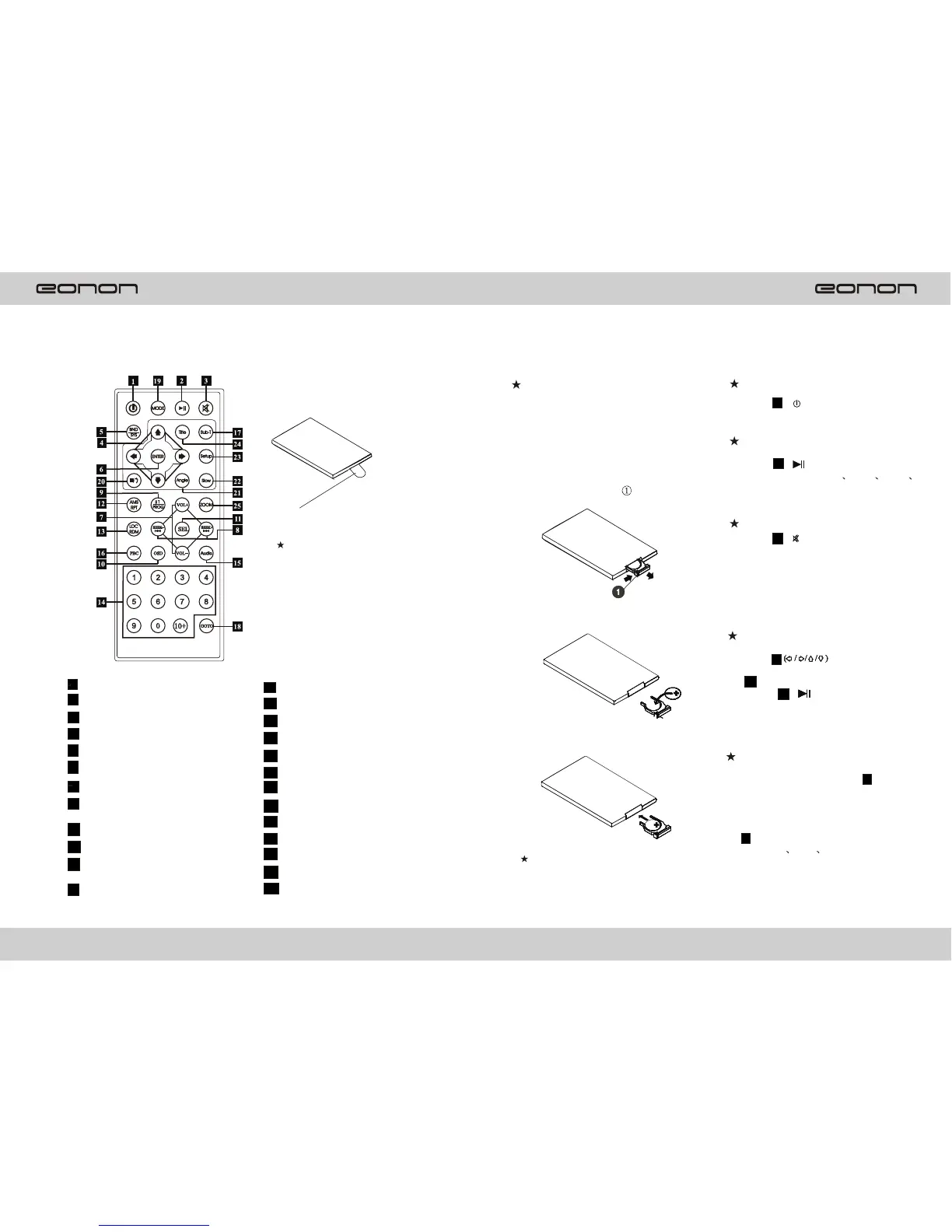
LOCATION OF THE REMOTE CONTROL
Insulator
Please take off the insulator
Before using the remote.
REMOTE CONTROL OPERATION
Replacing the Battery
When the range of the operation of
the card remote control becomes
short or no function with a new
button cell.
1.Pull out the Battery Holder while
Pressing the Stopper .
2.Put the button-type battery(+) mark
upward into the Battery Holder.
3.Insert the Battery Holder into the
Remote Control.
Note: Some models are not equipped with
remote control. you should ignore
The contents about remote control.
1 Power Switch
2 Pause/Play Button
Mute Button3
Selecting Menu Button
Band/System Switch
5
6
Enter Button
7
Volume control
8
Tuning/Selecting
Tracks/F.F/REW
Program Playing
9
10
On-Screen Display
11 Setting the Sound
Characteristics
12
Repeat Playing
13 Random Playing
14 Number Button
15 Audio-setting
16 PBC Menu
17 Subtitle-Setting
18 Playing Time-Setting
19 Mode Switch
20 Stop/Reverse Button
21 Angle-Setting
22 Slow-motion Play
23 Setup Menu
24 Menu-Display
25 Zoom-Setting
Power Button
-- Press ( ) button to turn1
On/Off the power.
Pause/Play Button
-- Press ( ) button to suspend2
The playback of CD MP3 VCD
DVD. Press it again to return to
Normal playback mode.
Mute Button
-- Press ) button to cut off 3 (
the sound output, Press it again
to resume at the previous sound
Level.
Menu Button
-- Press 4 to select
Your desired menu. Then press
6 (ENTER) or press the play
Button 2 ( ) to confirm.
Note: This function works in main menu
mode only.
Band/System Switch
-- During radio mode, press 5
(BAND/SYS) to switch receiving
Band. Press and hold it, open the
LOUD function.
-- During playback mode, press
5 (BAND/SYS) button to swich
to AUTO PAL or NTSC syst em,
Press and hold it to open the LOUD
function.
1514
4



 To Previous Page