18
Pairing your gateway to your Internet (Con’d)
It is recommended to allow location permission
on devices running IOS 13 / Android 9 or above.
This will allow EMBER to automatically populate
the WiFi (SSID) information during Setup.
Without giving this permission, you will have to
enter your WiFi (SSID) details manually.
NOTE
After entering the WiFi password in Step 4,
do not press the continue button. Complete
step 5 and then press continue button as
per step 6.
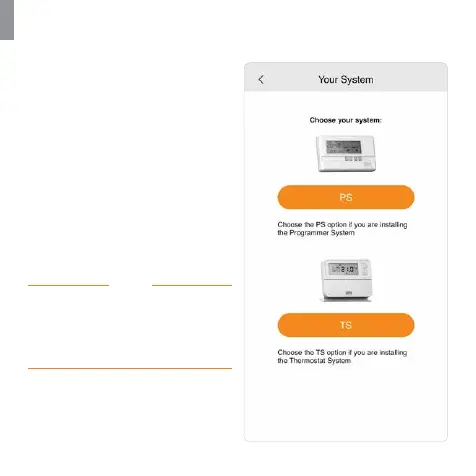
2. On the ‘Your System’ screen, you
must choose the ‘PS’ (Programmer
System) option.
GW01 will not operate with the
‘TS’ (Thermostat System).
3. Ensure your mobile device is
connected to the same network
that the gateway will be
connected to. This will ensure that
the SSID will be automatically
populated with the correct
information.


 To Next Page