9
1. Lower the cover on the front
of the RF programmer. Move
the selector switch to the ‘RUN’
position.
CLOCK
SET
PROG
SET
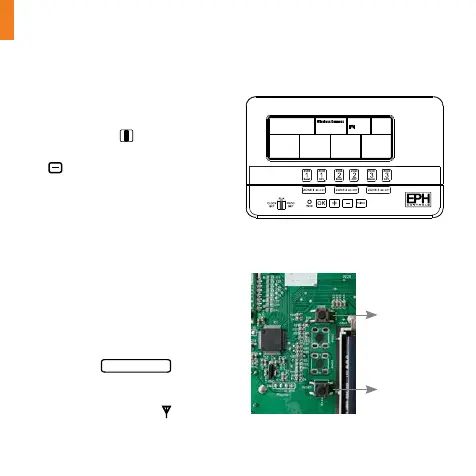
2. On the RF programmer, press the
button for 5 seconds. Wireless
Connect will appear on the
screen. Figure (7-a)
3. On the RFR wireless room
thermostat or RFC wireless
cylinder thermostat, press
the ‘Code’ button. This is
located inside the housing
on the Printed Circuit Board.
Figure (7-b)
4. On the RF programmer, the
available zones will begin to ash.
5. Press the
ZONE SELECT
button for
the zone you wish to connect the
thermostat to.
6. The wireless symbol
appears
on the screen.
Figure (7-a): ‘Wireless Connection’ screen
Reset button
Code button
Figure (7-b): Printed Circuit Board
Pairing your thermostats to your programmer
Complete this step before pairing your thermostats to your programmer


 To Next Page