Step 3: Connect to the
epoc Data Manager
(EDM)
1. Congure EDM options
• Turn on the
epoc Host
2
by pressing the power button.
•
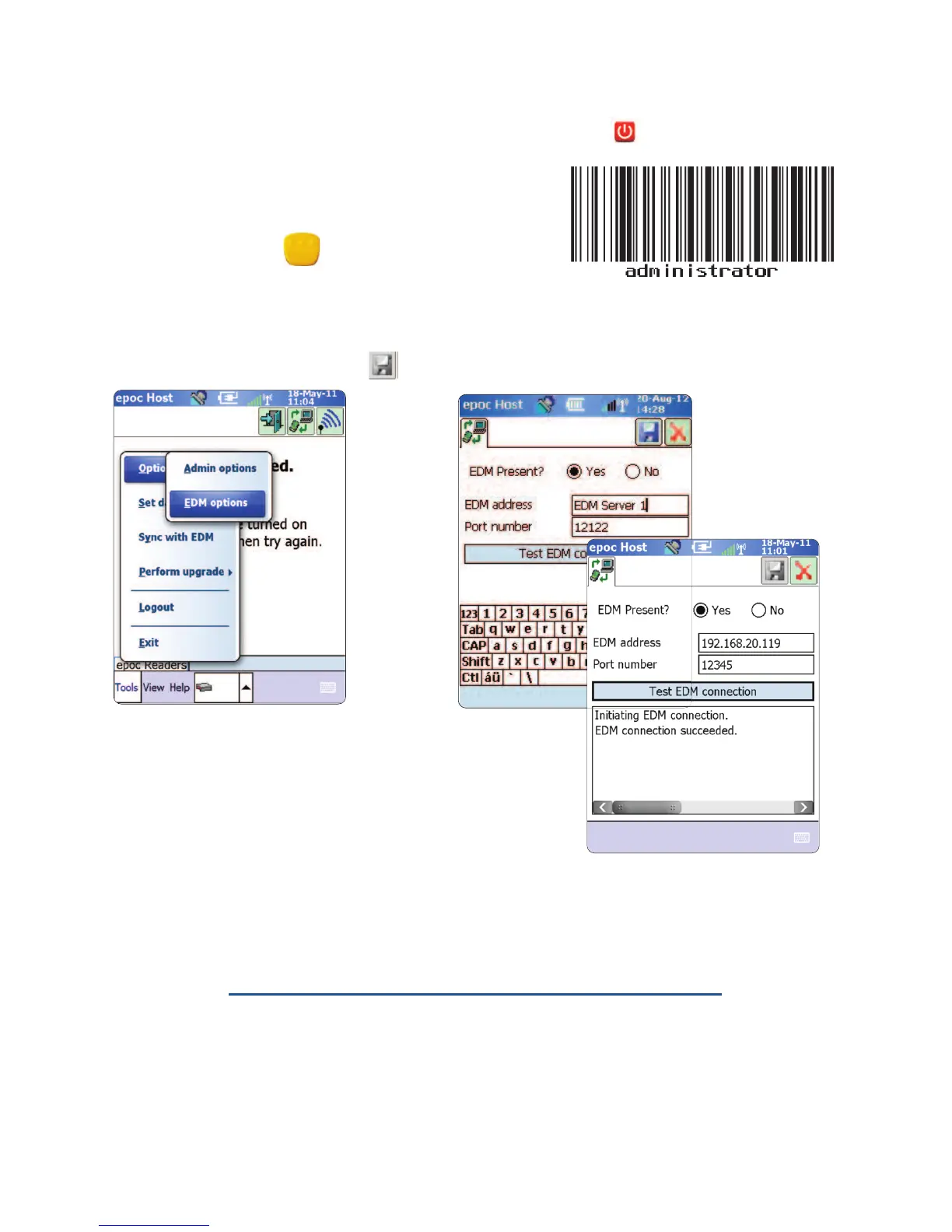
At the login screen, scan or enter the word
“administrator”
into the User ID and Password
elds. (Set date and time if prompted)
To scan, aim the Barcode Scanner at the barcode and
press the Scan Key.
•
Select “Tools”
then
“Options”,
then
“EDM
Options” from the menu.
•
Set “EDM Present?”
to
“YES”,
and enter the correct EDM address and port number,
then tap the disk symbol.
2. Conrm EDM Connection
• Tap the
“Test EDM connection”
button to conrm a
successful EDM connection.
The
epoc Host
2
is now ready for use.
NOTE: Refer to the epoc System Manual for instructions on updating the epoc Host
Software.
NOTE: Before placing this unit into service, consult your facility’s internal quality control
procedures and regulatory requirements.
6


 To Next Page