BIOS
Page 4-3
Notes:
If the hard disk Primary Master/Slave and Secondary Master/Slave are set to
Auto, the hard disk size and model will be auto-detected.
The Halt On: field is used to determine when the BIOS will halt the system
if an error occurs.
Floppy 3 Mode support is a mode used to support a special 3.5-inch drive
used in Japan. This is a 3.5-inch disk that stores 1.2 MB. The default setting
for this is disabled.
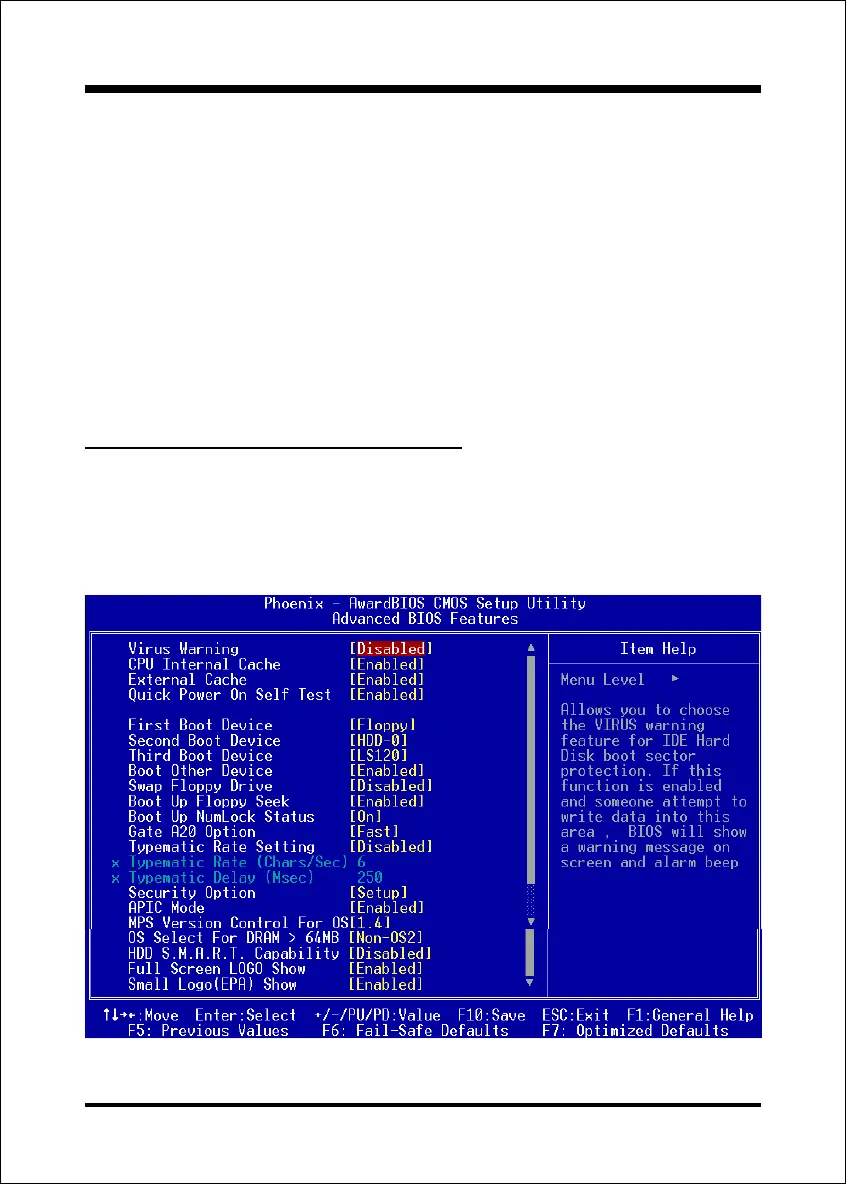
4-2 Advanced BIOS Features
Selecting the ADVANCED BIOS FEATURES option in the CMOS SETUP UTILITY
menu allows users to change system related parameters in the displayed menu. This
menu shows all of the manufacturers default values for the board.
Pressing the [F1] key displays a help message for the selected item.
Figure 3: BIOS Features Setup



 To Next Page